

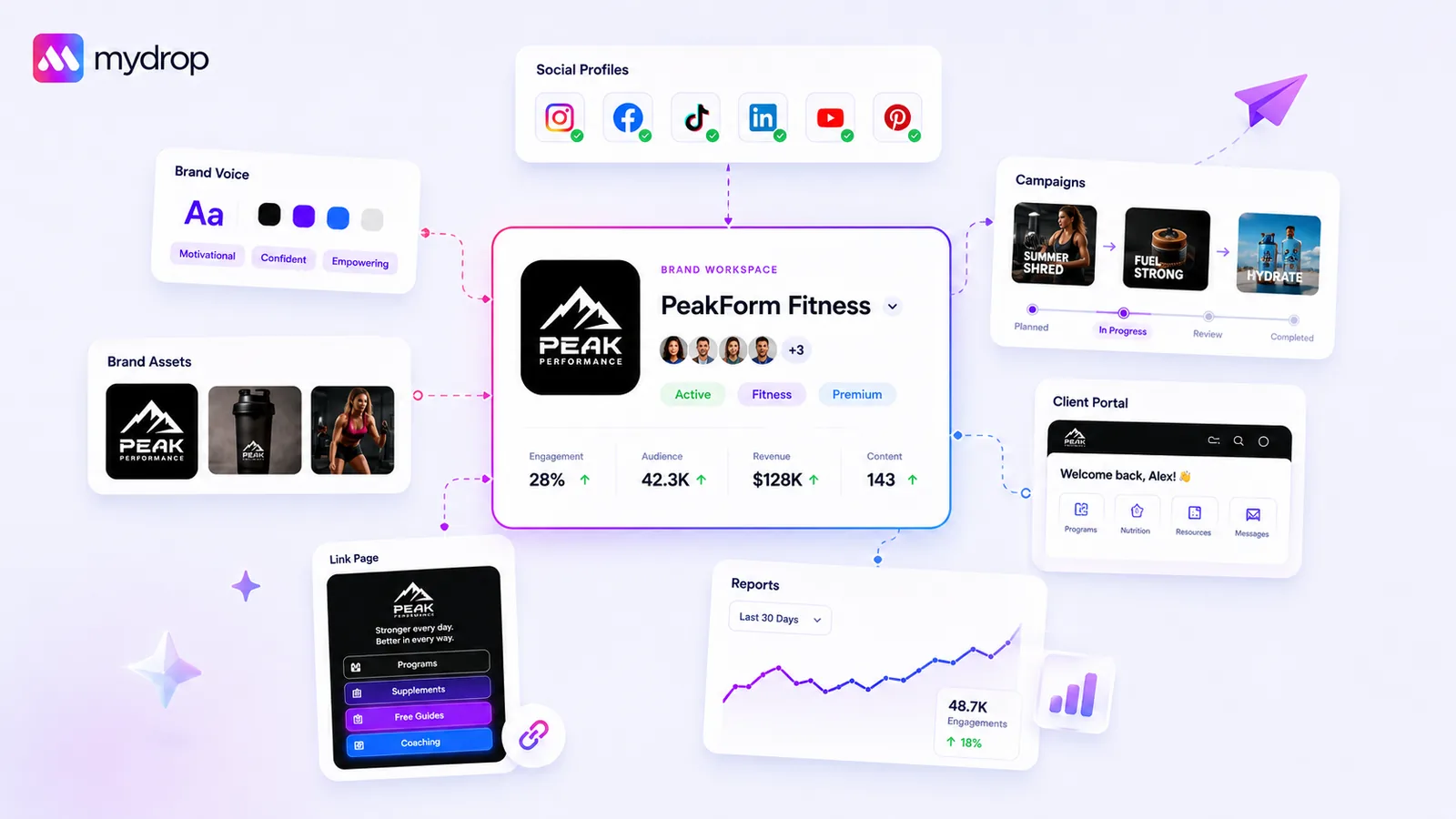
Stop managing brands by individual social profiles. You need to group them into a single, unified "Brand Group" architecture where all assets, AI context, and identity live in one place. If your agency is still manually updating logo versions and hex codes across ten separate LinkedIn, Instagram, and X settings, you are not just wasting time. You are building a structural liability that makes brand drift inevitable.
We get the daily scramble. You are handling five, ten, or fifty client brands, and every campaign feels like an excavation project to find the final updated logo or the right tone of voice document from three months ago. That constant context switching is not just a productivity tax. It is the silent killer of your team's creative energy. When the simple act of setting up a new channel takes forty minutes of hunting through folders, nobody is doing their best work. You are just trying to keep the lights on without making a mistake that lands on a client's desk.
What the best tools need to handle

If your current platform forces you to treat each social handle as an island, it is time to move on. At Mydrop, we see agencies managing hundreds of profiles effectively not by working faster, but by eliminating coordination debt entirely.
A true brand foundation must act as a central conduit, not a collection of settings. When you evaluate tools for this, look for these non-negotiable capabilities:
| Capability | The Broken Workflow | The Operator Standard |
|---|---|---|
| Asset Management | Manual upload per profile. | One central asset pool per brand. |
| AI Context | Copy-pasting tone to prompt boxes. | Persistent, brand-aware AI context. |
| Website Sync | Manual setup. | Automated asset/color extraction. |
| Profile Grouping | Reconnect profiles for each campaign. | Dynamic brand-group membership. |
When these features are absent, you are effectively paying your team to reinvent the wheel for every single content piece.
Operator rule: If you cannot update a client's brand color or logo in one location and have it automatically propagate to every associated profile, AI tool, and link-in-bio page, your foundation is brittle.
The best setup should feel like a living document of the brand identity. You enter the website, the tool extracts the colors, you drop in the tone guidance, and suddenly your composer and AI tools are smart for every post. When a client pivots their strategy, you update that central record once-not twelve times-and the entire machine shifts to match. This is not just about efficiency. It is about governance. When your team has a single source of truth, the chance of an off-brand post slipping through review drops to near zero.
Where basic tools start to break

If you are managing social presence for ten clients and you are still configuring assets on a per-profile basis, you are not working-you are babysitting software.
The "fragmentation trap" is simple: you start with one client and one profile. Then you add a second profile. Then a third. Suddenly, your team is manually updating the same logo in five different places, and your lead designer is chasing down hex codes from a three-month-old email because the last person who updated the color palette didn't leave a note.
It is the operational equivalent of keeping track of your house keys by putting one on every door of your house. When you need to leave, you better hope you remember where you put the last one.
This breaks down in three predictable ways:
- The Versioning Deadlock: You change a brand logo, but you only update the link-in-bio page and forget the reporting template. Now, your client sees a mix of old and new assets, and your credibility takes a hit.
- The Tone Drift: Your AI tools have no idea what the brand’s actual target audience or marketing goals are because they are fed per-post prompts instead of a persistent brand context. Every post sounds slightly different because the "AI context" is basically whoever wrote the prompt last.
- The Onboarding Tax: When you add a new social channel for an existing client, you have to recreate their entire identity settings from scratch. It is a slow, manual, error-prone cycle that stops you from scaling.
When you operate at this level, your team is not thinking about strategy-they are thinking about administrative maintenance.
The buying criteria that matter
To break this cycle, you need to demand a platform that forces a unified, asset-centric "Brand Group" architecture. This means the system treats the brand as the source of truth, not the individual social profile.
When you are evaluating tools, ignore the marketing fluff and look for these specific capabilities:
- Automated Asset Extraction: Can the tool pull colors, logos, and website assets directly from a URL? If the answer is "no," you are signing up for hours of manual entry every time you onboard a client.
- Centralized Brand Context: Can the tool store structured identity data-like target audience, marketing goals, phone numbers, and preferred tone-and serve it to both your human team and your AI generation tools?
- Dynamic Profile Grouping: Can you add or remove social profiles from a Brand Group without having to disconnect or reconfigure the underlying brand settings?
At Mydrop, we see teams that make the switch to this model report a significant reduction in setup time for new channels.
The following matrix helps you score your current tool against a true Brand Group maturity model.
| Maturity Level | Where the Brand Lives | Asset Management | AI Grounding | Scaling Effort |
|---|---|---|---|---|
| Level 1 (Reactive) | Scattered across profiles | Manual upload per channel | None (Prompt every time) | High (Full re-setup) |
| Level 2 (Organized) | Folder-based project | Centralized file library | Static brand guidelines | Medium (Copy-paste) |
| Level 3 (Unified) | Asset-centric Brand Group | Auto-extracted / Linked | Dynamic/Context-aware | Low (Profile toggle) |
If you are sitting at Level 1 or Level 2, stop optimizing the process. You cannot make a broken architecture faster. You need to switch to a platform that centralizes the Brand Group before you allow a single post to go through the pipeline.
The real test of a tool is not how well it publishes; it is how well it governs. If your tools do not hold the brand identity constant, your consistency is just luck.
How Mydrop supports this workflow
When you centralize everything into one record, the work stops feeling like digital scavenger hunts. At Mydrop, we designed the Brand Groups system precisely to replace the manual drudgery that usually stalls agency scaling. Instead of treating your client as a list of disconnected platforms, you create a single Brand Group record. This becomes your source of truth for everything from color palettes and logos to the nuances of their AI-generated tone.
The website import tool is a massive time-saver. Rather than manual data entry for every new client, you simply point Mydrop at their URL. It handles the color extraction and initial asset ingestion in seconds. From there, you add the specific "Brand Intelligence" fields-target audience, marketing goals, preferred emojis, and hashtags. Because these fields are natively linked to the AI content engine, the first draft your team pulls is actually on-brand, not generic fluff. Mydrop's architecture ensures that every team member, from the junior creator to the lead strategist, is working from the exact same, updated brand context, effectively turning a hours-long setup process into a 15-minute verification task.
The real magic happens when you update a brand asset once and see it propagate through your composer, link-in-bio pages, and portals immediately. If you have to tell a designer to check the Slack history for the newest logo for every single post, you are failing your team's time.
A simple shortlist checklist
If you are currently onboarding clients with a spreadsheet or a collection of unorganized folders, the gap is massive. Use this checklist as your new operating standard for the next client brand you launch.
Client Brand Onboarding Checklist
| Stage | Action Item | Why it matters |
|---|---|---|
| 1. Centralize | Is there one Brand Group per client? | Prevents multi-platform drift. |
| 2. Import | Are assets and colors auto-synced? | Removes manual file chasing. |
| 3. Ground | Is the AI context (goals, audience) filled? | Stops generic, off-brand AI output. |
| 4. Validate | Are profiles linked but not recreated? | Maintains seamless history without bloat. |
| 5. Review | Is the tone guidance specific? | Reduces rounds of stakeholder feedback. |
Conclusion
Managing multi-brand agency growth eventually hits a wall where the complexity of your own processes outweighs the value of your creative ideas. You can hire more people to manage the chaos, or you can fix the underlying architecture. Most teams do not have a content problem. They have a decision bottleneck.
This shift is uncomfortable. It requires discipline to move from the quick-and-dirty profile setup to a structured brand repository. But the payoff is a team that spends time crafting narratives, not troubleshooting asset mismatches.
When you consolidate your brand identity into a single, accessible layer, you give your team the freedom to focus on strategy rather than searching for hex codes. You shift from managing profiles to building brands. The next time you onboard a client, test this: see if a team member can go from intake to first drafted post without ever leaving their seat to ask, "What was that font again?" If they can, you have finally mastered the foundation.


 Google review
 Trustpilot review




