


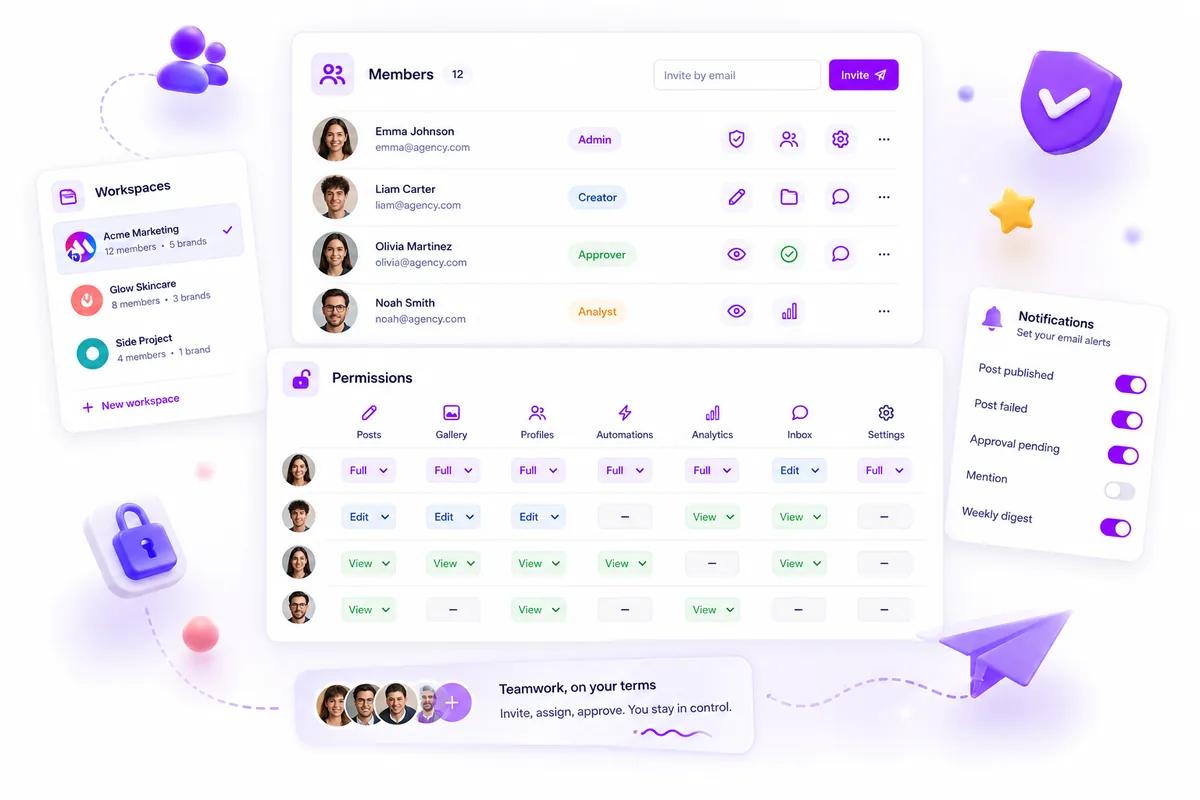
Stop treating "Manager" as a permission level. In a multi-brand setup, assigning global roles is the fastest way to accrue coordination debt and invite a PR crisis. The fix is a granular action-based matrix where every brand resource, from posts and analytics to image galleries, is locked by default. Effective social operations require mapping your internal team to four specific actions: Create, Read, Update, and Approve. This isn't just about security; it's about stripping away UI clutter so your team can move fast without the constant fear of clicking the wrong button.
Managing access for fifty people across ten different brand portfolios feels like a high-stakes game of Whac-A-Mole. We get it. You want to be the lead who trusts their team, but one over-provisioned login can lead to "cross-brand contamination," the nightmare scenario where a post meant for a niche sub-brand ends up on the main corporate feed. This work is often thankless and invisible until something breaks, but moving from "titles" to "action maps" is how you finally stop chasing approvals at 6 p.m. Most teams do not have a content problem; they have a decision bottleneck.
At Mydrop, we've seen this play out across thousands of enterprise workflows. The "Admin Trap" is real. Teams over-provision because the defaults are too broad, creating a cognitive load that slows everyone down. When a creator sees twenty buttons they shouldn't touch, they work with a hesitation that kills creativity. Restricting access isn't about a lack of trust. It is about clearing the dashboard so teams can execute without fear.
The decision teams usually frame too broadly

Most operations leads start by asking, "Who should be an Admin?" That is the wrong question. It frames permissions as a hierarchy of status rather than a map of utility. When you give everyone "Manager" rights just to make sure they can "do their jobs," you are actually making their jobs harder by forcing them to navigate a minefield of destructive actions.
Instead of global roles, use a resource-action map. Here is how a standard "shared services" team should actually look when mapped against specific resources in a platform like Mydrop:
| Internal Role | Posts | Gallery | Analytics | Approval Right |
|---|---|---|---|---|
| Intern / Junior | Create, Read | Create, Read | Read-only | No |
| Content Specialist | C, R, U | C, R, U | Read-only | No |
| Brand Manager | C, R, U, D | C, R, U, D | C, R, U | Yes |
| Operations Lead | C, R, U, D | C, R, U, D | C, R, U, D | Yes |
The goal is to ensure that if a team member doesn't need to delete a campaign, they shouldn't even see the trash can icon. By isolating "Brand A" assets from "Brand B" teams using these granular maps, you eliminate the cognitive tax of "is this the right profile?" every time someone clicks "Save." Mapping the messy middle of your organization is the only way to scale without losing control of the narrative.
High-velocity creation should be a wide-open sandbox, but high-stakes governance requires a manual gate. The most efficient teams decouple the ability to make things from the authority to break things. By letting creators "Create" and "Update" in a sandbox environment while strictly gating "Approve" and "Delete" actions for senior leads, you remove the friction of constant permission requests without handing over the keys to the kingdom.
We have all been there at 6 p.m. on a Friday, staring at a missing campaign thread and wondering which "just in case" admin accidentally hit archive. It is a terrible feeling, and it is entirely avoidable. Most teams think they have a trust problem when they actually have a configuration problem. They over-provision access because they want to avoid being a bottleneck, but they end up creating a "high-entropy" environment where a single misclick becomes a PR crisis. The goal is to build a workflow where your team can move fast enough to be relevant but has enough guardrails to stay employed.
What should stay manual and what can move faster

Here is where teams usually get stuck: they try to approve every single tiny draft, which buries the operations lead in notifications. Instead, you should move the "Drafting" and "Resource Uploads" into the fast lane. If an intern is hired to write captions, they should have full Create and Update rights for Posts and Gallery assets. They can move as fast as they want in that sandbox because nothing they do is visible to the public until a second pair of eyes hits the "Approve" button.
At Mydrop, we usually see that the "Delete" permission is the most dangerous button in the stack. Unless someone is a manager responsible for clean-up or compliance, they simply do not need to see the trash can icon. Removing that single permission from ninety percent of your team does more for your peace of mind than any "social media policy" memo ever could.
You should also keep Profile Management manual. Your creative team needs to post to the Instagram account, but they do not need the ability to disconnect the API token or change the profile bio. By locking down the Profiles resource to "Read-only" for everyone except the Ops Lead, you ensure that the plumbing of your multi-brand setup stays intact while the content flows freely.
The tradeoff matrix
To fix coordination debt, you need a standard "Role-to-Resource" map. This is the plug-and-play matrix we use to help enterprise teams decide who gets to click what. This is not about hierarchy; it is about cognitive load. When you hide the buttons a user does not need, they work faster because they aren't worried about breaking something they shouldn't touch.
The following matrix maps internal roles to specific action toggles (C/R/U/D + Approve) across different brand resources.
| Role | Posts (Resource) | Profiles (Resource) | Gallery (Resource) | Analytics (Resource) |
|---|---|---|---|---|
| Intern / Contractor | C, R, U | R | C, R, U | R |
| Content Specialist | C, R, U | R | C, R, U, D | R |
| Brand Manager | C, R, U, A | R, U | C, R, U, D | R, U |
| Operations Lead | C, R, U, D, A | C, R, U, D | C, R, U, D | C, R, U, D |
Decision check: If a team member asks for "Admin" access, ask them which specific resource they need to delete. If the answer is "none," then they only need "Update" permissions.
In the Mydrop member resource map, these permissions are not global labels. They are granular toggles. This means a Content Specialist can have "Update" rights for Brand A but be restricted to "Read-only" for Brand B. This isolation is the secret to managing fifty people across ten brand portfolios without losing your mind. It ensures that even if a team member is logged into the wrong workspace, they cannot accidentally publish a "Brand A" draft to a "Brand B" profile.
Moving to this model takes a bit of upfront work, but the payoff is an environment where you stop being the "Permission Police" and start being the "Growth Accelerator." When the guardrails are invisible and automated, your team stops asking "Can I do this?" and starts asking "How can we make this better?"
The safest way to roll out a new permission matrix is to start with a "passive audit" phase rather than a hard reset that locks everyone out of their workflows on a Tuesday morning. By auditing who has over-provisioned access before you start clicking "Save" on new restrictions, you avoid the inevitable Slack firestorm from a creative lead who suddenly can't upload a last-minute asset.
We have all been there-the sinking feeling when you realize a simple settings change broke a mission-critical approval loop. You want to tighten the ship, but you do not want to become the bottleneck that causes a campaign to miss its window. Scaling permissions is about moving from "everything is open" to "everything is intentional" without the friction of a total work stoppage.
How to pilot the workflow safely
Do not try to fix every brand and every team member in one afternoon. Instead, treat your permission rollout like a software deployment. You want a "canary in the coal mine" brand-one that is busy enough to test the rules but small enough that a minor hiccup is not a catastrophe.
We recommend a four-stage migration to keep the peace:
- The Access Audit: Export your current member list and highlight everyone with "Admin" or "Manager" status. You will likely find former employees, interns who left six months ago, and agency partners who only needed one-time access.
- The Shadow Week: Share the new "Role-to-Resource Matrix" with your team leads. Ask them to look at their daily tasks and flag any action-like approving a post or checking an analytics report-that the new rules might block.
- The "Read-Only" Shift: Move users who do not create content (like legal reviewers or executive stakeholders) to a Read permission level first. This reduces the risk of accidental edits while keeping their oversight intact.
- The Granular Lock: Finally, update your creators to specific Create and Update maps, reserving the Approve and Delete toggles for senior ops leads.
Operator rule: Never revoke "Admin" access for a team lead until you have verified they can perform 100% of their weekly "Approve" and "Publish" actions under their new role.
Pilot Checklist: The First 48 Hours
| Phase | Action | Success Signal |
|---|---|---|
| Hour 0 | Apply new "Role Templates" to one brand pod. | No "Permission Denied" errors in the first hour. |
| Hour 24 | Check the activity log for any blocked actions. | Creators are successfully moving posts from "Draft" to "Pending." |
| Hour 48 | Brief the next brand pod on the rollout. | Stakeholders can view reports without needing "Manager" rights. |
The operating rule to keep
If there is one principle that will save your team from a PR crisis, it is the Trash Can Rule: If they do not absolutely need to delete it, they should not see the button.
In many legacy tools, "Editor" roles often include "Delete" permissions by default. This is a liability, not a feature. In a multi-brand environment, the ability to erase a brand's history or delete an entire content gallery should be a "glass-break" permission held only by the operations lead or a verified brand manager.
At Mydrop, we have seen that the most efficient enterprise teams treat permissions as a way to clear UI clutter. When a junior creator only sees the "Create" and "Read" options, they work faster because they aren't worried about accidentally clicking a button that breaks the workflow. Restricting access is not about a lack of trust; it is about providing a safety net for your 11 p.m. self who might be one tired click away from a mistake.
Conclusion
Success in a high-volume social media environment is won in the settings menu, not just the creative suite. When you move away from the "Manager" trap and toward a granular, action-based matrix, you aren't just securing your accounts-you are removing the cognitive load that slows your team down.
The goal is to reach a state where your permission map is so well-defined that it becomes invisible. Your creators should feel like they have total freedom within their sandbox, and your stakeholders should feel confident that the "Publish" button is only reachable by the people authorized to represent the brand. Start small, audit often, and remember that the best governance is the kind that lets your team move faster, not slower.

 Google review
 Trustpilot review
 Product Hunt comment




