


Your campaign launch was supposed to go live ten minutes ago, but the designer is waiting on the approved logo file, and the social manager is hunting for the current brand color hex codes in a buried Slack thread. You didn't miss a deadline because of a lack of talent or effort. You hit a wall of fragmented context. When your brand identity-colors, logos, tone, and guidelines-exists only in scattered folders or chat history, you aren't just storing files; you are creating a manual retrieval process that guarantees friction every time someone hits "publish."
We have all been there. You are trying to move at the speed of social, but you are constantly stuck in archeology mode, digging through drives and message archives just to ensure the brand voice doesn't drift. It is exhausting, it is unscalable, and frankly, it is not actually your job. Most teams do not have a content problem. They have a decision-making bottleneck.
Where the handoff is actually breaking

The breakdown happens because most agencies and internal teams treat branding as a collection of loose files. They store logos in a cloud drive, hex codes in a text file, and tone-of-voice guidelines in a PDF. When a social manager needs to create a post, they have to reach across three different systems to stitch the identity back together.
Here is why your current handoff is likely failing:
- Workflow isolation: Your storage (like Google Drive) is disconnected from your composer. That gap requires manual copy-pasting, which is where versioning errors creep in.
- The creative wall: Designers often hold the "truth" in high-res, local files. By the time that file reaches the social team, it is often the wrong format, the wrong resolution, or simply the wrong version.
- Platform drift: When you manage multiple brand profiles, changing a primary color or updating a contact address should be a one-time edit. Instead, most teams have to manually update each individual profile or campaign, leading to inevitable inconsistencies.
If you are currently paying this tax, you likely have a "Scatter Score" that is dragging your team down.
Mini-Audit: Are you paying the Scatter Tax?
Run this check to see how much friction is built into your daily operations.
| Diagnostic Question | If Yes, You Pay... |
|---|---|
| Do you have to copy/paste hex codes into an AI prompt? | Manual Input Penalty |
| Is the designer the only person who can export the correct logo? | Access Bottleneck |
| Does your tone-of-voice exist in a static PDF no one reads? | Compliance Risk |
| Do you manually re-enter brand info for every new campaign? | Efficiency Leak |
If you answered yes to more than two, you are spending more time managing files than you are creating impact. At Mydrop, we see teams thrive when they shift from "Brand as Folder" to "Brand as Intelligence." By centralizing profiles, identity data, and media into a single record, you stop searching for assets and start executing on intent.
Operator rule: If the asset is not linked to the central brand record, it does not exist for the campaign. This one simple constraint eliminates 90% of the "wait, which file is current?" confusion.
The coordination debt checklist

If you feel like your team is constantly doing digital archaeology just to hit "post," you are paying a heavy price for scattered assets. Use this audit to see if your current setup is draining your team's energy.
| Audit Question | The "Scatter Tax" Symptom | The Operational Fix |
|---|---|---|
| Where do you look for hex codes? | Slack history or random sticky notes. | Centralized Brand Identity records. |
| Who owns the latest logo version? | Whoever last saved it to their desktop. | Shared Brand Media folders. |
| How does AI get your brand voice? | Constant copy-pasting into prompts. | Saved Brand Intelligence fields. |
| What happens if a profile moves? | Manual re-entry of every setting. | Dynamic Brand Profile Grouping. |
| Is the creative team in the loop? | They work in a silo; social is in another. | Unified access to Brand Groups. |
If you answered "yes" to more than two of these symptoms, your team is likely burning hours on manual retrieval rather than creative output. This is the moment to stop asking "where is that file?" and start asking "why isn't this data structured?"
How to move decisions closer to the work
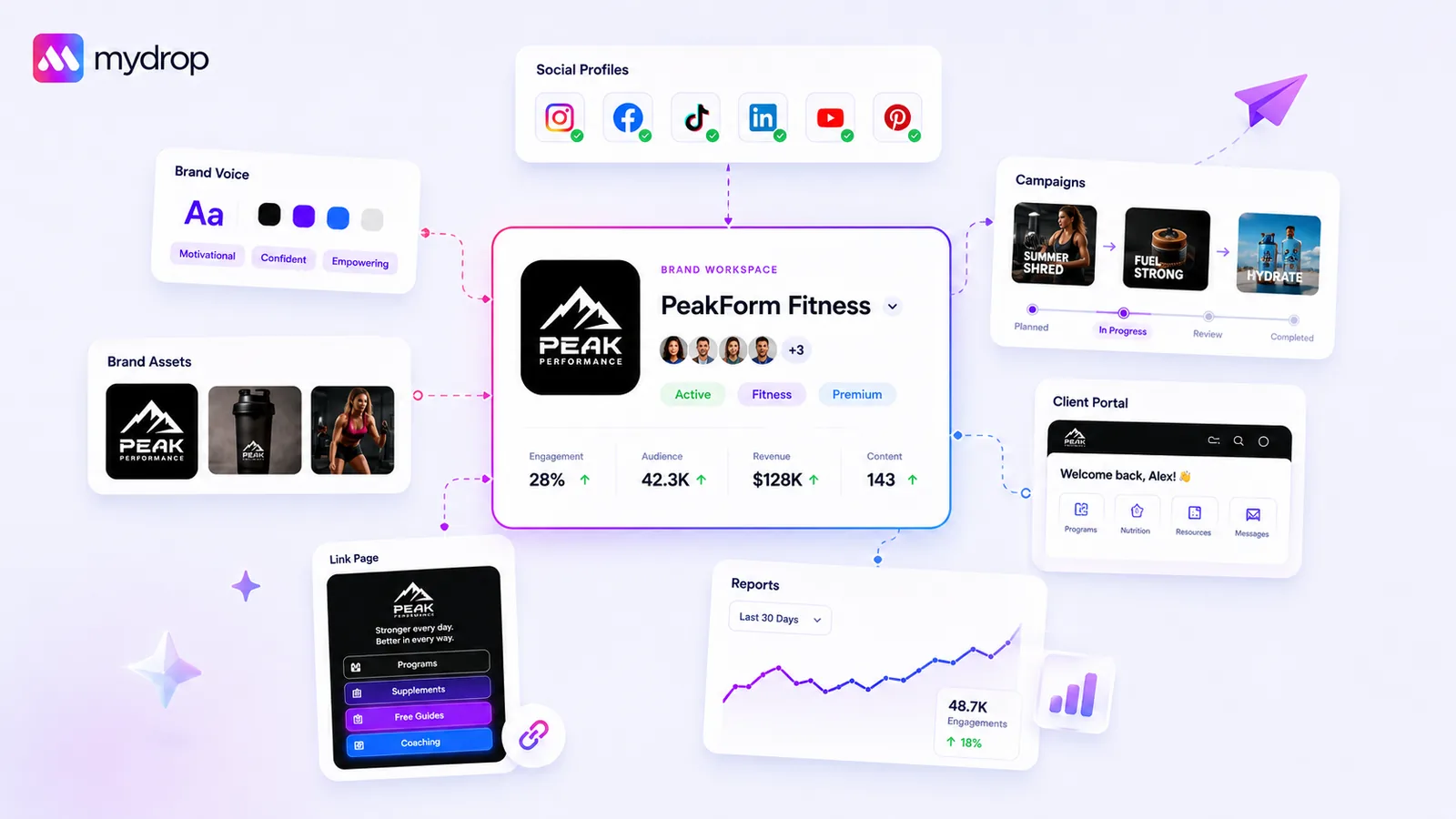
The most effective way to eliminate this friction is to stop treating branding as a static folder of files and start managing it as a live, evolving data structure. When you define a brand once and group your profiles under it, you move from "chasing assets" to "executing on intent."
In our experience, teams managing dozens of channels often struggle because their tools don't talk to each other. A designer updates a logo, but the social media manager is still using a cached version from last month. By centralizing everything-color palettes, fonts, approved imagery, and even tone-of-voice prompts-into a single Brand Group, you ensure that anyone on your team, or any AI assistant helping you build a campaign, is pulling from the exact same source of truth.
Decision check: If a brand asset or identity detail isn't linked to your central group, it effectively does not exist for the campaign.
Think about the time wasted during a typical Tuesday: a social lead needs to pull an image for a last-minute push. If they have to download a file, hunt for the right font, and ping a designer for the tone-of-voice document, you have already lost 48 hours of momentum.
At Mydrop, we see brands thrive when they shift their perspective. Instead of treating the brand as a collection of loose files, you link your profiles to a single group. This allows the system to auto-inject your verified colors, fonts, and brand context directly into your publishing tools. You aren't just saving time; you are building a resilient operating habit.
When your Brand Intelligence-your audience goals, tone, and visual identity-lives right where the work happens, the "handoff" disappears. The work just moves forward. Stop searching for files and start building a smarter, unified workspace.
The roles and rules that reduce rework
The best teams treat their brand identity like a living record, not a static pile of files. When you define specific owners for brand intelligence, you stop the constant cycle of manual requests that slows everyone down.
Here is a simple way to assign responsibility so that your assets remain functional rather than just stored.
| Role | Responsibility | Outcome |
|---|---|---|
| Brand Lead | Owns the Brand Group record, including color palettes and tone guidelines. | No more guessing if a hex code is current. |
| Asset Curator | Manages the media library and file cleanup within the brand folder. | Designers stop spending time re-exporting logos. |
| Campaign Manager | Uses the centralized group profile settings for every new launch. | Instant access to approved fonts, logos, and mission statements. |
When you designate these roles, the friction of "who has the latest file" vanishes. The Brand Lead ensures the source of truth is always updated in the system, so the Campaign Manager never has to ping a designer for a logo again.
Workflow check: If a file exists outside of your Brand Group, it is effectively invisible to the people who need it most.
The weekly habit that keeps the system honest
Operations fall apart when maintenance happens only during a crisis. Instead, spend fifteen minutes every Friday morning performing a "Pulse Check" on your primary brands to ensure your automation and publishing tools are reading the right context.
- Verify Asset Health: Check that the latest campaign assets are uploaded to the brand folder.
- Audit Profile Membership: Confirm that all active social profiles are correctly grouped under the right brand.
- Review AI Context: Take a quick glance at the target audience and tone of voice fields to ensure they still reflect your current strategy.
At Mydrop, we see brands thrive when they stop viewing "brand setup" as a one-time project. When you treat the Brand Group as a dynamic dashboard, you ensure your AI-assisted drafting and publishing tools are always pulling from a clean, accurate record.
It sounds simple, but this fifteen-minute habit prevents the hour-long fire drills that happen when a team realizes mid-week that they are pushing content with outdated logos or a mismatched brand voice.
Conclusion
Most teams struggle not because they lack creative talent, but because they have buried their best work in a graveyard of folders and long-forgotten chat threads. You can choose to keep digging, or you can build a system that serves your team automatically.
The goal is to stop acting as a human delivery service for files and hex codes. By centralizing your brand intelligence into a group-based structure, you transform a messy, manual process into a repeatable workflow that scales with your ambition. Start by auditing where your team spends the most time searching, then move those assets into a unified home. Your designers, social leads, and stakeholders will thank you, and your output will finally match the quality of your ideas.


 Google review
 Trustpilot review
 Product Hunt comment




