


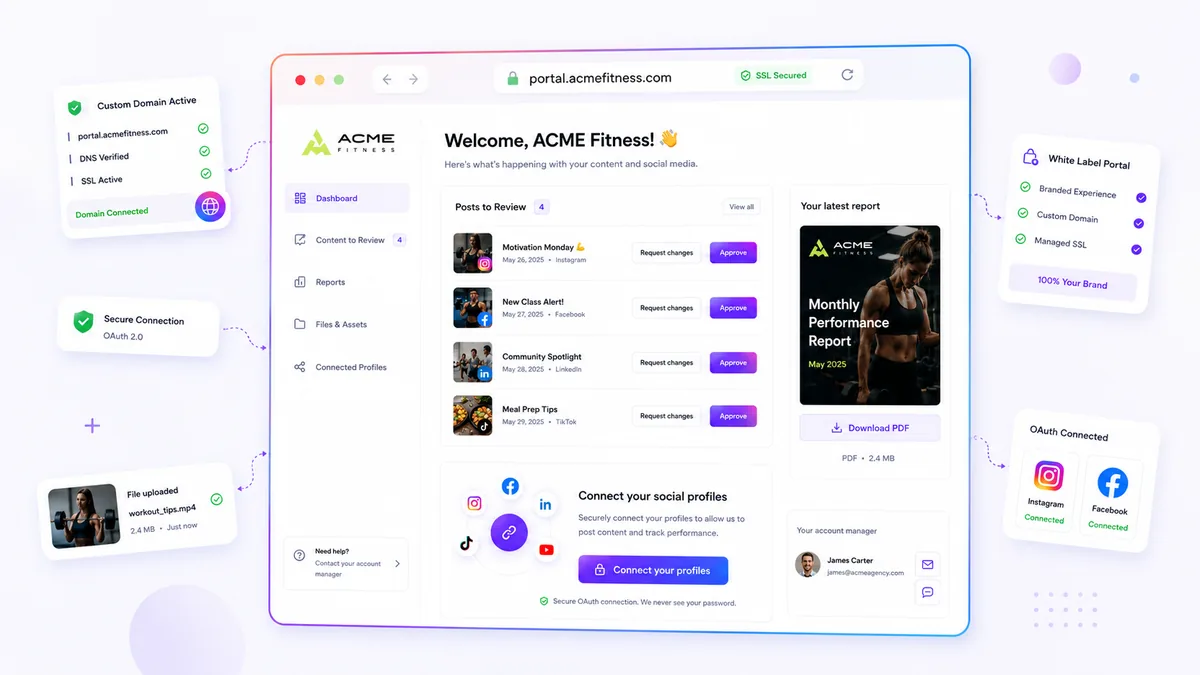
That sudden dip in your click-through rate (CTR) likely isn't a content fatigue issue; it is a browser security issue. When your custom domain’s SSL certificate expires or DNS records misalign, platforms force an automatic redirect to a generic fallback URL. Users-and their security-conscious browsers-don't trust broken connections, and they certainly don't click them.
We get it. You spent weeks perfecting the brand voice, the aesthetic, and the post cadence, only to have a background technical error quietly dismantle your conversion funnel. It is the messy, invisible reality of managing digital infrastructure, and it is infuriating when the tech gets in the way of your team’s creative work. The fix isn't a better graphic; it is a more resilient domain management habit.
What changed before the numbers moved

Your branded link-in-bio is not a passive asset; it is a live technical surface that requires active maintenance. In the past, "publishing" a link was a one-time setup. Today, browsers have become aggressive gatekeepers. If a browser detects an expired SSL certificate or a domain that points to nowhere, it throws a "Not Secure" warning before the user even sees your landing page.
Across the thousands of brand profiles we support, we have seen this pattern repeat: a team migrates their DNS records, an automated certificate renewal fails, or an internal domain policy shifts, and suddenly the "Identity Revert" tax hits. Your traffic doesn't just slow down; it vanishes because your brand identity literally disappears from the browser bar.
Here is the frustrating part: this technical drift often happens silently. Your social media manager sees that the link in the bio is "working," but they don't see the browser warning or the forced redirect to a generic platform URL happening on the user's end.
| Signal | What it actually means |
|---|---|
| Visible browser warning | SSL certificate expired or host misconfiguration. |
| URL switch | Domain authentication failed; system reverted to public fallback. |
| Low CTR / High bounce | User sees yourbrand.com but the browser flagged a security error. |
| Redirect lag | DNS target is stale or routing through outdated proxies. |
This is where teams usually get stuck. They treat their link-in-bio as a marketing asset rather than a technical endpoint. If your domain is not consistently routing to the correct target, you aren't just losing a URL-you are losing the psychological identity dividend that drives every click.
Operator rule: Treat your link-in-bio domain with the same security rigors as your primary corporate portal. If it is client-facing, it needs automated SSL monitoring, not just a set-and-forget DNS record.
The failure patterns to check first

When your link-in-bio traffic drops, look at your domain status before you blame your latest creative campaign. Most of these technical stumbles happen silently, and they usually stem from a disconnect between your DNS provider and your hosting platform.
To get a clear view of your infrastructure health, start with this mini audit.
SSL Health Scorecard
Metric What to check Signal of failure Certificate Status Current sslStatein your portalpending,failed, orerrorDNS Alignment Verify your CNAME points to the correct target NXDOMAINor stale IP recordsAssignment Match Is the domain assigned to the intended surface? Mismatched targetIdroutingHost Dispatch Check if your host routes to the public or private surface Fallback to mydrop.bioURL
If you see a mismatch, you have found your culprit. It is usually a case of a certificate failing to renew or an old DNS record pointing to a deprecated host. We often see teams fix the creative, fix the copy, and push new designs while the underlying infrastructure is still stuck in a broken sslError state.
The proof that separates signal from noise
It is easy to assume a drop in clicks means the audience is bored. But when you distinguish between bad creative and bad infrastructure, the data usually tells a different story.
Use this Decision Matrix to triage your next performance dip.
The "Link-in-Bio" Diagnostic Matrix
- Scenario A: High Impressions, Near-Zero Clicks
- Symptom: Your traffic is steady, but your CTA is invisible or the link just does not load.
- Diagnosis: Likely a technical infrastructure error. Your domain might be serving a 404 or a browser security warning.
- Action: Check your
sslStateand domain routing immediately.
- **Scenario B: Moderate Impressions, Low## The failure patterns to check first
When your click-through rates dive without a corresponding drop in content quality, stop looking at your engagement metrics and start looking at your infrastructure health. Most teams assume the platform changed its algorithm or the audience lost interest, when in reality, a silent domain error is simply blocking the front door.
To catch these issues before they erode your trust, you need to treat your branded domain as an active piece of software rather than a static redirect.
SSL Health Scorecard: Is your link-in-bio secure?
| Indicator | Technical Status | User Perception | Action Required |
|---|---|---|---|
| Active/Valid | Managed SSL certificate is provisioned and current. | Fully branded, secure, and professional. | None. You are in the clear. |
| Expired | SSL certificate has lapsed; auto-renewal failed. | Browser shows "Not Secure" warning. | Manually refresh SSL or re-verify DNS records. |
| DNS Mismatch | Custom domain points to a non-existent target or default. | Page 404s or shows a generic platform URL. | Re-verify your domain routing settings. |
| Provisioning | SSL is pending; initial setup or DNS propagation. | Unstable connection or potential latency. | Wait for validation and check SSL status logs. |
Decision check: If your domain defaults back to a generic platform URL, you lose more than just a link-you lose the identity dividend that drives repeat clicks.
Run a quick audit of your brand portal settings. Check your domain’s current sslState. If you see an sslError flag, do not wait for the next weekly check. These errors are often silent, meaning your team might be promoting a broken link to thousands of users while the technical backend simply sits in a retry loop.
The proof that separates signal from noise
It is easy to blame creative fatigue for a dip in traffic, but you can distinguish between bad content and broken infrastructure using your routing signals. We have seen this across dozens of enterprise teams: content fatigue manifests as a slow, gradual decay in clicks, whereas an infrastructure failure looks like a sharp, vertical drop in your dashboard.
If your click volume plummeted overnight across all your social channels simultaneously, you are likely looking at a domain routing issue.
Distinguishing the failure
- Creative Fatigue (Signal): CTR decays slowly over weeks. The drop is consistent across different platforms and organic segments.
- Infrastructure Failure (Noise): Clicks vanish instantly. You might see 2,000 clicks one day and 40 the next, with no change to the underlying social posts.
At Mydrop, we suggest mapping your clicks against domain health events. If you have the ability to track sslState alongside your engagement, you will quickly see that the "Not Secure" warning in a browser acts as an immediate conversion killer. Users do not care if your content is brilliant if their browser warns them that the destination is dangerous.
Do not let your team spend hours re-editing perfectly good posts because a forgotten DNS record update caused an infrastructure mismatch. Verify your targetId and routing configuration first. If the domain is healthy, then-and only then-should you start auditing the creative strategy. A simple rule helps: Fix the conduit before you blame the message.
What## What to fix this week
If your link-in-bio traffic looks sluggish, don't just tweak your ad copy or swap out your hero image. Start by putting your current infrastructure under a microscope. Fixing technical drift doesn't require a marathon engineering session, but it does require a 15-minute audit.## What to fix this week
If your domains have been drifting, you don't need a massive re-platforming project. You need a technical hygiene sprint. Start by auditing your current infrastructure to identify where the connection between your brand and your audience is fraying.
Use this Domain Health Checklist to verify your setup immediately:
- Run a DNS sweep: Confirm that your
AorCNAMErecords currently point exactly to the required target IP or host. Even a minor migration of your landing pages can break this link. - Audit your SSL state: Check your dashboard for any "Pending," "Expired," or "Error" statuses. If you see an
SSL Errorflag, it usually means the handshake between your host and the certificate authority failed-often due to an incomplete DNS propagation or an expired record. - Validate target routing: Ensure your
hostis correctly dispatched to the intended page. We often see teams leave an old portal domain active while they try to launch a new link-in-bio, creating a race condition where the wrong surface renders. - Rotate credentials: If you rely on manual processes, verify that the service account used for your domain authentication is still active.
Common mistake: Teams often blame their creative agency for a dip in traffic when the real culprit is a stale
certificateIdsitting in a long-ignored DNS setting.
When to stop diagnosing and change the workflow
If you find yourself manually refreshing SSL certificates or checking DNS propagation every month, you are paying a hidden tax on your team’s focus. That is coordination debt in its purest form.
Stop the manual labor if your team is managing more than five brand profiles. At that scale, the "human middleware" approach-someone manually checking status pages or running scripts-always breaks during your most important campaign launches.
The goal is to shift from reactive firefighting to automated infrastructure. You want a system where:
- DNS verification is handled asynchronously.
- Managed SSL provisioning initiates automatically upon domain assignment.
- The system alerts you before the certificate expires, rather than after the browser warns your customer.
We have seen teams move from constant "domain down" panics to a stable, set-and-forget model simply by moving away from manual host management and into a platform-native, white-label delivery system. If the platform you use requires you to babysit the DNS, you will always be a step behind your own publishing schedule.
Conclusion
Your link-in-bio is not a passive placeholder; it is the most important technical surface your brand owns. It represents the final, fragile handoff between a high-performing social post and a conversion event.
When you treat your domain as a living asset that requires active monitoring, you protect your identity dividend. The most successful teams don't just win on creative; they win because they refuse to let technical friction get in the way of their audience.
Take the time to stabilize your routing and automate your security today. Your future self-and your conversion metrics-will thank you during the next big campaign.



 Google review
 Trustpilot review
 Product Hunt comment




