


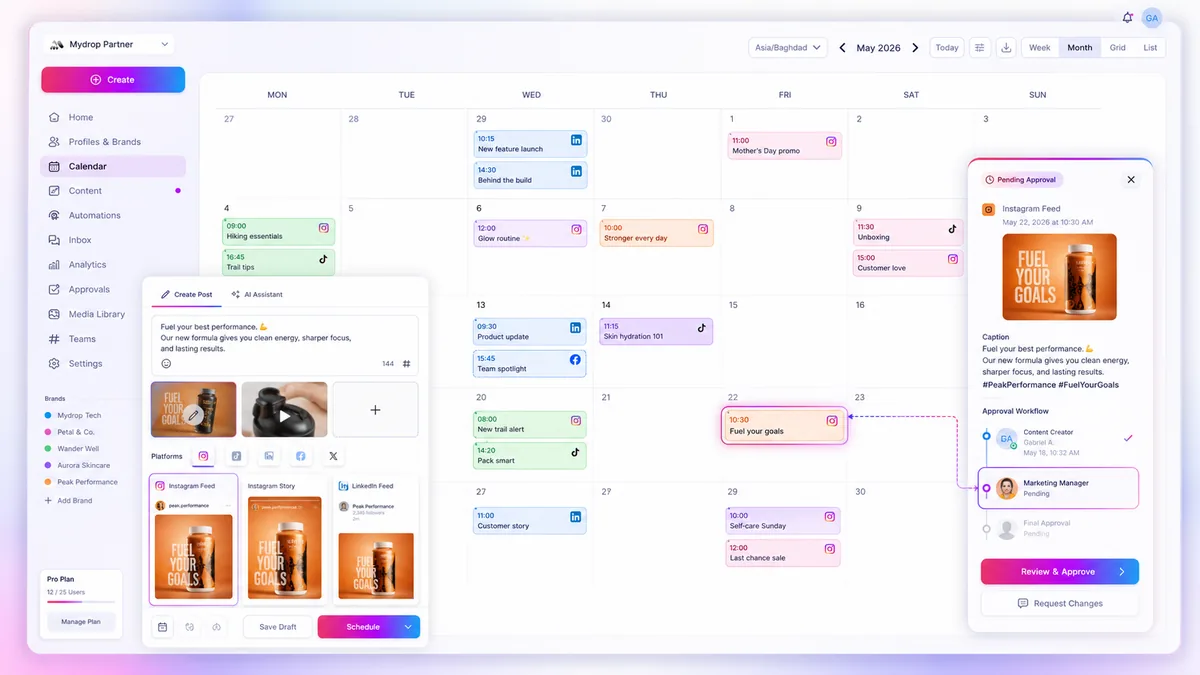
Stop looking at your campaign calendar as a grid. If you are managing multiple brands across dozens of channels, that visual board is almost certainly the primary reason your team feels buried in administrative busywork. The grid is perfect for visualizing timing, but it is terrible for managing execution. To fix the coordination debt slowing down your high-volume operations, you need to switch your daily command center to a list-based view.
We know the feeling. You open your calendar, and instead of a clear production schedule, you see a mosaic of colored boxes that all look exactly the same. You need to check the approval status of a post for a retail launch in the Northeast, but you end up clicking through five different days, squinting at thumbnails, and hoping you did not miss a pending reminder. It is exhausting, and it is a complete waste of your best strategic time.
The operating problem this solves

Most enterprise teams fall into the "visual trap" because calendar tools look professional and intuitive. The problem is that visual grids are designed to show you empty space, not to help you audit progress. When you rely on a grid, you are forced to infer metadata-like approval status, campaign attribution, or platform-specific compliance tags-from visual cues like color coding or positioning.
The result is inevitable coordination debt: your lead planners spend more time navigating the interface than they do ensuring the work is actually correct. When you have hundreds of posts moving through approval loops, you cannot afford to "hunt and peck" through a calendar grid to find a bottleneck.
This is where switching to a list-based workflow changes the game. By shifting to a table-like rendering of your content, you surface the actual data-status, campaign, profiles, and deadlines-as primary fields rather than hidden attributes.
Operator rule: High-volume teams should spend 80% of their time in filtered lists and 20% in the visual calendar. Use the calendar to spot scheduling gaps, but use the list to manage the work.
To understand why your current grid feels like a bottleneck, run this quick audit against your team's daily process.
| Metric | Visual Grid Approach | List-Based Workflow |
|---|---|---|
| Locating a specific post | Requires manual scanning of time slots. | Instant sorting by status or campaign. |
| Approval bottlenecks | Hidden; requires checking each box. | Surface-level via Pending status filter. |
| Campaign coverage | Subjective "visual weight" check. | Quantitative check against campaign tags. |
| Daily audit time | Usually 30+ minutes of manual clicking. | Under 10 minutes via saved filters. |
The move to list mode is not just about changing how you look at the screen; it is about taking control of the data. When you stop managing by pixels and start managing by metadata, you can see exactly which campaigns are stalling and which assets are still waiting for legal sign-off. The goal is to make the status of your entire operation visible at a glance, rather than burying it under a wall of pretty colors.
The minimum system that works

The secret to moving past calendar fatigue is recognizing that your planning surface should be boring. If you need a calendar that looks like a designer's portfolio to keep your team motivated, you have a culture problem, not a software problem. For high-volume teams, the best system is a simple, filtered list view that prioritizes state over aesthetics.
You only need four columns to maintain sanity: Status, Scheduled Date, Campaign/Brand, and Reviewer. Everything else is noise. When you use Mydrop to isolate "Pending Approval" items for a single region, you instantly strip away the administrative clutter of the other ninety-eight posts that aren't your problem right now.
Decision check: If you cannot identify the bottleneck in under thirty seconds of filtering, your view is too wide. Narrow your focus to one brand or one status until the chaos clears.
The goal is to move from visual scanning (looking for empty rectangles) to data-driven auditing (looking for missing signals).
Where teams overbuild the process
The most common trap is the "Master View" obsession. We see large agencies create one massive, all-encompassing calendar board, assuming that transparency equals efficiency. In reality, that board becomes an unreadable wall of color-coded rectangles that nobody actually trusts.
This is where the visual grid fails you. It tries to force too much information into a single fixed space, making it impossible to see if a post is stuck in an approval loop or if a campaign has missed its launch window.
Workflow Audit: The Grid vs. The List
| Metric | Visual Drag-and-Drop | List-Based Filter |
|---|---|---|
| Locating a specific post | Scanning grid cells | 1-click filter (Campaign/Brand) |
| Approval bottleneck detection | Clicking individual posts | Sorting by Status (Pending) |
| Cross-market coverage | Manual color counting | Grouped view by Profile/Region |
| Coordination debt risk | High (visuals obscure metadata) | Low (data-first visibility) |
Teams often try to solve this by adding more categories, more color-coded tags, and more complex naming conventions. But adding more complexity to a broken grid is just building a taller house of cards. You end up with a calendar that requires a PhD to decode and a full-time coordinator to manage.
The truth is that your calendar is not a creative mood board. It is a database of commitments. When you stop treating your planning surface as a showcase and start using it as an operational tool, you stop chasing fires and start managing velocity. Stop trying to make the grid work harder. Shift your routine to the list, audit your bottlenecks by status, and let the visual view handle the occasional long-term planning meeting. Everything else is just expensive administrative theater.
How to run the cadence
Transitioning to list-based management only works if you turn it into a non-negotiable habit. For high-volume teams, we recommend a 15-minute "List Sweep" at the start of every day. This isn't about deep creative work; it's about clearing the lanes so your team can actually focus.
To make this stick, follow this daily routine using Mydrop’s list filters:
- The Status Check (5 min): Open Calendar, switch to List Mode, and apply the
Pending Approvalfilter. Sort byDue Dateascending. If you see a post due in less than 4 hours, prioritize it. - The Campaign Audit (5 min): Select a primary campaign from the filters. Check the
Scheduledvs.Draftcount. If your ratio is off, identify the specific profile or region causing the lag. - The Bottleneck Sweep (5 min): Look for items with the
Changes Requestedstatus. Use the preview pane to leave a direct, actionable comment, then move on.
Workflow check: If a post sits in
Pending Approvalfor more than 48 hours, it is no longer an approval issue; it is a communication failure. Move it out of the list and into a direct message with the stakeholder.
By treating the list as your command center rather than a simple view, you turn the platform into an early-warning system for your content pipeline.
The proof that the habit is working
How do you know you have successfully replaced "grid panic" with operational control? The evidence shows up in your team’s collective stress levels and, more importantly, in your metrics. Use this scorecard to audit your progress after two weeks of using List Mode.
| Metric | Visual Grid Baseline | List Mode Goal | Improvement Signal |
|---|---|---|---|
| Locate Asset | 4-8 clicks | 1-2 clicks | Drop in "Where is that file?" pings |
| Approval Lag | 24+ hours | < 8 hours | Fewer status "stalls" in the dashboard |
| Campaign Coverage | Visual "guessing" | Filtered verification | Zero gap-days in your high-priority launches |
| Stakeholder Friction | Constant chasing | Audit-ready transparency | Reduction in "Are we still on track?" emails |
If you are hitting these goals, you have effectively moved your team from managing a calendar to managing a content machine. You aren't just filling boxes anymore; you are governing a complex, multi-brand strategy that can actually scale.
Conclusion
The visual grid is a great tool for initial brainstorming, but it is a terrible place to live when you are managing enterprise-scale operations. If your screen is filled with indistinguishable rectangles and you are losing track of statuses, you are paying a "coordination tax" that you don't have to pay.
Shift your daily focus to the list. Strip away the visual noise, apply the right filters, and turn your calendar into a high-utility command center. Your team will stop asking you what is happening and start focusing on the quality of what is going out.
Stop managing the space, and start controlling the data.
 Google review
 Trustpilot review
 Product Hunt comment




