


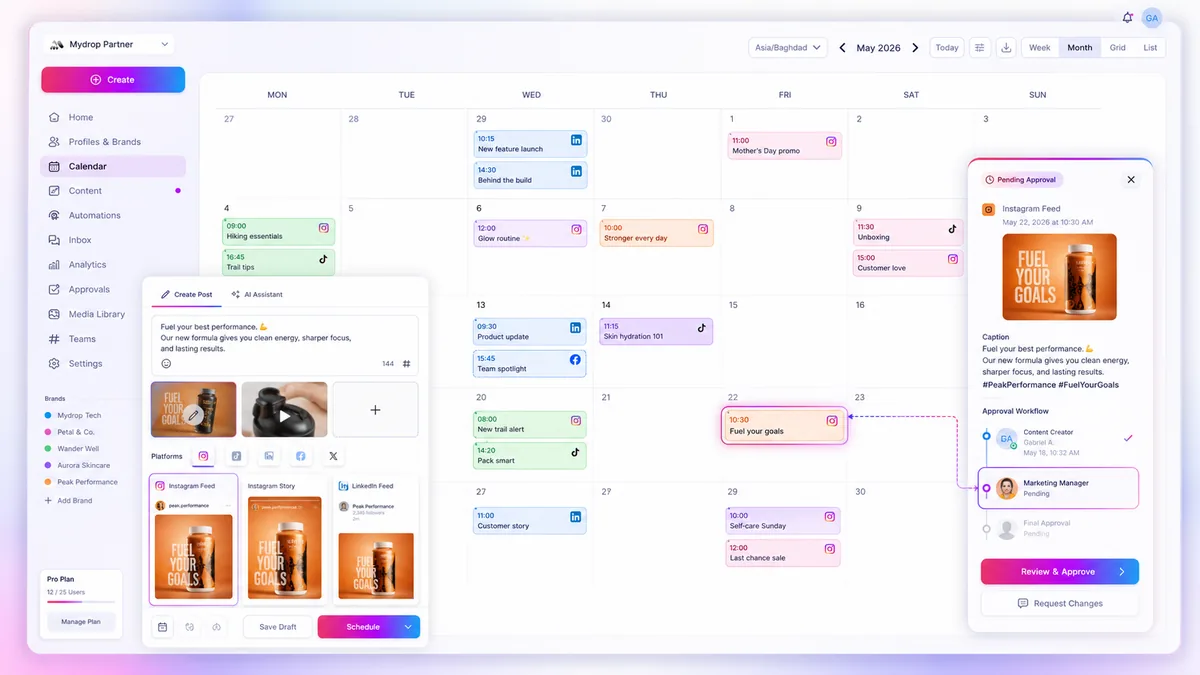
The secret to faster approvals is stop asking stakeholders to review your entire calendar. Instead, move your review process to campaign-filtered workflows. When you force a brand manager or legal reviewer to scan a wall of unrelated content to find the three posts they actually care about, you are not being transparent; you are creating an audit trap that kills your momentum.
We have all been there. It is Thursday at 4:00 PM, a product launch is looming, and your Slack is blowing up with requests for "the Q3 assets." If you are still relying on a single, monolithic calendar view to manage these requests, you are fighting a losing battle against cognitive overload. The fix is simple: treat each campaign as a distinct unit of work and use high-precision filtering to isolate those milestones in seconds.
The decision teams usually frame too broadly

Most teams view "reviewing the calendar" as a generic, top-level chore. They think the goal is to make sure every post is visually accounted for in a big, month-long view. But in reality, your stakeholders do not care about the entire month. They care about their specific campaign's performance, alignment, and compliance.
When you frame the review as "checking the calendar," you create a massive coordination debt. You are asking reviewers to filter out the noise themselves, which guarantees they will miss details, ask redundant questions, or delay their feedback simply because the sheer volume of information feels overwhelming.
Operator rule: Never show a stakeholder a calendar that contains more than one campaign at a time. If they need to see the "big picture," share a high-level roadmap report-but for approvals, prioritize density and focus over scope.
Here is how the "clutter bias" shifts when you change the unit of work:
| Review Request | The "Clutter" Workflow (Inefficient) | The "Filtered" Workflow (Efficient) |
|---|---|---|
| Urgent Launch | Scanning the entire month view to find posts. | Applying the Campaign Tag Filter to see only relevant milestones. |
| Influencer Check | Searching post history for creator assets. | Filtering by Automation/Form Source to isolate influencer submissions. |
| Compliance Audit | Manually checking each post's status. | Filtering by Pending Status + Campaign to target only actionable work. |
At Mydrop, we see teams managing hundreds of brand profiles across five or more markets. Those that move the fastest are not the ones with the most meetings; they are the ones that have replaced "review the calendar" with a Filter-First rule. By setting up saved views that map directly to your campaign milestones, you turn a chaotic, hours-long review cycle into a surgical, five-minute task.
This shift works because it aligns the interface with the actual decision-making hierarchy. You are not just organizing content; you are creating a reliable conduit for the people who need to say "yes" so you can finally hit publish.
What should stay manual and what can move faster

The secret to a sane workflow is accepting that not all decisions deserve the same amount of your team's energy. We often see teams treat every post as a high-stakes, manual event, but that is a quick path to burnout. The planning phase-the creative spark, the intent, the campaign strategy-is where your humans need to be locked in. That is the manual, high-touch work that builds your brand voice.
But the approval and sorting process? That should be mechanical.
When you rely on manual scanning, you are asking a brand manager to do the job of a database. You are forcing them to mentally filter out the "evergreen maintenance posts," the "local branch updates," and the "internal team reminders" just to find the five posts that actually matter for the upcoming Q3 launch. That is not review; that is noise. By using the campaign-filtering capabilities in Mydrop, you can move the sorting phase to an automated state, letting stakeholders interact only with the specific milestone content they own.
Decision check: If a stakeholder has to scroll through a calendar to find their work, you have already created a coordination bottleneck.
The tradeoff matrix
Different views in your stack serve different masters. If you are trying to find gaps in your coverage or visualize the overall pace of your publishing, a Calendar View is your home base. It is the best tool for spotting timing conflicts. However, when it comes to density, status checks, and surgical approvals, a List Mode is objectively faster.
Most teams toggle back and forth without a strategy, but matching the view to the task is how you reclaim those lost hours on Thursday afternoons.
| Task | Recommended View | Why it wins |
|---|---|---|
| Spotting gaps | Calendar View | Shows the macro rhythm of your publishing across profiles. |
| Urgent approvals | List Mode (Filtered) | Isolates only "Pending" posts for a specific campaign milestone. |
| Cross-market audit | List Mode | Enables quick scanning of copy and assets by profile group. |
| Identifying clashes | Calendar View | Visualizes if two high-priority posts hit the same hour window. |
How to read this matrix: Use the Calendar View for the "big picture" health check-are we publishing enough? Are we too quiet on Tuesdays? Use the List Mode with campaign-specific filters when you need to "clear the desk."
If you are currently reviewing 50 posts by manually scrolling through a calendar, you aren't actually auditing the content. You are just checking if you remembered to post. The moment you switch to a filtered list, you stop playing "find the post" and start actually approving quality. That shift from search-heavy to filter-driven is exactly how the best agencies we work with scale their output without breaking their approval loops.
How to pilot the workflow safely
You do not need to overhaul your entire operation by Monday morning. In fact, if you try to mandate a platform-wide shift for every single brand and region at once, you will trigger a revolt before the first coffee break. Instead, pilot this approach with one high-stakes campaign where the "noise" is currently worst.
Follow this 10-minute exercise to calibrate your team:
- Define the campaign tag: Pick a single upcoming launch. Ensure every post linked to this campaign has a consistent metadata tag (or campaign ID) in your planning tool.
- Clean the list: Open Mydrop’s Calendar List Mode for that campaign. If the list feels cluttered, hide the metadata columns you do not need for the initial review.
- The "Only This" check: Use the filter to isolate only that campaign’s posts. If a brand manager or stakeholder can still see posts for other regions or product lines, you have not set your permissions or filter views correctly.
- Dry run: Invite one stakeholder to review that specific filtered view. Ask them: "Can you see exactly what you need without scrolling through irrelevant content?"
If they answer "yes," you have your template. If they answer "no," you likely need to refine your campaign tagging or group profiles more logically. At Mydrop, we see that the biggest failures in this process happen not because the tool fails to filter, but because the team lacks a standardized tagging taxonomy. If "Q3 Launch" is spelled three different ways, your calendar will never be clean.
The operating rule to keep
The most effective teams we work with treat the calendar like a high-traffic intersection: it requires clear signage and strict right-of-way. They move away from the "search and rescue" method of finding content and adopt a "view-first" discipline.
Workflow check: Never send a stakeholder a link to the "Master Calendar." Always send a link to the specific Filtered List View that corresponds to their scope of authority.
When you make this a habit, you stop being an administrative clerk chasing people for sign-offs and start acting like an operational lead who curates the review experience. It shifts the power dynamic. Instead of dumping raw data on a busy executive, you are presenting a polished, curated package of work that is ready for their "approve" button.
It is a small change in how you copy-paste a URL, but the ripple effect on your approval cycle is massive.
Conclusion
At the end of the day, your stakeholders want to feel confident, not overwhelmed. They aren't trying to slow you down; they are just trying to manage their own risk, and when you show them an unmanaged, messy calendar, that risk looks higher than it actually is.
Stop forcing your team to swim through a sea of irrelevant posts just to get a thumbs-up on a campaign. By using granular, campaign-based filters in your calendar, you strip away the noise and give reviewers exactly the context they need to say "yes" and move on.
Most teams do not have a content production problem; they have a decision bottleneck. Once you fix the visibility, the speed usually follows on its own. It is time to stop apologizing for the chaos and start managing the signal.



 Google review
 Trustpilot review
 Product Hunt comment




