


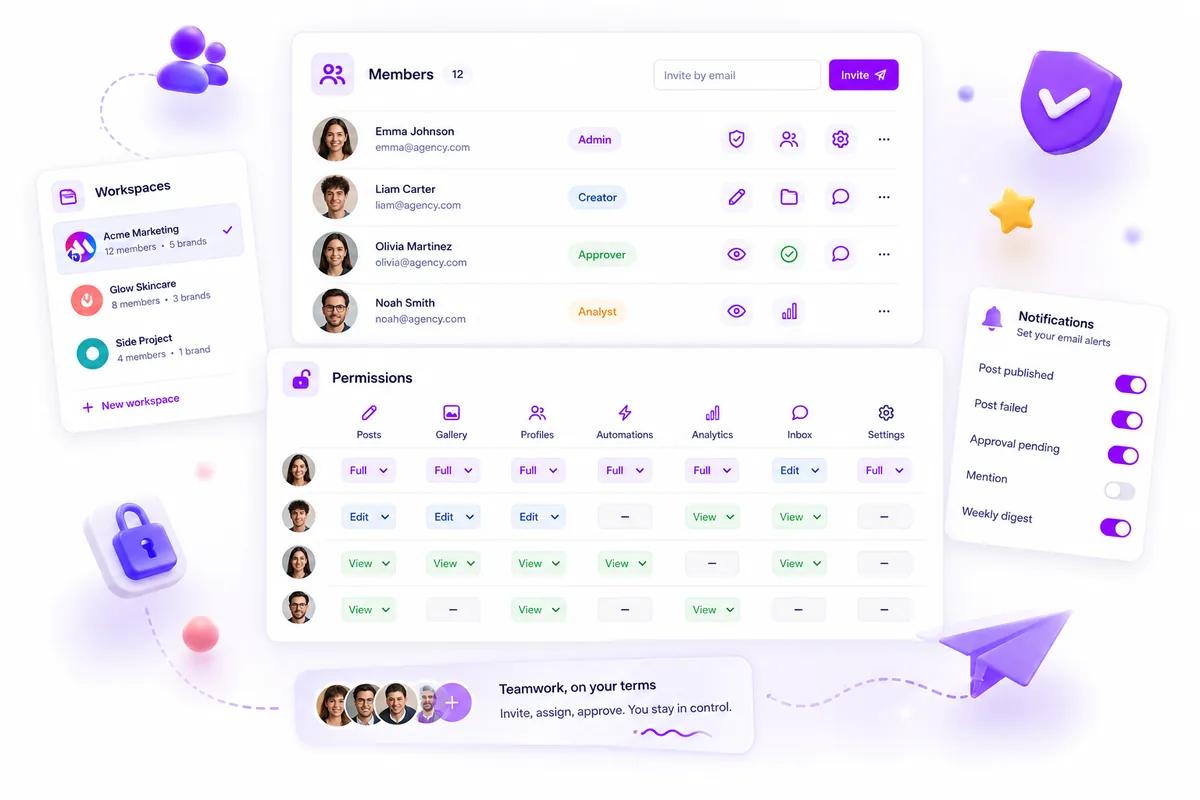
If you are managing more than two clients in a single, shared social media dashboard, you are not scaling; you are living in an inevitable accident waiting to happen. The secret to scaling agency operations isn't finding a faster way to post or a better hashtag generator. It is containerization. To grow, you need a multi-workspace architecture that isolates client billing, user permissions, and sensitive operational data into distinct, private environments.
We have all been there. It is the end of a long week, you are juggling three tabs, and you accidentally post a client’s draft content to the wrong brand handle. Or perhaps you spend three days at month-end manually untangling invoices because every client shares a single billing bucket. That is not just poor efficiency; it is high-stakes operational debt that drains your team's energy and risks your reputation. When you move to dedicated, isolated workspaces, you don't just gain organization-you gain the ability to delegate safely and move at scale without the constant, gnawing fear of a cross-brand slip-up.
What the best tools need to handle

When you are auditing tools to support a growing roster of brands, the feature set must prioritize operational safety and auditability over flashy, surface-level metrics. If a tool doesn't allow you to logically separate your work, it is a liability, not an asset.
At a minimum, your tool's architecture needs to satisfy these three operational requirements for multi-brand environments:
- Absolute Environment Isolation: Every client needs their own container. This includes separate billing profiles, distinct user sets, and independent timezone settings. If you have to manually configure permission filters for every report, you are already spending too much time on maintenance rather than strategy.
- Granular, Role-Based Access: You should be able to invite a client or a freelancer to one workspace without giving them visibility into your other twelve accounts. Permission creep is the fastest way to lose client trust.
- Scoped Usage Tracking: You need clear visibility into usage, quotas, and billing status per client. When you can track resource consumption at the workspace level, month-end reporting changes from a three-day manual spreadsheet project into a five-minute export.
The Multi-Brand Decision Checklist
Before committing to a platform, run this quick check against your current stack:
| Feature | What to Look For | Why It Matters |
|---|---|---|
| Containerization | Dedicated, isolated workspaces | Prevents cross-brand posting errors |
| Billing Logic | Workspace-specific billing/quotas | Simplifies client-side chargebacks |
| Access Control | Member-level permissions per container | Limits risk of exposure/accidental edits |
| Local Context | Per-workspace timezone settings | Keeps reporting accurate by region |
Most teams do not have a content problem. They have a decision bottleneck, often caused by trying to manage complex workflows in a platform that doesn't respect the boundaries of their different client environments. Your tools should make it difficult to make a mistake, not rely on your team’s perfect memory at 5 p.m. on a Friday.
Where basic tools start to break

The "one-account trap" is not just annoying; it is a structural failure point that eventually brings agency operations to a halt. When you manage a single client, a shared dashboard is fine. But when you start stacking brands, that same dashboard becomes a minefield.
We have all seen this script: a team member accidentally replies to a client comment using the wrong brand handle because they were toggling between windows in the same account, or a billing invoice for Client A is incorrectly generated using the usage quota of Client B. These are not just "oops" moments; they are signs that your operational environment has reached its limit.
The core issue is coordination debt. Without true containerization, every action requires double-checking. You are forced to manually audit shared buckets for billing, manually map permission sets that weren't designed for multi-brand roles, and manually create workarounds to prevent cross-brand leakage. This manual overhead creates a bottleneck where your agency's ability to grow becomes directly proportional to how much time you spend on account hygiene rather than actual strategy.
At some point, your team stops building campaigns and starts spending all their time managing user access or patching holes in the dashboard. If your tool does not allow you to silo environments by default, your scale is an illusion.
The buying criteria that matter
When you are ready to stop fighting your own software, you need to be brutal about your requirements. You are not looking for more "features" or "cool AI tools"; you are looking for operational isolation.
Use this scorecard when evaluating any platform. If a tool cannot pass the basic requirements of your agency environment, it is not saving you time; it is just delaying the inevitable mess.
Agency Scalability Scorecard
| Criteria | High Requirement (Must Have) | Why it matters |
|---|---|---|
| Data Isolation | Complete workspace containerization | Prevents accidental cross-posting and data leakage. |
| Permission Granularity | Role-based access by workspace | Ensures stakeholders only see relevant client data. |
| Billing Visibility | Workspace-level usage tracking | Eliminates manual end-of-month invoice reconciliation. |
| UI Fluidity | Zero-latency workspace switching | Essential for teams managing 5+ brands daily. |
Decision check: Rate each category on a scale of 1 to 5.
- If any category is a 1 or 2: The tool is not enterprise-ready and will fail as you scale.
- If the total is below 15: Do not proceed with the tool, regardless of how "fast" or "easy" the UI looks.
Beyond the scorecard, look for tools that treat the "workspace" as the primary object. In platforms like Mydrop, for instance, everything is scoped to the workspace by default. The active environment is not a tag you add; it is the fundamental boundary that determines what a user can see, who they can invite, and how their usage is calculated.
This is the difference between a tool designed for a single brand and one designed for an agency. Most tools force you to work around their architecture. The best tools have an architecture that works with yours.
The truth is, most teams do not have a content problem. They have a decision bottleneck, and that bottleneck usually sits right where their software fails to separate one client from the next.
How Mydrop supports this workflow
When we built Mydrop, we started from a pretty simple observation: the most dangerous thing you can do for a client is to give them access to a shared environment where they can see their competitors. Or, more simply, where you might accidentally mix up their billable data.
In Mydrop, we use dedicated Workspaces to act as these hard containers.
You create a workspace for a client, and that is it. All their assets, all their team members, and their unique timezone settings live inside that box. If you are an agency manager, you are not just logging into a dashboard; you are switching into their specific operational context. The platform handles the boundary so you do not have to worry about it.
This means if you have three clients, you have three distinct settings environments. You can manage member permissions for client A without ever seeing the list of people working on client B. If client C needs a different timezone for their automated reports, you just set it in their workspace. It does not affect the others.
The real value, though, is in the "Oops" prevention. Because Mydrop resolves your access based on the workspace you are currently in, it acts as a gatekeeper. You are not toggling between client accounts in the same view; you are switching contexts. The UI updates to match the client you are currently serving, minimizing the chance that you act on the wrong brand.
A simple shortlist checklist
Before you pick a tool, run it through this maturity checklist. If it fails these three points, your agency is going to struggle as you take on more accounts.
Agency Workspace Maturity Checklist
| Feature | The Basic Test | Why It Matters |
|---|---|---|
| Permission Isolation | Can I restrict a freelancer to one client workspace only? | Prevents accidental data exposure across clients. |
| Scoped Billing | Can I pull usage reports or set quotas per client? | Necessary for accurate margins and billing transparency. |
| Local Context | Does the tool remember my last active client? | Reduces the cognitive load of switching between brands. |
Decision rule: If the tool forces you to manage cross-brand access via global permission toggles instead of per-workspace membership, keep looking. That is a coordination debt waiting to happen.
Conclusion
Scaling an agency is rarely about working harder. It is almost always about removing the friction points that make work dangerous and slow.
Most teams do not have a content problem. They have a decision bottleneck. When your team has to constantly double-check if they are using the right handle, or if they have the right permission, or which timezone their data is in, that is mental bandwidth that should be going toward strategy and creative output.
If you want to support more brands, start by containerizing your operations. Stop trying to make one account do everything. Your clients expect a professional, secure, and dedicated experience. Your team deserves a workspace that helps them do their job instead of getting in their way.
The right tools do not just organize your work; they protect your reputation by making the correct path the easiest one to take.
 Google review
 Trustpilot review
 Product Hunt comment




