


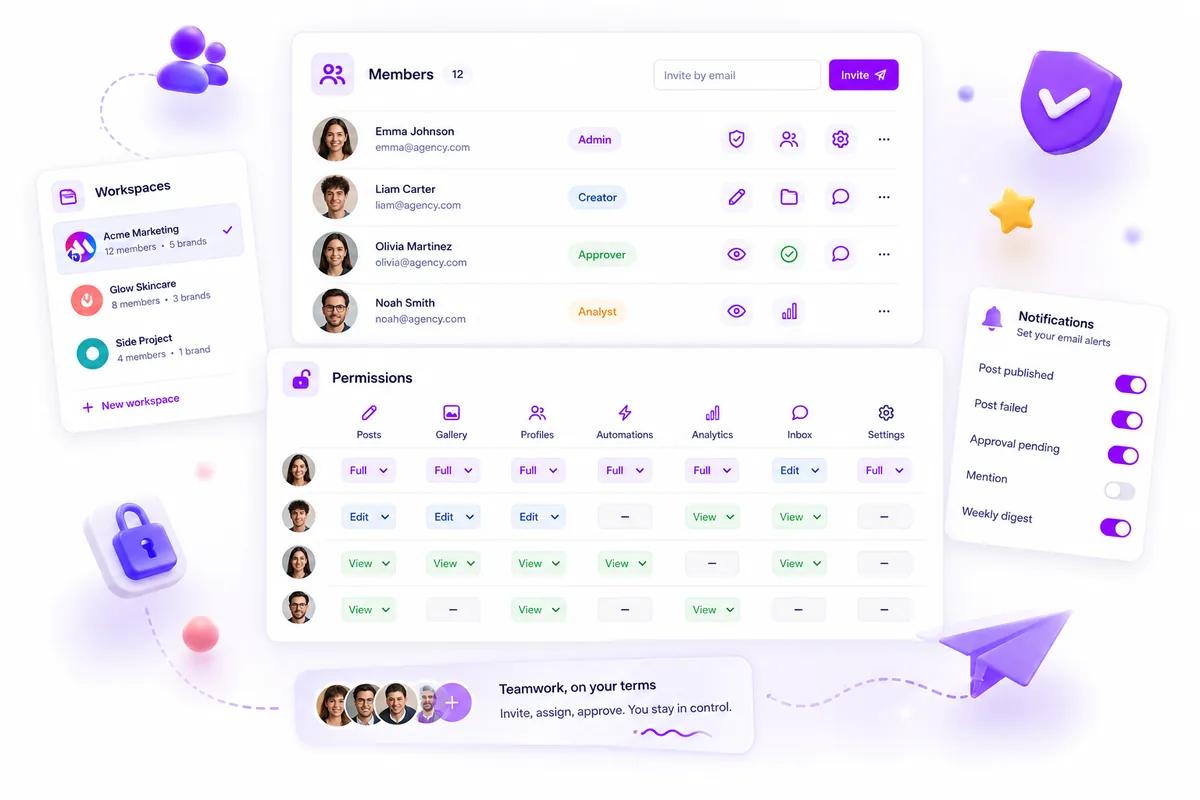
Stop managing multi-brand campaigns in a single workspace the moment your team members exceed five people or your client data privacy requirements necessitate distinct billing and access logs. While a unified dashboard feels efficient during a project’s infancy, holding everything under one roof eventually creates a "coordination tax" that throttles your team’s agility and exposes your clients to unnecessary risk.
We get it. Starting a new campaign in the same environment where you already have your assets and workflows feels like the path of least resistance. It keeps your login count low and your "all projects" view tidy. But as your team scales, that convenience turns into a liability. Suddenly, you are navigating accidental data cross-pollination, confusion over which billing entity covers which post, and the persistent anxiety of a junior team member accidentally accessing sensitive client logs. It is not just messy; it is an operational bottleneck waiting to snap.
The decision teams usually frame too broadly

Most teams misdiagnose the problem as needing "better organization" or "clearer folder structures," when the real issue is architectural. They treat their workspace as a filing cabinet rather than a boundary for risk.
When you scale, your workspace architecture should act as a deliberate perimeter. Every time you bring on a new brand, launch in a new market, or add a distinct stakeholder group, you are adding variables that increase the complexity of your permission model. If you try to manage all these variables in one place, you eventually hit a ceiling where the cost of managing the rules outweighs the benefit of having the data in one view.
Operator rule: Only build a workspace when you need a distinct "Blast Radius." If a campaign’s failure or data leak would jeopardize another client, it belongs in an isolated environment.
In our experience, teams often wait until a major approval error or a billing misallocation occurs before they decide to separate their brands. This is a reactive trap. You want to move toward Boundary-First Scaling, where the separation is established before the complexity arrives. This isn't about siloing your team; it is about creating the right environment for them to perform without constantly checking over their shoulder to see if they are in the "right" brand folder.
When you use features like Mydrop Workspaces to define these boundaries, you aren't just cleaning up a menu. You are ensuring that billing states, timezone configurations, and member permissions are tightly aligned with the specific operational needs of that brand. You are trading a cluttered "everything" view for a focused "exactly what we need" environment.
The real question isn't "Can we fit this in our existing setup?" but rather, "Does this brand need its own pulse?" If the answer is yes, you are ready for a new workspace.
What should stay manual and what can move faster

Most teams get into trouble when they try to automate the decisions rather than the delivery. You can (and should) automate your publishing schedule, your approval notifications, and your asset retrieval. But the actual act of deciding whether a piece of content aligns with a brand’s unique voice? That requires a human gut-check that no tool can replace.
In our experience, the best teams keep the creative review and final approval manual, but automate the administrative logistics that surround them. If your social lead is still manually copying post-links into a secondary spreadsheet to verify compliance, you are paying a massive coordination tax. That manual data-wrangling is exactly what creates the bottleneck that causes posts to miss their window.
Decision check: If a task involves moving data from one place to another to "keep track of it," it is a candidate for automation. If it involves a human looking at a screen to say "Yes, this feels like us," keep it locked behind a manual, human-only gate.
The tradeoff matrix
Deciding to split your account into multiple workspaces is rarely about "losing features." It is about intentionally choosing where you want to incur friction. Splitting your environment buys you regulatory and operational safety, but it costs you the ability to see a total, cross-brand view in a single glance.
Here is how to evaluate your current setup against these four critical pillars.
| Evaluation Metric | Keep Centralized (Single Workspace) | Split Workspace (Isolated Environment) |
|---|---|---|
| Data Privacy | Shared visibility across all teams. | Strict data silos; perfect for distinct client contracts. |
| Team Access | Everyone sees everything. | Role-based isolation; users only see what they manage. |
| Billing/Usage | Shared pool of posts and assets. | Distinct usage quotas and separate billing invoices. |
| Timezone Sensitivity | Standardized to the primary team location. | Localized scheduling; avoids "middle-of-the-night" posting errors. |
If you have a client in London and a client in New York, trying to manage both in a single workspace with one time_zone setting is a recipe for a 6:00 a.m. mistake that no one catches until it is too late. Mydrop allows you to handle these timezone and usage discrepancies by treating each workspace as a self-contained unit.
The goal isn't to create a fragmented mess. It is to create containment zones where your team can move fast without needing to check if their work will inadvertently impact a totally different brand’s publishing calendar or compliance logs. If your current structure makes you nervous when you hit "Publish," you aren't being too careful-you are just too centralized.
How to pilot the workflow safely
Moving to a multi-workspace setup feels like performing surgery on a live feed, but it is actually one of the most reliable ways to shed coordination debt. If you are currently feeling the strain of "everything everywhere all at once," you do not need to move everyone at once. Pilot it with your most isolated brand or region first.
Use this sequence to migrate without dropping a single post or losing your historical data:
- Baseline Audit: Identify which product collections are currently cluttered by the target brand. Note current active members, custom timezone settings, and existing approval workflows.
- Define the Boundary: Create the new workspace in
Settings > Workspace. Move your target brand’s social channels into this new container. - Permissions Pass: Invite only the necessary stakeholders. You will immediately notice how much quieter and more focused the notifications become when people are only seeing the relevant brand scope.
- Shadow Run: Keep the old workspace active for the team for one week, but run all new content drafts through the new workspace.
- Final Cut: Once you verify that all reporting data and scheduling triggers are working as expected, remove the brand profiles from the original workspace.
The goal is to move from a state of Permission Gridlock (where everyone sees everything but owns nothing) to Delegated Autonomy (where brand leads have full control over their specific environment).
The operating rule to keep
Every team that successfully scales out of a single-workspace trap eventually settles on the same ritual: the quarterly "Blast Radius" Review.
Workflow check: If a campaign or brand launch is large enough that a scheduling error or data leak would trigger a cross-brand PR crisis, it requires its own isolated workspace boundary.
Treating your workspace architecture as a living part of your operations-rather than a "set it and forget it" configuration-is how you prevent the bloat from returning. When you have five workspaces, you do not need one person micromanaging them all. You need a standard, consistent way to audit who has access to which container.
Conclusion
Operational maturity is rarely about finding a more complex tool. It is about knowing when to draw boundaries that make your team’s daily work easier, not harder.
If you find yourself apologizing for notification noise, explaining why someone accidentally edited a draft for the wrong client, or struggling to find the right billing split in your monthly report, you are already past the point of diminishing returns. Stop trying to optimize a broken container.
Take the audit. Draw the boundary. Give your team the breathing room they need to actually create, rather than just manage the noise. When you prioritize the right structure, the coordination debt vanishes, and you can finally get back to the work that actually grows the brand.


 Google review
 Trustpilot review
 Product Hunt comment




