

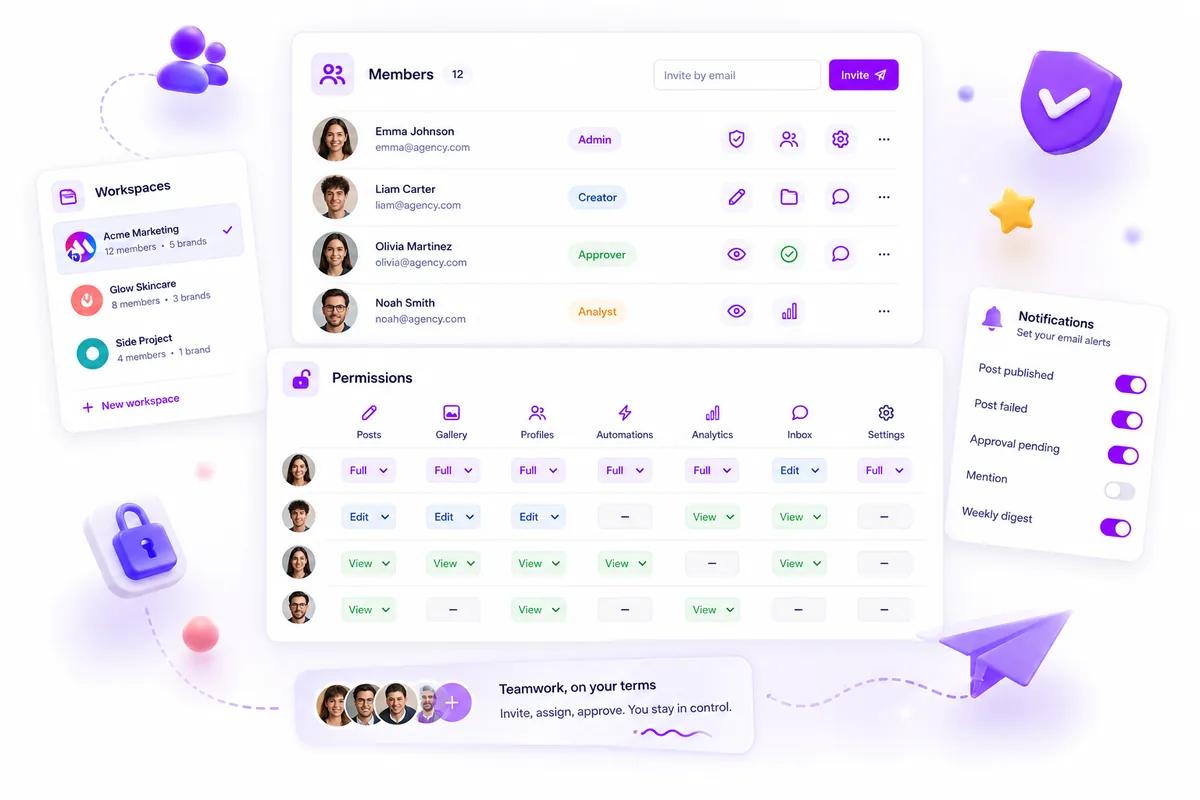
The most effective way to scale an agency is to stop using roles that function as black-and-white switches. Instead, you need resource-level permission maps that allow you to decouple access from responsibility, ensuring that your team can move fast without anyone accidentally touching the wrong account or bypassing a critical approval.
Agencies often hit a permission ceiling where adding a new client or teammate triggers a massive audit of who can see or change what. It feels like a high-stakes guessing game-you are forced to choose between giving someone "full access" to avoid blocking their work, or restricting them so heavily that they have to nag you for every minor edit. We have seen this hundreds of times: when software makes collaboration difficult, your team eventually starts sharing logins or using shadow-workarounds just to get the job done. That is not just a workflow friction; it is a massive security liability waiting to happen.
What the best tools need to handle

The best platforms treat permissions as a granular contract between the user and the specific assets they manage. It should not matter if someone is a "Manager" or "Creator" in the traditional sense; what matters is whether they can create a draft for Brand A, approve a post for Brand B, or pull analytics for Brand C.
When you are auditing your current software, look for the ability to control action-level access across your entire resource tree. If your tool only offers static roles like "Admin" or "Contributor," you are already stalling your own growth.
Operator rule: If you have to share a login to get work done, your permission model has failed.
Here is how the best teams differentiate between static, outdated roles and truly scalable action maps.
| Feature Type | Static Role Model | Granular Action Map (Mydrop Style) |
|---|---|---|
| Asset Access | All-or-nothing per brand | Specific access to individual profiles, groups, or campaigns |
| Approval Workflow | Binary (Can/Cannot) | Conditional (Can draft/Cannot approve/Can edit existing) |
| Notification Logic | All/None per account | Toggle by event (e.g., alert only on approval requests) |
| New Asset Handling | Defaults to "All" | Defaults to "Restricted" until mapped |
In our experience, the biggest bottleneck isn't a lack of talent-it's coordination debt. When your software doesn't support the nuance of your agency's actual workflow, you spend more time managing internal access than you do creating content. The goal is to build a system where the "default state" for every new team member is restricted access, which you then open up strategically as their role matures. That is how you turn a administrative headache into a predictable, repeatable process.
Where basic tools start to break

Basic software often hits a wall the moment your agency manages more than three clients. We see this all the time: a tool offers roles like "Admin," "Editor," and "Viewer," and you think you are set. Then, a client needs a local intern to help draft copy but not touch the approval queue, or an analyst needs to pull reports without seeing the internal campaign notes.
When your software cannot handle those specific, granular needs, your workflow turns into a game of "workarounds." You end up sharing a single login because the tool is too rigid, or you give someone "Admin" access just so they can hit "Publish," only to find they have accidentally deleted a critical approval folder.
Common mistake: Trading security for speed by giving team members higher roles than they actually need, just to bypass "Access Denied" errors.
This is the Admin Trap. It happens when the software forces you to pick between "All-Access" or "Nothing." In reality, professional agency work exists in the middle, and if your tool doesn't support that, you aren't managing your workflow-you are just managing the fallout of bad access controls.
The buying criteria that matter
When you are ready to stop managing "permission debt," look for a tool that treats access as a map of actions, not a hierarchy of titles. You need to know that if someone can see a post, they cannot necessarily delete it. If they can build a report, they cannot necessarily change the workspace settings.
Here is a 7-Point Permission Reliability Checklist to grade your current platform. If you cannot answer "Yes" to at least five of these, your agency is carrying hidden risk.
| Criteria | Why it matters | Decision Rule |
|---|---|---|
| Action Mapping | Can you separate draft creation from publishing? | Must allow granular control per resource. |
| Resource Isolation | Can you block cross-client visibility for stakeholders? | Zero tolerance for leaked brand data. |
| Audit Trails | Is every permission change logged? | Mandatory for compliance audits. |
| Notification Scope | Can members customize their email alerts? | Prevents "alert fatigue" and missed tasks. |
| Role Templates | Can you save permission presets for new hires? | Avoids manual setup for every invite. |
| Portal Control | Can clients perform actions without full member access? | Separates client feedback from internal editing. |
| Default-Deny Logic | Is everything locked until explicitly allowed? | Prevents accidental data exposure. |
At Mydrop, we built our permission model around this "Default-Restricted" philosophy. Because we store permissions as an action map rather than a hard-coded role, you are not locked into our definitions of what a "Manager" should do.
If your team needs to separate the person who creates the campaign from the person who hits the "approve" button, you just update the permission map for that specific resource. You stop worrying about who has the keys to the entire house, and start focusing on who has the authority to move the furniture.
Scaling an agency isn't just about hiring more people; it’s about making sure your software isn't the biggest bottleneck in your room.
How Mydrop supports this workflow
At Mydrop, we approach this by treating permissions as a fluid map of actions rather than a rigid hierarchy. We have seen that when teams rely on static "Editor" or "Manager" roles, they inevitably end up in a bottleneck where someone with high-level access has to manually hit "approve" on every single tweet. It is a slow, manual nightmare that no one actually enjoys.
Instead, we use a granular Resource Action Map. Every workspace member is defined by what they can specifically do with each resource-like posts, analytics, or inbox threads. You can let a junior content creator draft a post, assign a social lead to review it, and enable a legal consultant to only view specific brand assets without ever being able to hit "publish."
Decision check: If you have to share account passwords because your software cannot handle a specific permission set, you are not scaling your agency. You are building a security breach waiting to happen.
Because our permission checks happen in real-time across the platform, you don’t have to worry about "permission drift" when we introduce new features. If a new resource type is added, you define the access model once, and it instantly applies to your team. You aren’t just assigning titles; you are codifying your agency’s internal review policy directly into the tools your team uses every day.
A simple shortlist checklist
Before you commit to a new platform-or keep paying for a broken one-run this check. If you can’t say "yes" to these points, you are likely losing more hours to administrative friction than you realize.
| Feature | Goal | Why it matters |
|---|---|---|
| Granular Actions | Can you separate "create draft" from "approve"? | Prevents unauthorized content from going live. |
| Resource Isolation | Can you restrict client A’s team to client A’s data? | Eliminates the risk of cross-account data exposure. |
| Action Mapping | Do permissions map to the lifecycle of the work? | Moves work forward without needing an admin to intervene. |
| Audit Trails | Can you see who changed a permission and when? | Essential for compliance and accountability. |
| Notification Control | Can users toggle their own operational alerts? | Stops "notification fatigue" for managers. |
Conclusion
Scaling an agency isn't about working harder; it is about building a system where your team can act autonomously without you checking every single detail. The "permission ceiling" is a real thing, and it usually breaks around the time you add your fourth client or your fifth team member.
Don't wait for a public brand mistake to realize your software is holding you back. If your current tool forces you to give everyone "all-access" just to get work done, it is time to move on. Focus on platforms that treat permissions as a flexible, resource-based map. It is the only way to keep your operations fast, your clients happy, and your own sleep schedule intact. After all, the best marketing tool is the one that gets out of the way, allowing your team to create content rather than chase down approval emails at 6 p.m.
 Google review
 Trustpilot review




