


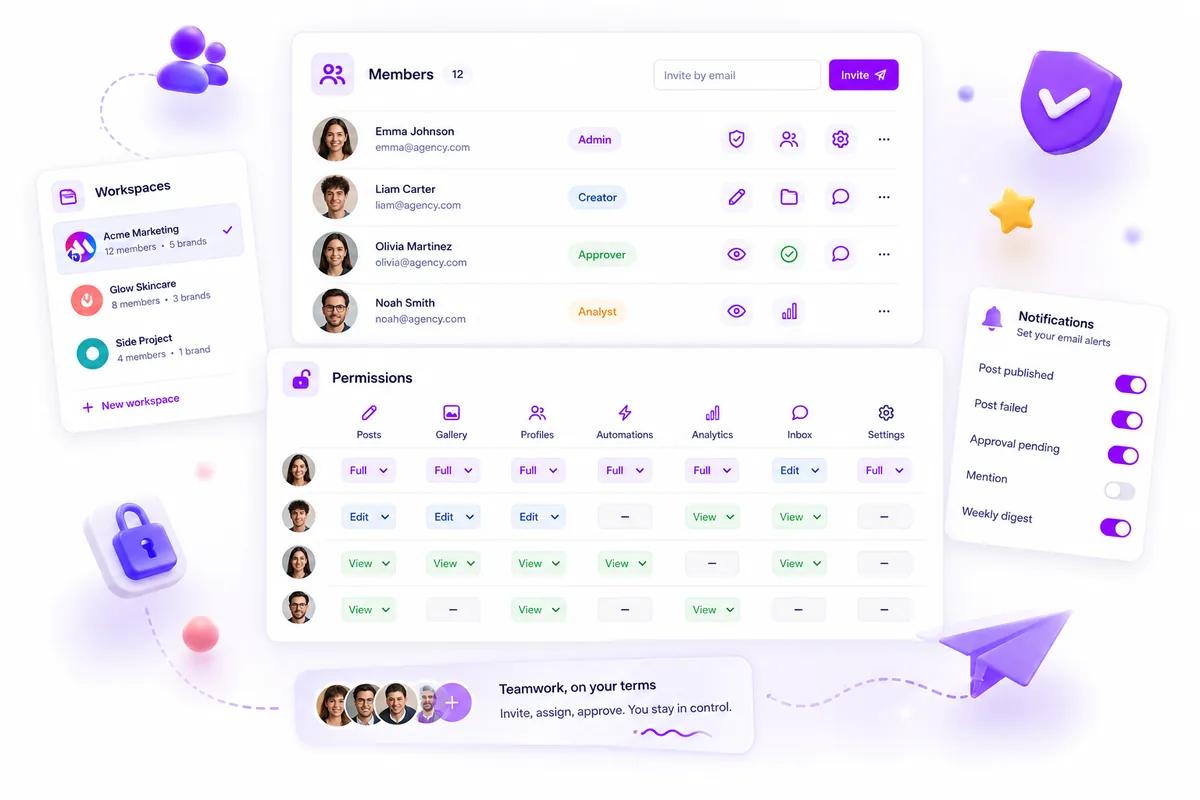
Accidental cross-brand posts usually happen because your permission settings are too broad to protect your team from a bad click. If your current setup treats everyone like an "editor" across every brand, you are one mistake away from pushing a B2B report to your lifestyle feed. The solution isn't stricter training-it is shifting to granular, resource-level isolation where access is tied to specific brand projects, not global roles.
We have all felt that sinking feeling when a post goes live on the wrong account. It is high-pressure work, and the reality is that when you manage dozens of channels, human error is inevitable unless the software makes the wrong path physically impossible to take. This audit is about moving from "I hope they don't click that" to "They literally cannot click that."
What the best tools need to handle

Most platforms force a binary choice: you are either an "Admin" who sees everything or a "Member" who is dangerously limited. When you have five brands and three agencies in the mix, that approach falls apart instantly.
The best tools treat permissions as a dynamic, resource-action map rather than a static role. Every asset-a post, a profile, a gallery-needs to be locked down by default, and access granted only as needed.
Operator rule: If your tool allows a user to see a profile they don’t need to manage, your access model is already failing.
When auditing your current tools, look for these three capabilities to ensure you aren't just relying on good intentions:
| Feature | Why it matters |
|---|---|
| Project-level scoping | Isolates brand assets so users only interact with their assigned markets. |
| Action-level control | Separates the ability to create a draft from the ability to approve or publish it. |
| Role inheritance audit | Prevents "access creep" when team members change roles or projects end. |
Without these, you are managing coordination debt, not content. A solid system forces a strict separation of concerns. If your marketing manager needs to check analytics for the B2B brand, they should not even see the "create post" button for the lifestyle brand.
The best systems are invisible when they work, keeping team members in their lanes without the friction of constant permission requests. When that fails, the cost is not just a deleted post-it is the erosion of trust across your entire stakeholder ecosystem.
Where basic tools start to break
Most entry-level social media tools operate on a binary: you are either an Admin with the keys to the kingdom or a Member who can only press buttons. That simplicity feels great when you are just starting, but it becomes a major liability as soon as your team grows beyond two people. When your tool does not distinguish between a user who can draft a post and one who can hit "publish," you are forced to rely on "honor system" governance.
We have seen this pattern across countless agencies and large brands. Because the tool cannot restrict access to specific profiles or actions, you end up with every team member having implicit permission to touch anything in the workspace. The inevitable result? A junior coordinator accidentally pushes a live campaign to the wrong brand page while trying to set up a test post. It is rarely malicious; it is just a high-pressure environment where broad permissions make mistakes mathematically certain.
The breakdown happens at the action layer. Basic tools lack the ability to check if a user is authorized to perform specific tasks, such as creating, updating, or deleting content across different resources. Without granular isolation, the interface becomes a minefield where the difference between a successful post and a PR crisis is a single accidental click.
The buying criteria that matter
When auditing your current stack, stop looking for "ease of use" as the primary metric. You need to shift your focus to auditability and resource-level isolation. An easy setup that lets everyone break everything is a luxury you cannot afford at scale.
Here is a simple scorecard to evaluate whether your current or potential tools are actually protecting your brand or just adding to your coordination debt.
Access Control Scoring Rubric
| Feature | Low-Risk (Enterprise Ready) | High-Risk (Legacy/Basic) |
|---|---|---|
| Role Definition | Resource-action maps defined per member | Broad, hard-coded roles (Admin vs User) |
| Isolation | Explicit, per-profile/brand assignment | Global access to all linked profiles |
| Actions | Granular control (e.g., Draft vs. Publish) | All-or-nothing permissions |
| Review | Audit logs linked to specific user actions | Shared credentials or generic logs |
| Cleanup | Easy removal or role modification | Manual, error-prone user management |
Decision check: If your tool does not allow you to restrict a team member to only the specific brands or actions required for their role, your permission model is fundamentally broken. You are not just managing social media; you are managing a platform security risk.
The best tools force you to define who can do what, where, and when. This approach is not about creating red tape; it is about providing the "guardrails" that allow your creative team to move fast without the constant fear of a cross-brand slip-up. If you cannot see exactly who has access to which resource action-from posts to analytics-you simply do not have the control required for serious multi-brand operations.
How Mydrop supports this workflow
At Mydrop, we built our permission model because we watched too many teams struggle to reconcile "freedom to create" with "security to publish." When you have dozens of stakeholders and hundreds of social profiles, relying on a binary Admin/User role creates a massive, unnecessary security gap.
Instead of broad roles, we use a granular resource-action map. You don't just grant someone access to a "workspace"; you define precisely what they can do with specific assets.
- Scoped isolation: A team member can be assigned as a "Creator" for a specific set of brand profiles but lack permissions to touch the "Analytics" or "Approval" workflows for that same brand.
- Action-level control: You can permit a freelancer to create drafts within a post gallery while strictly blocking their ability to approve those posts or modify the workspace settings.
- Dynamic updates: When a project ends or a team member changes focus, you update their specific resource map. Because permissions are not hard-coded into global roles, you don't have to overhaul your entire account architecture to revoke access.
This approach stops the "Admin creep" that plagues larger teams. By explicitly mapping what a user can do to what a user can see, you create a secure sandbox where mistakes stay contained.
A simple shortlist checklist
Before your next campaign, take ten minutes to run this audit against your current team setup. If you can't check these off confidently, you are running with more exposure than you realize.
| Audit Item | Why it Matters |
|---|---|
| No "Global" Admins | Are more than 3 people truly authorized to delete profiles? If yes, tighten this. |
| Role-Action Map | Can a user create a draft without the ability to approve a live post? |
| Active Lifecycle | Have you removed access for team members who left the project or company in the last 90 days? |
| Notification Sync | Are operational email alerts mapped to the current approvers, not legacy users? |
| Scope Review | Does every member have access only to the brand profiles relevant to their current KPI? |
Conclusion
The goal of your permission structure isn't just to stop accidental cross-brand posts; it’s to build a system that supports your team’s speed without creating a compliance nightmare. When you move from "everything for everyone" to granular, resource-based control, you aren't just tightening security-you are actually enabling faster, more confident work. Your team deserves the autonomy to create, but they also deserve a system that reliably keeps them from hitting the wrong button at the wrong time. Start by auditing your current roles this week, and you’ll likely find that clarity is your best defense against the next avoidable mistake.
 Google review
 Trustpilot review
 Product Hunt comment




