

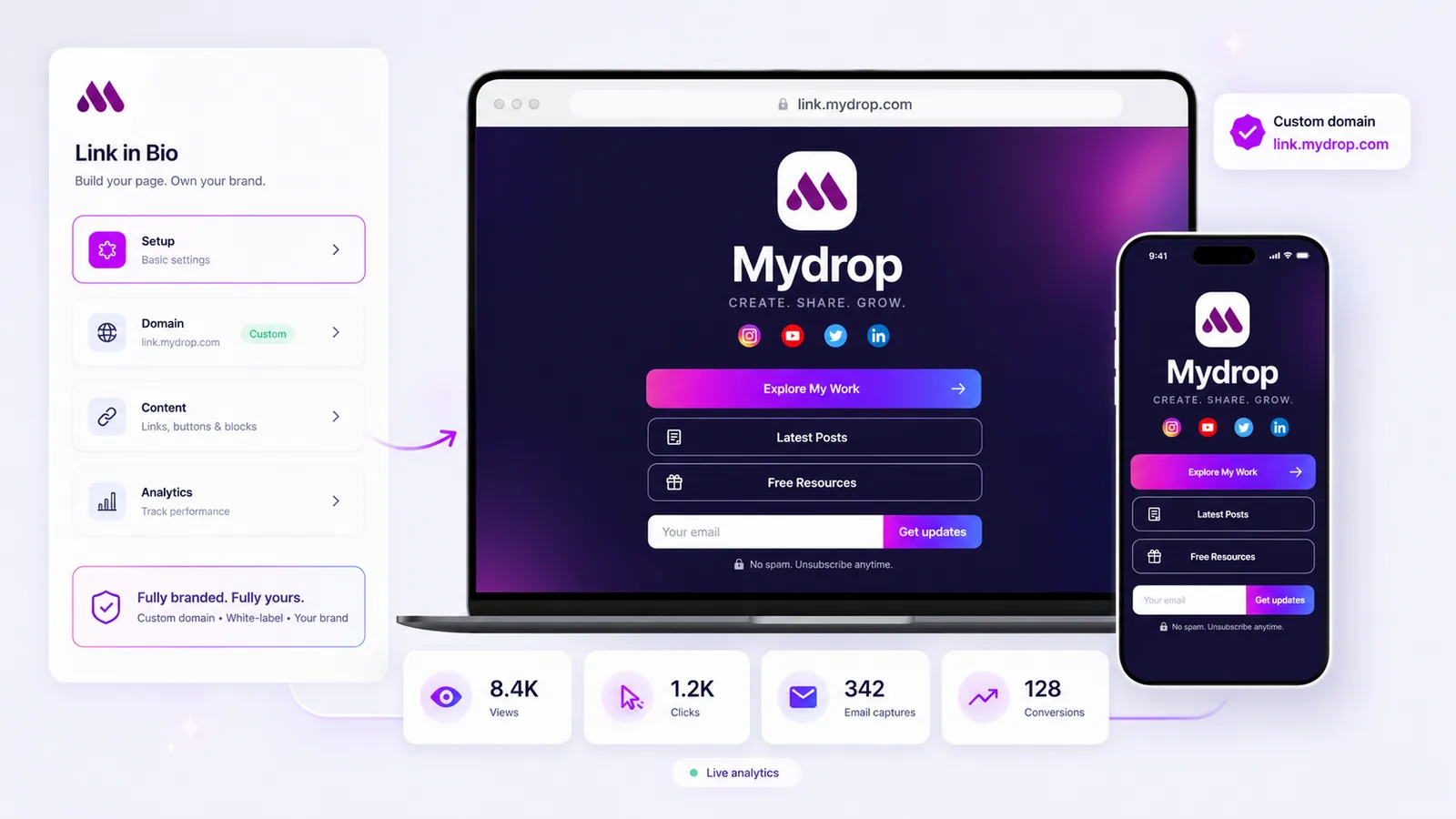
You need a dedicated landing page system for each brand, not a simple link list. If you are managing dozens of profiles with basic bio tools, you are likely suffering from a severe lack of structure. Your analytics are siloed, brand integrity is inconsistent, and you cannot prove ROI at scale. We can help you stop this.
Patching together conversion data across your portfolio feels like playing whack-a-mole. It should not be this hard. To move beyond this, adopt a Three-Tier Architecture: Brand Identity to own the surface, Conversion Logic to drive the action, and Aggregated Analytics to capture the insight. This shift transforms your bio page from a navigational list into a powerful conversion surface.
What the best tools need to handle
When managing enterprise-scale marketing, you are not just hosting links; you are maintaining a distributed landing page system. The tools that scale need to treat every bio page as a client-owned, white-labeled destination. Here is the operational reality of what you should be evaluating when selecting your next platform.
First, stop viewing these pages as just navigational links. They must act as conversion surfaces that allow you to capture emails, distribute files, show media kits, and route visitors directly to active campaigns. If the tool lacks native conversion tracking, you are blind to the bottom-of-funnel impact of your social efforts.
| Criteria | Basic Link-in-Bio | Enterprise Conversion Surface |
|---|---|---|
| Identity | Generic subdomain | Full white-label custom domain |
| Tracking | Outbound clicks only | Full event-based conversion logic |
| Workflow | Manual UTM entry | Automated parameter injection |
| Asset Management | Static links only | Integrated media kits & file delivery |
| Success Threshold | 10% CTR (basic) | >5% Conversion Rate |
The hidden cost of basic tools is the loss of attribution data. When you cannot assign a distinct, client-owned custom domain to a specific brand, you dilute your brand authority. When you cannot automate UTM parameters, you end up with messy, unusable reports.
Common mistake: Teams often choose a tool based on how easy it is to set up a basic list, ignoring the long-term cost of manual data reconciliation.
The best tools centralize this work while decentralizing the brand experience. You should be able to create, publish, and track a brand-specific landing page that adheres to your corporate identity without asking IT for a new development sprint every time a campaign launches.
Where basic tools start to break

When you move from managing one social profile to fifty across a portfolio, "simple" tools stop being simple. They become a liability. You reach the point where you are spending more time fixing broken tracking paths and manually tagging links than you are actually driving traffic. This is the "click-and-hope" trap.
The fundamental issue is that most bio tools treat themselves as a list, not a landing page. When a visitor taps a link, the tool hands them off to the destination and effectively loses visibility. You get a vanity metric, which is a click, but no insight into whether that visitor actually converted, signed up, or downloaded the asset.
This is where teams usually get stuck:
- UTM friction: Manually appending parameters to every link is prone to human error. If a member of your agency team misses one, that campaign's ROI is effectively erased.
- Brand dissonance: If your primary brand looks professional and polished but your bio page uses a generic service domain and limited styling, you are leaking trust at the exact moment of conversion.
- Data silos: When you cannot connect conversion events back to the specific social referral channel in a centralized way, you are flying blind. You are left guessing which creative actually worked, which is the definition of inefficient scaling.
The awkward truth is that most bio tools are built for creators, not for distributed enterprise teams. They prioritize fast setup for one person rather than governance and consistent tracking for fifty.
The buying criteria that matter
Stop evaluating tools by how fast they allow you to set up a button. Start evaluating them by how they function as a distributed landing page system. You need a platform that treats every brand profile as a dedicated conversion surface.
Operator rule: If you have to export data from three different places to see if a social campaign broke even, you do not have a tool problem; you have a coordination bottleneck.
To audit your current stack or evaluate a new one, use this scorecard.
| Criteria | Basic Link-List Tool | Enterprise Conversion Surface |
|---|---|---|
| Custom Domains | Often limited or paid-tier only | Native support per brand/sub-brand |
| Conversion Pixels | Rare; mostly clicks only | Server-side event tracking/UTM support |
| Brand Governance | Shared settings across profiles | Brand-isolated asset management |
| Lead Capture | Minimal or none | Integrated, form-ready blocks |
| Analytics Aggregation | Profile-specific only | Portfolio-wide cross-brand insights |
Here is the 5-point audit for your procurement checklist:
- Does it support client-owned custom domains? If you cannot put the page under
link.yourbrand.com, it is not an enterprise tool. It is a redirect service. - Can you track non-click conversions? You need to measure email signups, file downloads, and form fills, not just button clicks.
- Is it built for multi-brand hierarchy? Managing twenty brands in one flat list is a nightmare. Look for true brand separation and asset isolation.
- Are UTMs automated? Stop asking your team to remember parameter syntax. The tool should handle UTM injection at the template level.
- Is the design actually white-labeled? The tool's brand should disappear entirely. Your bio page should look like your brand, not like a template.
At Mydrop, we see this pattern often: teams start with a tool that works for one creator, but when they deploy it across an enterprise portfolio, the coordination debt starts to mount. They need a system that acts as a secure, branded conversion surface that actually bridges the gap between social engagement and CRM outcomes.
Your goal is to transition your bio presence from a passive navigational list to an active conversion machine that your stakeholders can trust and your team can actually measure.
How Mydrop supports this workflow
We built Mydrop specifically to move beyond simple link lists because we saw firsthand that teams managing dozens of brands were hitting a ceiling. When you are operating at that scale, your link-in-bio page should function as a lightweight, branded landing page rather than a static list of URLs.
At Mydrop, we approach bio pages as a three-tier system. First, you need Brand Identity that lives on your own custom domain, keeping the experience seamless for the user and compliant with your brand guidelines. Second, you need Conversion Logic baked directly into the page. Instead of just sending someone to a generic site, your bio page should capture an email lead, let a fan download a media kit, or route them to a specific campaign. Finally, you need Aggregated Analytics that roll up across your entire portfolio. You shouldn't have to hunt for UTM data in a separate spreadsheet to see if a campaign is working. By using Mydrop to manage these surfaces, you get clean, server-side tracking on every interaction, from button clicks to file downloads, without the friction of manual tagging.
A simple shortlist checklist
Before you commit your portfolio to a new platform, run this audit. If a candidate tool cannot satisfy these five conditions, it will only create more coordination debt for your team.
- Client-owned domains: Can you assign a unique, brand-specific custom domain to every single bio page?
- Integrated conversion blocks: Does the tool support email capture, lead forms, or file distribution natively, without forcing visitors to navigate away to a third-party site?
- Granular event tracking: Are button clicks, email submissions, and media downloads recorded as specific conversion events rather than just generic page views?
- Centralized portfolio management: Can you toggle between brand profiles within the same dashboard to maintain consistent governance and asset control?
- Sanitized custom code support: Does the tool allow for custom head or body HTML to handle complex tracking requirements without sacrificing page security or performance?
If a tool forces you to compromise on these points, you are not upgrading your infrastructure; you are just choosing a different way to lose data.
The most dangerous assumption in enterprise social management is that your link-in-bio page is just a navigational utility. It is not. It is your most accessible conversion surface, and when it is managed with the same rigor as your primary website, it transforms from a simple traffic conduit into a predictable, scalable lead machine. Stop treating your bio pages like a bookmark list and start managing them like the critical assets they are. Your analytics will finally stop being a mystery, and your team can get back to doing the actual work of building brands instead of fighting with the tools meant to support them.


 Google review
 Trustpilot review




