


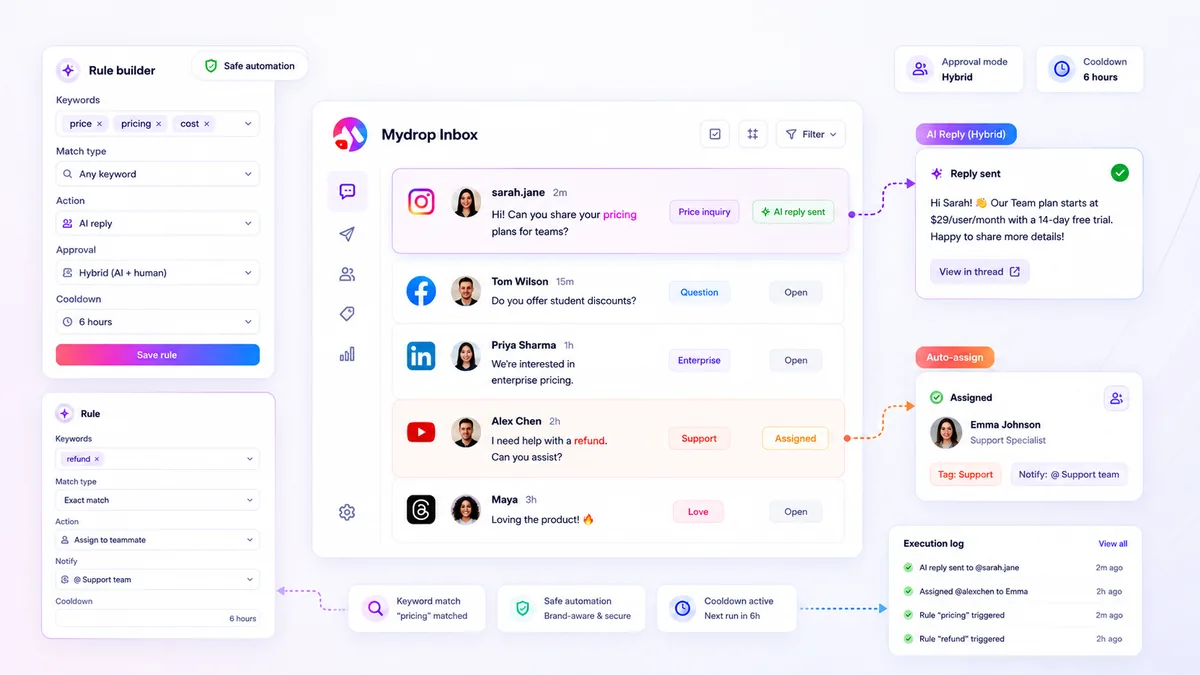
When your inbox rules stop catching relevant leads or support requests, the instinct is to blame the platform’s API or an erratic algorithm. In reality, 90 percent of missed messages are trapped by your own logic: rules that are technically active but operationally neutered by conflicting priorities or overly narrow keyword definitions.
We know the drill. You spend hours fine-tuning support automation to save your team time, only to find yourself manually triaging the very messages the rules were supposed to catch. It is the kind of coordination debt that turns a time-saving workflow into a full-time auditing chore. The good news is that this is rarely an algorithmic failure; it is usually a configuration cleanup.
What changed before the numbers moved

In our experience across hundreds of brand profiles, the most common culprit is a logic layering conflict. When you add a new, specific rule to catch a trending issue without auditing your existing, broader rules, you effectively create a digital labyrinth. The messages are there, but your own automated gatekeepers are rejecting them before they ever reach the tagging or notification stage.
Before you start rewriting your entire rule library, trace the timeline of the breakdown. Did you add a new filter after a bad AI response? Did you tighten a keyword match to avoid false positives on a high-volume campaign?
Here is where most teams get stuck:
- Rule Collision: You have a broad "General Support" rule with
contains_anykeywords, and a newer "Product X" rule that usescontains_all. If these overlap, the sequence of execution often forces the more restrictive rule to exit or, worse, cancels the action entirely if the thread is already tagged. - The Precision Trap: You switched from
contains_anytoexactmatching because you were tired of irrelevant noise. Now, simple shorthand like "Help!" or a missing space in a product name causes the rule to ignore the message entirely. - Filter Bloat: You added profile-specific exclusions to protect a sensitive account, but you accidentally locked out a high-priority tag that applies across your entire brand portfolio.
Operator rule: If a rule stops firing, check the execution logs before touching the keywords. If the log shows the rule was skipped rather than failed, you have a priority or filter conflict, not a matching problem.
The goal is to move away from "perfect" automation, which requires constant maintenance, toward "reliable" automation that flags exceptions for human review. If you find yourself constantly adding new exclusion filters to keep your bot from acting, you are not saving time-you are just shifting the burden from triaging incoming messages to auditing your own rule list.
The failure patterns to check first

When your rules are not firing, stop looking at the platform API and start looking at your filter stack. We have seen this across hundreds of brands; teams often layer so many constraints onto a single rule that they accidentally create an "impossible" condition.
Think of it like a security checkpoint. If you require the visitor to be from a specific brand AND a specific profile AND a specific thread type AND have a critical priority tag, you have created a narrow pipe. A single mismatch-a thread that comes in without a formal "support" tag, for instance-and the rule skips it entirely.
Common culprits for silent rule failures
- Logic Overlap: You have two rules monitoring the same inbox. If Rule A is a "Catch-all" and Rule B is specific, but they share keywords, Rule A might claim the message first.
- The Exact-Match Trap: You set an
exactmatch for "Help me" but the customer typed "Help me!" (with an exclamation point) or "help me" (lowercase). The rule misses because the string is not identical. - Cooldown Lockout: If you set a
cooldownHoursof 24, and a customer follows up 2 hours later, the rule will ignore the second message. It thinks it is still on break. - Filter Bloat: Using a filter for
Platform: TwitterandThreadType: Direct Messageis fine. AddingBrand: MainandPriority: Criticaloften kills the rule if your inbound traffic does not perfectly match every single metadata field.
Decision check: If a rule stops firing, cut the number of active filters in half. If it starts working again, you know exactly which filter was too restrictive.
The proof that separates signal from noise
The fastest way to stop guessing is to look at your execution logs. If you are using Mydrop, the execution history is your best friend here. It shows you the moment a rule tried to match, why it succeeded, or why it decided to skip the thread.
Without logs, you are flying blind, assuming the message "didn't arrive" when it actually arrived and failed your criteria. Use this scorecard to audit your rules once a week until you find the bottleneck.
| Rule Name | Match Logic | Filter Count | Cooldown (Hours) | Execution Status |
|---|---|---|---|---|
| Urgent Support | contains_any |
2 | 1 | Firing regularly |
| General Inquiry | exact |
5 | 24 | Silent (Failing) |
| Feedback Loop | contains_all |
3 | 0 | Intermittent |
How to interpret this scorecard:
- Rule Name: Keep it descriptive so you know what it touches.
- Match Logic: If you are using
contains_all, you are being too strict. Social users rarely use the perfect combination of words. Switch tocontains_anyto see if your capture rate improves. - Filter Count: If this number is above 3, you are likely filtering out valid traffic.
- Execution Status: If it says "Skipped: Cooldown," your window is too wide. If it says "Skipped: Filter Mismatch," your criteria are too rigid.
Most teams do not have an automation problem; they have a logic cleanup problem. Once you remove the filters that aren't actually serving your business, you will likely find that 80% of your "missing" messages return to the automated queue overnight.
What to fix this week
If you are currently drowning in manual triage, your goal for the next 48 hours is to strip your inbox rules back to the studs. You likely have layers of legacy configuration that were added during specific campaigns and never cleaned up.
Start by auditing your active rules with this 3-step cleanup workflow:
- The Broaden-First Pass: Take your three most important "high-volume" rules and switch them from
contains_alllogic tocontains_any. If you are chasing exact phrases, you are losing to users who use emojis, shorthand, or common typos. - Filter Consolidation: Look at the rules that are failing. Are they scoped to a single brand profile when they really apply to five? Strip away the granular platform and profile filters unless the rule is specifically about regional compliance.
- The Cooldown Reset: Check your cooldown windows. If you have set them to 24 or 48 hours for common support queries, you are likely silencing follow-up questions from the same user. Drop these to 1 hour or 2 hours for standard triage to ensure you do not miss genuine frustration.
At Mydrop, we see teams achieve immediate relief simply by deleting the rules that have not triggered an action in the last 30 days. If a rule is not helping you move work, it is just adding noise to your diagnostic logs.
When to stop diagnosing and change the workflow
There is a point where the complexity of your rules stops being an efficiency gain and starts becoming a governance liability. If you find yourself building a "rule for everything" to handle every edge case, you have stopped automating support and started building a complex, fragile machine that no one on the team fully understands.
If your rule set looks like a flowchart from a noir detective novel, it is time to move to a human-in-the-loop hybrid model.
Instead of trying to program the perfect AI auto-reply for every scenario, use your rules to triage and tag, then push those threads into a shared dashboard for human review. This keeps your response quality high and prevents the awkwardness of a brand-safe bot firing off an automated reply to a sensitive customer complaint.
Workflow check: If your team spends more time auditing why an automated reply fired than it would have taken to reply manually, kill the automation.
Remember, the goal of inbox rules is to handle the predictable, high-volume noise so your team can focus on the messages that actually need a human touch. When the logic becomes too heavy to maintain, it is not a tool failure. It is a sign that your team has outgrown that specific automation strategy.
Conclusion
Automating your inbox should feel like hiring a smart assistant, not managing a complex server cluster. If your rules are missing messages, do not blame the algorithm. Start by auditing your own filter stack, simplify your keyword logic, and accept that some nuance belongs in the hands of your team.
The most successful brands we work with do not have the most complex rules. They have the most consistent ones. Keep your logic simple, your cooldowns reasonable, and your human-in-the-loop workflows ready for when the conversation gets complicated. Your team will thank you for it by the end of the week.



 Google review
 Trustpilot review
 Product Hunt comment




