



Stop treating your social media tool as a final-mile delivery platform. When you store assets in a centralized generic cloud drive but manage post context in a social tool, you create a "coordination gap" that leads to version drift, broken links, and hours of wasted status-checking. The fix is to migrate your final, platform-ready assets directly into your social workspace, letting your collaboration and publishing happen in the same environment.
We know the drill: you have a perfectly polished graphic in your team drive, but then a last-minute caption tweak happens in a spreadsheet, and suddenly no one is sure if they are posting the v2 or the v3. It is a relentless, low-grade grind of "did you get the latest file?" that turns creative teams into glorified file clerks. At Mydrop, we see this across hundreds of brand profiles: the technical ability to upload a file isn't the problem-the problem is the hidden tax of moving it from a storage bin to a publishing dashboard.
The decision teams usually frame too broadly

Most managers try to solve this by forcing everyone to adopt a single, "perfect" folder structure in their cloud drive. They spend weeks building complex subfolder architectures hoping that better organization will somehow fix the handoff. But the truth is, the storage isn't the problem-the distance is.
Every time you require a team member to fetch, verify, and re-upload an asset from a central repository to a publishing tool, you aren't being "organized." You are injecting an extra point of failure into your production line.
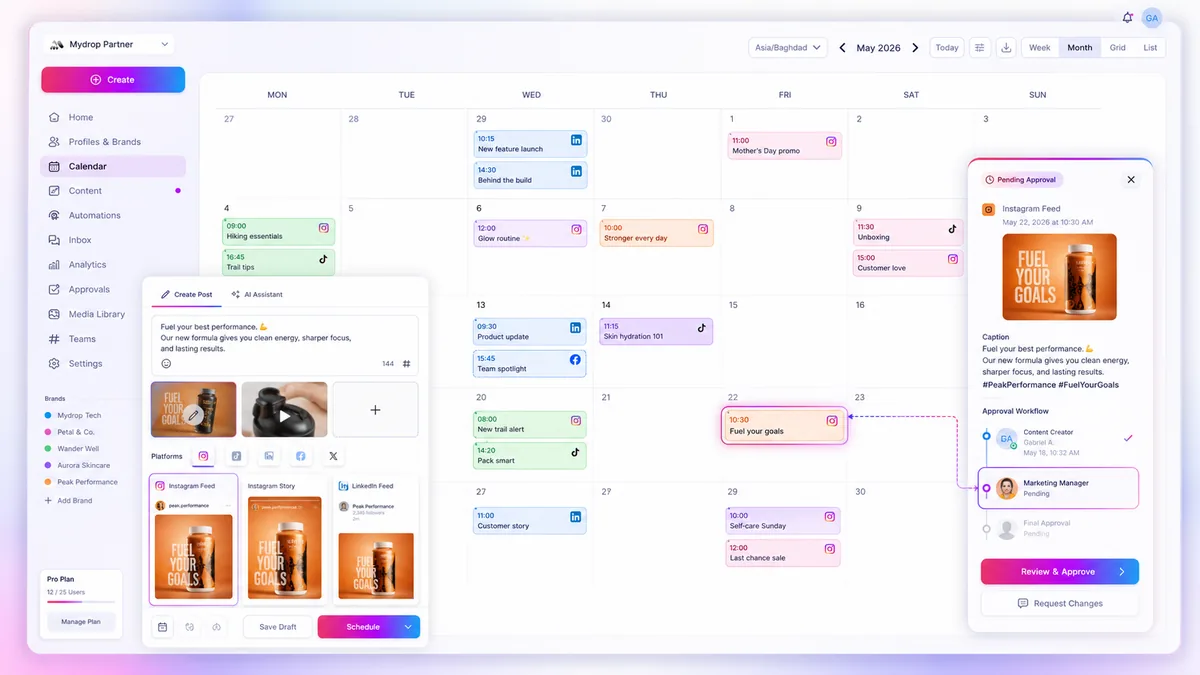
Operator rule: A central cloud drive is for archiving; your social workspace is for staging. If it is not ready to be posted, it stays in the archive. Once it is a final, platform-ready file, it moves into the workspace to live alongside the caption, the preview, and the team feedback.
This simple distinction clears the desk. When we look at teams that manage thousands of posts across global markets, the ones that thrive are those that collapse the distance between their creative assets and their publishing calendar. They treat their social workspace as a collaborative staging ground where the conversation about the post happens right next to the file itself, rather than in an endless, disconnected email thread.
Moving assets into the workspace allows you to anchor your creative feedback to the specific version being posted. No more guessing if the "Final_Final_V2" file is the one in the post or the one sitting in your download folder. By pulling the asset into the workspace, you provide a single source of truth for the social team, keeping the "why" and the "what" glued together.
What should stay manual and what can move faster

Most teams get into trouble by treating their primary publishing tool like a high-security document vault. They treat every asset-from raw, multi-gigabyte project files to the final, exported 1080x1080 graphic-as something that must "live" in a central drive to remain safe.
In practice, this creates a synchronization tax. Every time a designer updates a thumbnail or a copywriter tweaks a caption, the "source of truth" in your drive sits stale while the team bickers in a separate chat thread about which version to use.
We have seen this across hundreds of brand profiles. The assets that should stay in your long-term storage are your source files: raw footage, layered PSDs, project templates, and original brand assets. These are the "building blocks." They don't need to be in your publishing calendar because they aren't ready to go live.
The assets that should move to your workspace are your deliverables: final exports, specific platform crops, and finalized thumbnails. When you treat your social workspace as the staging area for these finished assets, you collapse the distance between decision and publication.
Decision check: If an asset requires a secondary approval or a platform-specific crop, it belongs in the draft post, not just the shared folder.
The tradeoff matrix
To decide where an asset belongs, ask yourself: Is this a building block or a finished product? If it is a finished product, keeping it in a separate drive just adds friction to your workflow.
| Asset Type | Storage Location | Logic |
|---|---|---|
| Raw Footage/PSD | Central Drive | Keeps core project files organized and safe from accidental deletion. |
| Brand Guidelines | Central Drive | Static reference; rarely changes during a specific campaign cycle. |
| Final Export | Mydrop Workspace | Allows immediate collaboration and scheduling without re-uploading. |
| Platform-specific Crop | Mydrop Workspace | Direct association with the post context reduces version drift. |
| Final Copy/Caption | Mydrop Workspace | Should stay locked to the asset, not in a disconnected doc. |
How to audit your "Coordination Debt"
If you want to see how much time your team is leaking, run a simple check on your next ten posts.
- Count the handoffs: How many times does a human need to "fetch" a file from a central folder and move it into the posting tool?
- Verify the truth: How many times did someone ask, "Is this the latest version?" before hitting publish?
- Track the "context switch": How long does it take for a team member to open the drive, find the folder, download the file, and then switch back to the dashboard?
In our experience, most teams don't have a content production problem; they have a decision bottleneck. Every minute spent "managing files" is a minute stolen from actual strategy. By migrating your final staging into a collaborative workspace, you don't just save time-you remove the ambiguity that leads to half of your social media errors.
How to pilot the workflow safely
You do not need to flip a giant "ON" switch and move your entire legacy archive into a new system overnight. That is a recipe for a massive, unmanaged headache. Instead, start with a single campaign or a specific brand pod to test the friction reduction.
Select one team-ideally the one currently complaining the most about version control-and migrate only their active, near-term assets into the Mydrop workspace. If you try to dump three years of historical assets into the flow, you will just be recreating your file-drive clutter inside a new interface.
Follow this simple cadence to ensure the shift sticks:
- The Sandbox Sprint: Spend one week managing post assets exclusively within your social workspace for one active brand.
- The Feedback Loop: Ask your designers, "Did you find yourself going back to the shared drive?" If the answer is yes, find out why. Usually, it is because they need a raw file version you should not be moving anyway.
- The Governance Check: Before rolling this out to the wider enterprise, identify who is allowed to edit or delete assets inside the workspace. You want enough freedom to collaborate, but you do not want a junior account manager accidentally deleting a campaign-critical video.
Workflow check: If an asset requires a Photoshop file to be "complete," it stays in the central repository. If an asset is ready to be viewed by an audience, it belongs in your publishing workspace.
The operating rule to keep
To keep your new workspace from turning back into the "digital landfill" you just escaped, you need a strict lifecycle policy for your staging area.
Most teams treat their publishing workspace like a permanent archive because they fear losing data. This is a mistake. Think of your workspace as a high-velocity staging zone, not a library. Once a post is published, the asset has served its purpose in the staging environment.
We recommend a clean-out cadence: every quarter, archive or purge the assets in your workspace that are attached to posts older than 90 days. If someone needs to find a legacy graphic, they can go back to the source-of-truth drive. Keeping the workspace lean ensures that when your team logs in, they only see the assets that matter for the work at hand.
Conclusion
The goal of centralizing assets isn't to build a better folder structure; it is to stop your team from acting like internal couriers. When you strip away the high-latency friction of moving files between a drive and a publishing tool, you stop "coordination debt" in its tracks.
You will find that your team spends less time pinging each other on Slack asking "which file is the right one?" and more time focusing on what actually moves the needle: the quality of the content and the performance of the posts.
Make the switch, prune the excess, and stop the file-version madness for good. Your team’s sanity is worth the migration effort.

 Google review
 Trustpilot review
 Product Hunt comment




