


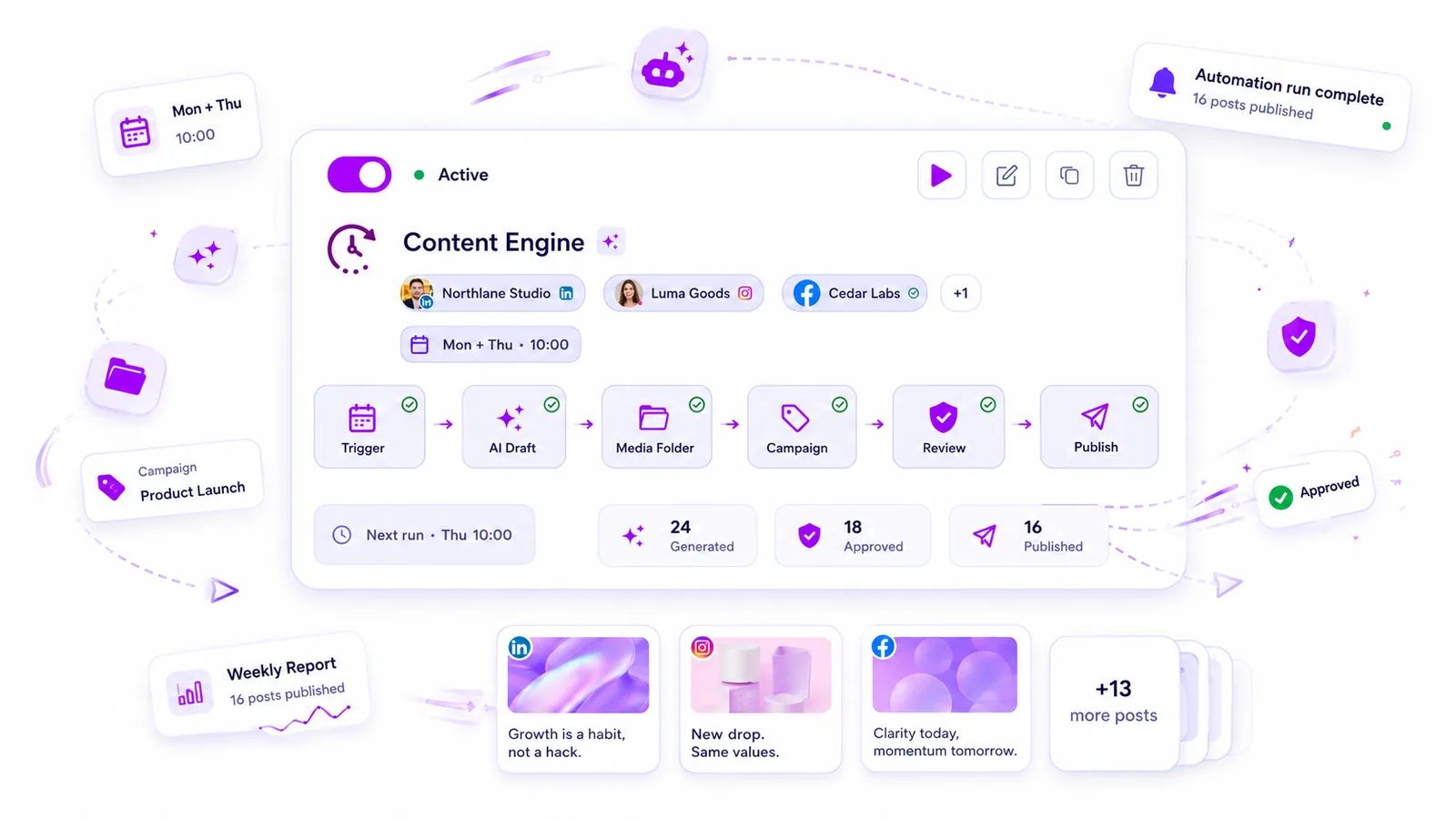
The secret to a scalable social media operation isn’t choosing between AI and humans-it is assigning them the right work based on the Creative Risk of the specific post. You should only automate content that is high-frequency and low-risk, while everything else must hit a hard human-in-the-loop approval gate.
We get it. You are drowning in coordination debt, trying to keep up with daily publishing demands while feeling like your brand's voice is slipping into the abyss of generic, low-effort content. It is exhausting to manually build every post, but terrifying to hit full-auto on your primary marketing channel. You are not alone in this; most teams we talk to are caught in the exact same trap, juggling dozens of stakeholders and brand profiles while feeling like they are one bad post away from a crisis.
The good news is that you don't have to choose between a ghost town feed and an accidental disaster. By applying a clear filter to your workflow, you can reclaim your time without handing over the keys to your brand.
The operating problem this solves

Most teams do not have a content problem. They have a decision bottleneck.
When you scale, you inevitably hit a wall where the sheer volume of assets, platform requirements, and stakeholder reviews outpaces your team’s capacity. You end up spending four hours chasing sign-off on a post that takes two minutes to read, or worse, you bypass the process entirely because the deadline is looming. This is the hidden cost of manual operations: coordination debt.
This debt manifests in three predictable ways:
- Review fatigue: Your legal or brand leads get buried in pings for minor, repetitive content.
- Context switching: Your team spends more time copy-pasting into spreadsheets than actually shaping the strategy.
- Inconsistent governance: Because processes are manual, they are brittle. Someone forgets to check a compliance box, or a typo slips through because the last person in the chain was rushing at 6 p.m.
The goal isn't just "more content." It is building a reliable system that handles the heavy lifting of production so your team can focus their energy where it actually moves the needle. A simple rule helps here: If the cost of a mistake is low, let the system handle it. If the cost of a mistake is high, make it impossible to publish without a human click.
At Mydrop, we see teams use this exact logic to separate their "always-on" background content-like recurring community shoutouts or tip series-from their high-impact campaign launches. Once you separate the two, you stop treating every single post like a high-stakes emergency and start running a professional, predictable media cycle.
The minimum system that works

The most reliable way to avoid chaos is to design a system that assumes everything will break eventually. Your goal isn't to build a perfectly frictionless flow, but to install a series of essential safety rails that catch your team before a mistake reaches the public feed.
In our experience across hundreds of brand profiles, the teams that move the fastest are the ones that enforce a Post State hierarchy. Every piece of content, whether generated by a human or an automated source, should carry a clear status flag: Draft, Review, Waiting, or Publish.
When you configure your orchestration tools, treat the approval gate as non-negotiable for any content that touches your primary brand channels. You can let an engine generate a month's worth of recurring social updates, but if those posts go straight to "Publish," you are essentially outsourcing your brand's reputation to an algorithm you haven't checked.
Here is a practical way to categorize your content to avoid bottlenecks:
| Content Category | Automation Strategy | Approval Requirement |
|---|---|---|
| Routine Community Updates | Full Auto (Schedule-triggered) | Periodic audit (weekly) |
| Standard Campaign Assets | Manual Template (Form-mapped) | Mandatory human review |
| High-Impact Brand Launches | Manual Crafting | Multi-stakeholder sign-off |
| Trend-Responsive Content | AI-Drafted | Tight, rapid-response review |
For routine tasks like sharing community shoutouts or recurring tip series, the best approach is to configure a time-based trigger that drops posts directly into a "Waiting" state. This gives your team a clear, unified view to perform a quick "thumbs up" before the content actually goes live. You save the time of manual creation without losing the ability to hit the brakes if something looks off.
Where teams overbuild the process
The biggest mistake we see is teams trying to automate the creativity out of the process. They treat their tools like a factory line, chaining together complex prompts, AI media generation, and automated posting, expecting the end result to be high-quality social content.
The result is almost always a flood of bland, indistinguishable posts that fail to connect with any audience.
Common mistake: Using an automation trigger to generate 30 days of "thought leadership" content from a single broad prompt.
When you overbuild your pipeline, you create a new kind of coordination debt: the need to constantly fix, edit, or delete the low-quality output your system is churning out. If you find your team spending more time deleting automated posts than they would have spent writing them from scratch, you have hit the ceiling of useful automation.
A simple rule helps: If it takes longer to edit the automated output than it would to create the post manually, do not automate it.
Focus your efforts on the high-frequency, low-risk logistics of your operation. Use automated triggers to handle the scheduling and file-mapping of standard assets, but reserve the "creative blank page" for humans. Tools should carry the heavy lifting of distribution and metadata, not the heavy lifting of brand identity.
Once you have your core logic set, you will find that the best workflow is the one that stays quiet until it needs a human. You want a system that works in the background, reliably turning your structured inputs into prepared posts, and then steps back to let you make the final, nuanced decision.
How to run the cadence
Once you have your safety rails in place, the actual rhythm of your week changes. Instead of chasing down links and assets, you manage the exceptions. Think of your week as a series of pulses rather than a constant grind of manual uploads.
For teams running a mix of high-frequency and bespoke content, we recommend this weekly operating pattern:
- Monday (The Sync): Review the automated output generated over the weekend. Because you have configured these to land in a
reviewordraftstate within Mydrop, you are only inspecting the ones that need a human eye. - Tuesday (The Pulse): Check your automated triggers. Are they pulling the right assets from your folder slots? If you see a dip in performance, adjust the source folder rather than editing the individual post.
- Wednesday (The Deep Work): This is for the "Manual Only" bucket. Since the repetitive tasks are off your plate, you can spend this time on high-stakes campaigns or nuanced response strategies.
- Thursday (The Audit): Check your feedback loops. Look at the engagement data from the previous week's automated posts. If a specific "Full Auto" series is falling flat, kill the automation immediately.
Operator rule: Never let an automated process run for more than two weeks without a mandatory manual audit. Even if the content looks fine, the audience context shifts faster than any trigger can track.
The proof that the habit is working
How do you know if this shift is actually working? Most teams obsess over reach or engagement, but those are lagging indicators. The real proof of a healthy workflow is in your Efficiency Ratio, which measures how much of your team's time is spent on creative strategy versus pure coordination.
| Indicator | Early Warning Sign (Needs Fix) | Healthy State (Scaling) |
|---|---|---|
| Approval Time | Over 24 hours per post | Under 4 hours or pre-approved |
| Asset Sourcing | Manual file transfers | Automated folder-slot pulling |
| Crisis Response | Everyone is in the draft tools | Dedicated "Manual Only" channel |
| Creative Variance | Generic, repetitive post structures | High-impact, human-led creative |
If your team is still spending more than 30% of their day manually copying captions or chasing down final sign-offs, your system is failing you. The goal is to move that coordination burden into an automated background process so your team can focus on the nuance that only a human can provide.
Conclusion
The tension between scale and quality is not going away. If you try to do everything manually, you will eventually burn out or publish bland, uninspired content. If you try to automate everything, you will lose the soul of your brand.
The middle ground is a deliberate, filtered approach. Use automation to clear your desk of the repetitive, low-risk work that consumes your capacity, but keep a hard firewall around the content that defines your brand’s voice. When you treat your publishing flow as a system of prioritized filters rather than a single bucket for all tasks, you stop managing chaos and start managing your brand’s growth.
Start small. Find one recurring series you run every week, set up the trigger, and see how much time it gives back to your team. Once you see that time return, you will quickly realize where the rest of your operation should go.
 Google review
 Trustpilot review
 Product Hunt comment




