

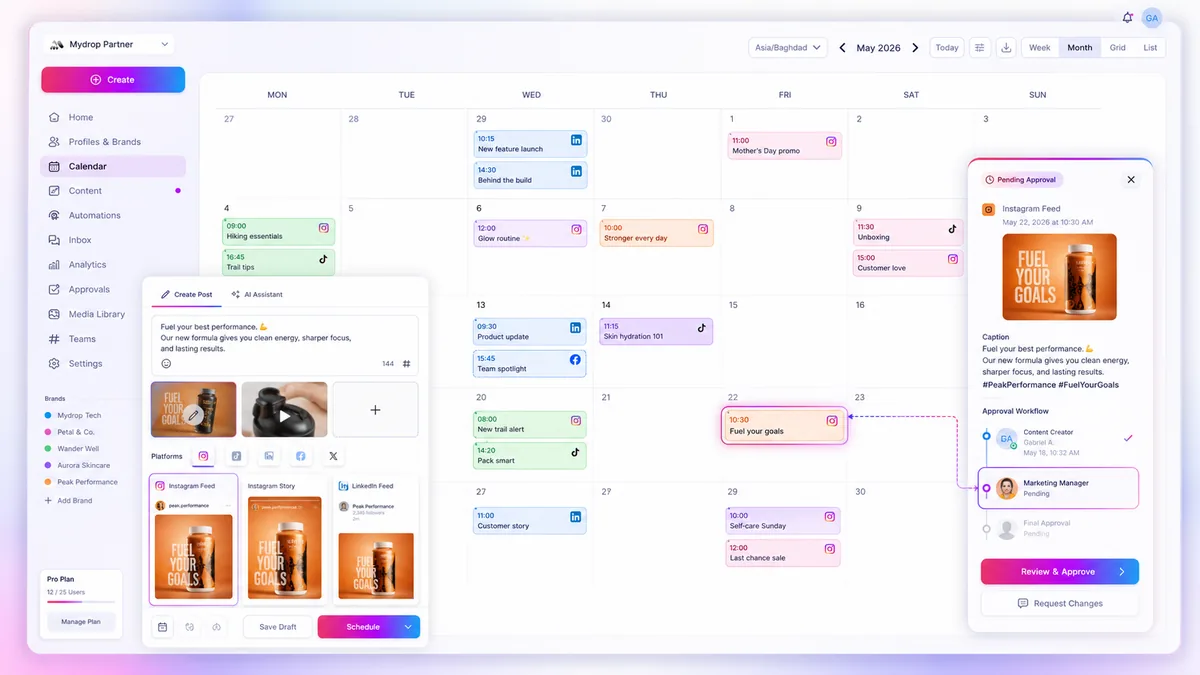
If your social calendar is a walled garden that only your social team can see, don't be surprised when stakeholders, designers, and approvers miss their marks. Content doesn't fail because of a lack of effort; it fails because the schedule is invisible to the people responsible for fueling it.
We get it. You spend hours meticulously planning a content calendar, only to watch it crumble because someone didn't see a deadline. The constant pestering, manual reminders, and "is this approved yet?" Slack threads are enough to burn out any operator. The fix isn't to work harder at communicating; the fix is to stop relying on communication entirely and start relying on visibility.
When social content deadlines slip, the problem is rarely lazy creative teams. It is almost always a case of coordination debt, where the social calendar lives in a vacuum, detached from the broader team's operational workflow. You are managing a schedule, but your team is managing a chaotic stream of disconnected notifications and fragmented status updates.
What changed before the numbers moved

The shift from on-track performance to constant firefighting usually starts when the team grows beyond a single spreadsheet. In the beginning, everyone knows what is due because everyone is sitting in the same loop. But once you scale to managing dozens of profiles across multiple regions, that shared context evaporates.
The process typically breaks down in three predictable phases:
- The Information Silo: The social team moves to a professional tool, effectively pulling the schedule out of the company-wide view.
- The Notification Fatigue: To keep people updated, you start manually pinging them. The volume of pings increases until stakeholders develop "notification blindness."
- The Invisible Deadline: The schedule becomes an abstraction that only exists inside your social tool. If a designer or legal reviewer isn't in that tool every day, they have zero visibility into upcoming pressure points.
This is the hidden trap of modern social operations. You’ve professionalized your scheduling, but in doing so, you’ve accidentally made your deadlines invisible.
Operator rule: If a stakeholder has to log into a separate platform to see their own deadline, you have already lost.
A reliable schedule needs to be calendar-native. It needs to show up exactly where your team lives: in their daily planner. By moving content events out of the walled garden and into shared environments-using tools like Google Calendar Sync to bridge the gap-you stop being a project manager and start being a coordinator. Suddenly, the deadline isn't a reminder you sent; it is an event on their calendar they can't ignore.
The failure patterns to check first

When the schedule slips, we often blame "creative block" or "low prioritization." In reality, we usually find a classic visibility gap. If your team isn't seeing the content deadline in their day-to-day workflow, they aren't ignoring you; they simply haven't accounted for your work in their own.
Check your current process against these three common failure points:
- The "Shadow" Calendar: Your social team tracks posts in a dedicated tool, while the rest of the business lives in their own calendars. If the two worlds never touch, the social calendar is essentially invisible to the people who need to support it.
- Manual Friction: If you are still relying on Slack pings, email threads, or status spreadsheets to remind colleagues of deadlines, you are fighting a losing battle. Manual coordination adds high cognitive load and is the first thing to drop when someone gets busy.
- Fragmented Accountability: When there is no single source of truth that forces the schedule into daily work logs, the concept of a "deadline" becomes negotiable. If it doesn't appear as a time-blocked event, it feels like an optional task.
Most teams assume the issue is a lack of alignment. Often, it is just a lack of calendar-native visibility. If a stakeholder cannot glance at their own schedule and see the social deadline, you are effectively asking them to do extra work just to remember when to work for you.
The proof that separates signal from noise
To diagnose if your team is truly misaligned or just suffering from poor visibility, run this Visibility Scorecard across your next campaign cycle.
| Diagnostic Marker | Low Visibility (High Risk) | High Visibility (Low Risk) |
|---|---|---|
| Deadline Mapping | Trapped in social tool/spreadsheet. | Syncs to personal work calendar. |
| Notification Method | Manual ping (Slack/Email). | Automatic calendar reminder. |
| Status Updates | "Did you do this?" (Check-in). | Event status "Done" (Auto-sync). |
| Stakeholder Effort | High (Requires active searching). | Low (Passive viewing). |
If you score mostly on the left, your operational debt is mounting. You are essentially paying for a social platform that acts as a silo rather than a bridge.
At Mydrop, we see teams solve this by moving away from "managing" content in a vacuum and toward calendar-native operations. By using Google Calendar Sync, you turn static planning objects into live, actionable events. When a designer, legal reviewer, or brand manager can see the exact post deadline alongside their other meetings, the "where is the asset" thread disappears.
Decision check: If a task does not exist in the primary calendar app of the responsible person, it does not exist for the team.
The goal here isn't just to "get things done." It is to make the workflow so seamless that missing a deadline becomes the exception, not the recurring baseline of your social operations. Stop asking people to check your tool; start pushing your requirements into the tools they already use every hour of the day.
What to fix this week
If you are currently drowning in status update pings, stop trying to fix the communication and start fixing the environment. Your goal is to move the content schedule out of your proprietary social tool and directly into the daily habits of your team. When people don't have to navigate to a specific software dashboard to see what is due, they stop "forgetting" their deadlines.
Start by auditing who actually needs to see what, and where they live digitally. Then, bridge the gap.
The 3-Step Visibility Reset
- Map the Dependencies: Identify the three roles that cause the most bottlenecks (usually designers, legal/compliance, or brand managers).
- Authorize the Bridge: Use a tool like Mydrop to connect your social calendar to your team’s primary calendar service, such as Google Calendar. This isn't just about sharing a link; it's about making the content timeline a shared operational reality.
- Audit the Sync Settings: Choose a sync mode that fits your reality-either
all_postsfor full transparency across the board orselected_profilesif you need to keep specific brand-market channels quiet.
By setting up a direct calendar integration, you transform your static content plan into a living, breathing schedule that shows up alongside their meetings and deep-work blocks. It forces the deadline into their peripheral vision, which is the only place it actually stays top of mind.
Workflow check: If a stakeholder has to click three times to find a deadline, the deadline does not exist.
When to stop diagnosing and change the workflow
There is a point where "figure out why they missed it" becomes a waste of management energy. If you have provided the tools, clarified the expectations, and built a clear, calendar-native visibility layer, and deadlines still slip, stop diagnosing the people. You are now looking at a structural failure.
At this point, you have two choices:
- The Hard Guardrail: If a task isn't marked as "done" or "ready for review" in your central system by a specific time, the content doesn't get scheduled. No exceptions, no heroics. You lose a post, but you gain back the sanity of the entire team.
- The Hardened Process: Shift from "asking" to "syncing." By leveraging calendar-native operations, you ensure that even recurring operational tasks-like checking a monthly report or running a compliance audit-pop up as events on team calendars. When the "occurrence done" state is tracked directly against their calendar event, the friction of manual reporting disappears.
Stop chasing the "why" and start building the "how." When your tools do the heavy lifting of surfacing tasks, you can get back to being a strategist rather than a glorified project secretary.
Conclusion
The difference between a frantic social team and a high-performing one isn't better coffee or longer hours. It is coordination. When you stop treating your content calendar as a private bunker and start making it visible in the tools your stakeholders already use, the chaos starts to recede. Your team wants to hit the mark; your job is simply to make sure they can see it. Stop pestering, start integrating, and let the calendar do the work you were never meant to handle manually.


 Google review
 Trustpilot review




