


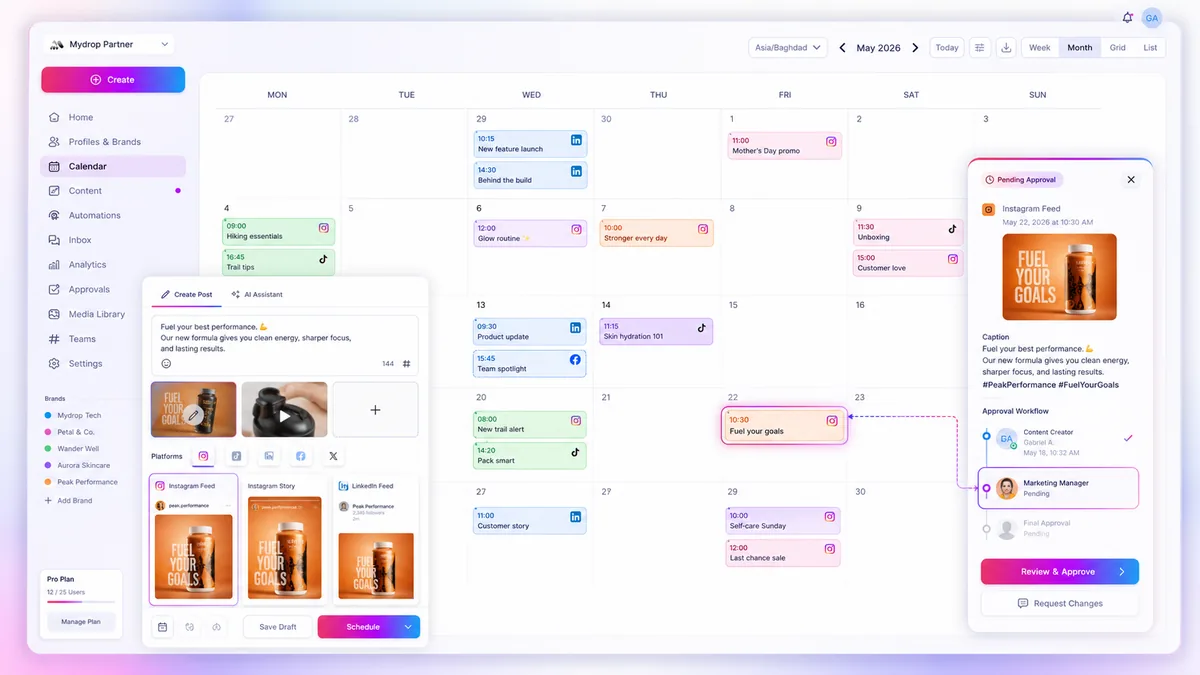
When your social media reminders go silent, the culprit is rarely the software; it is almost always a friction point between how you set your recurrence rules and how your chosen calendar interprets them. You do not have a technical glitch-you have a sync-mismatch between your internal planning rhythm and the external calendar requirements.
We get it. You have built a complex content machine, and there is nothing more frustrating than arriving at a deadline only to realize your automated reminders vanished into the digital ether. This work is messy, and when the operational layer breaks, it feels like your entire strategy is grinding to a halt. The good news is that these gaps are usually predictable, stemming from simple misalignments in how your team manages recurring tasks.
The decision teams usually frame too broadly

Most operators try to solve missing tasks by throwing more oversight at their team, but this is a classic misdiagnosis. The real issue is almost never human error; it is a mechanical failure in the bridge between your planning software and the calendar service.
When you scale to dozens of channels and hundreds of assets, you cannot manually track every single reminder instance. You need a setup that treats every task as a persistent object linked to your campaign. If the reminder is not tethered to a concrete asset-like a post, a profile, or a specific piece of media-it is effectively floating in space, waiting to be dropped by the next sync cycle.
At Mydrop, we see this across high-volume teams constantly: the moment you move from "ad-hoc notes" to a structured task layer, you expose the small gaps in your settings that cause these downstream failures.
To audit your current setup, look at whether you are managing tasks as one-off notes or as recurring operations. If your reminders aren't surfacing, your configuration is likely fighting your calendar's logic.
| Symptom | Primary Audit Point | Why it fails |
|---|---|---|
| Silent Reminders | Google Calendar Link | The connection service requires re-authentication after a password change. |
| Disappearing Instances | Recurrence End-Date | You set a frequency, but the logic defaulted to a single occurrence. |
| Ghost Notifications | Override State | You marked an instance as done, which effectively "deletes" that specific recurrence from the active view. |
| Timing Errors | Timezone Drift | Your workspace is in EST, but the calendar interprets the task in UTC, shifting the trigger by hours. |
A simple rule helps here: If it isn't linked to a concrete campaign object, it is not an operational task. When you lock your planning tasks to actual posts and media IDs, you stop managing "reminders" and start managing an automated delivery schedule. That shift moves your team away from manual spreadsheet checking and toward a predictable, repeatable cadence.
What should stay manual and what can move faster

Automation is not a magic wand for your content calendar. If you try to automate everything, you end up with a calendar full of notifications that no one trusts, leading your team to ignore the very tools meant to keep them on track. The trick is identifying which tasks provide genuine strategic value through human touch versus those that are simply mechanical hurdles.
In our experience, high-stakes creative decisions-like deciding if a brand-new campaign message actually hits the right note-should always remain manual. You cannot "automate" the intuition required to tell if a video tone is off-brand. Conversely, repetitive planning hygiene-like ensuring a social media manager knows the weekly cadence for community engagement or standard report submissions-is exactly where software should take over.
If you are currently spending your Monday morning manually pinging team members to ask if they finished their audit, you are throwing away focus. That is a candidate for a recurring task. If you are debating the strategic merit of a post, stay in the meeting and keep the digital tools out of it.
The tradeoff matrix
Use this matrix to audit your current planning load. If a task feels like an invisible weight slowing you down, see if it lands in the Automate or Simplify zone.
| Task Characteristic | Automation Potential | Recommended Action |
|---|---|---|
| High creative nuance | Very Low | Keep Manual / Use Collaborative Review |
| Fixed cadence (Weekly/Monthly) | Very High | Automate with Recurring Reminders |
| Single-use deadline | Low | Schedule as one-off event |
| Requires external sync | High | Use Calendar-integrated Task Layers |
| Stakeholder approval | Moderate | Partial Automation (Trigger-based Pings) |
Operator rule: A recurring task is only as good as its link to an active goal. If a reminder fires every Friday but is not attached to a specific campaign object, post, or media asset, your team will eventually stop reading it.
When you link a reminder to a concrete asset-like a specific brand campaign or a pending media file-the reminder stops being an abstract calendar event and becomes a shortcut to the work. We see the most effective teams treat their reminders as a bridge, not a chore.
When you configure your operational layer to tie a reminder directly to a specific post or profile, you remove the guesswork. You are no longer asking "Did I finish that task?" but rather "Is the asset linked to this reminder ready for the next approval stage?". This shift moves your team from reactive maintenance to proactive campaign management, ensuring that even if your capacity fluctuates, your operational rhythm stays rock solid.
How to pilot the workflow safely
You should not move your entire team to a new reminder system on a Monday morning. Instead, pick one recurring planning task-something like your weekly internal brand check or your monthly platform-specific asset review-and run it through the new rhythm for 30 days.
This is where you move from "hope-based" operations to a repeatable, reliable cadence. By isolating one recurring task, you can see exactly where the synchronization between your workspace and your external calendar hits a snag without risking your entire publishing pipeline.
The 30-Day Pilot Checklist
If you want to ensure your tasks trigger reliably every time, run this test:
- Attach the object: Ensure the reminder is linked to at least one concrete campaign post or profile. If the reminder is "floating" without a linked asset, it lacks the context that keeps teams oriented.
- Standardize the timezone: Lock your workspace timezone to your primary market. Drift is the silent killer of automated reminders.
- Verify the sync: After creating the reminder in Mydrop, check your connected Google Calendar. If the event does not appear, disconnect and reconnect the service link before adding more tasks.
- Mark, don’t delete: When the task is done, mark the occurrence as complete. Do not delete the instance, or you may break the chain for the next cycle.
- Review the log: At the end of four weeks, look at the history. If you missed a single notification, check if the "done" state was accidentally toggled on the root reminder rather than the specific instance.
The operating rule to keep
Teams often think they need more software. In reality, they usually just need a stricter definition of what constitutes an actual task.
Decision check: If a reminder is not linked to a concrete campaign object-like a specific asset, post draft, or profile-it is not an operational task; it is just noise.
By binding every reminder to a specific piece of work, you eliminate the ambiguity that causes team members to ignore notifications. When a reminder lands on someone’s phone, they should know exactly which brand, which platform, and which asset is currently waiting for their eyes. If they have to hunt through a file system to find the work, the notification has failed its primary purpose.
Conclusion
Operational reliability is not about finding the perfect tool; it is about building a system where missing a deadline becomes a visible anomaly rather than a standard Tuesday. When you standardize your recurrence rules and lock your planning to actual campaign assets, you stop chasing phantom bugs and start focusing on the work that actually moves the needle.
We have seen teams move from constant status-check meetings to high-velocity output simply by cleaning up their task triggers. Start by auditing those recurring reminders this week. You might be surprised to find that your content machine is not broken; it just needs a more disciplined link between its planning layer and the calendar you live in every day.

 Google review
 Trustpilot review
 Product Hunt comment




