


You fix handoff delays by moving your approval process away from static image files and into a live, platform-native preview environment before your designers ever hit save. When you shift the sign-off to the point of publication, you eliminate the frantic last-minute resizing and "where is the source file" email threads that typically eat up hours of your team's week.
We have all been there: your creative team sends over a beautiful campaign set, but by the time it reaches the social queue, three days have vanished into a black hole of cropping, re-versioning, and manual platform adjustments. It is the kind of invisible friction that makes even the most capable teams feel like they are constantly stuck in second gear. You are not alone in this; it is the standard tax paid by high-output marketing teams who have outgrown their original, simpler processes.
Where the handoff is actually breaking

The tension usually starts because of a fundamental disconnect between two milestones: Design-Done and Social-Ready. Designers often treat "Design-Done" as a final, high-resolution static asset. But for a social team, that file is just a starting point. It still needs to be chopped into platform-specific dimensions, optimized for platform-specific resolutions, and paired with the right technical metadata to perform well.
When these two groups operate on different definitions of "finished," you get a messy handoff. Here is a quick audit of the common fracture points we see across teams managing dozens of brands:
| Fracture Point | What actually happens | Result |
|---|---|---|
| Asset Origin | Designer creates one 16:9 master file. | Social team waits for 9:16 and 4:5 crops. |
| Approval Stage | Stakeholders review a static flat JPEG. | Last-minute request: "Can we change this crop?" |
| Technical Check | Metadata is handled as an afterthought. | Links break or aspect ratios display poorly. |
| File Management | Files live in shared drives or email chains. | Version control chaos; "Final_v3_REAL.jpg" happens. |
Common mistake: Treating creative approval and technical validation as two separate, sequential processes.
When approval happens on a static image rather than a functional preview, you are essentially asking your stakeholders to guess how the content will actually behave in the feed. This leads to the "let's just try one more version" loop. A simple rule helps: if your approver cannot see how the post looks with its specific caption, thumbnail, and link preview in the actual composer, you are not approving a post-you are just approving a picture.
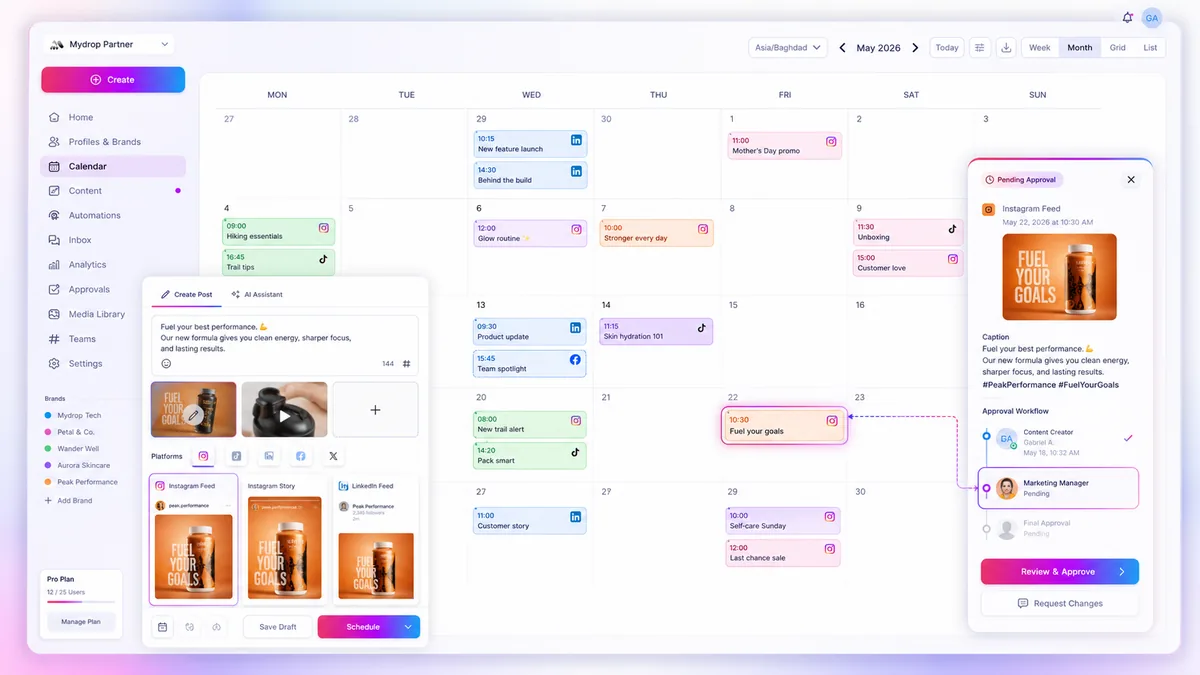
At Mydrop, we see teams stop this back-and-forth by creating templates that lock in aspect ratios and platform requirements before the design phase even starts. When you bring your creative team into the same space where the actual publishing happens, the technical validation is baked into the design process. You stop chasing assets, and you start shipping.
The coordination debt checklist

When your design assets sit in a shared drive waiting for "social-ready" status, you are paying a hidden tax on every post. Most teams don't realize they are losing hours every week until they map the micro-steps between the final design file and the actual publish button. We see this across hundreds of brands: the creative is perfect, but the labor to make it work on LinkedIn versus TikTok is essentially manual data entry.
To fix this, start by auditing how much time your team spends on these specific tasks. If you are doing these by hand, you are bleeding efficiency.
| Task | Typical Manual Time | The "Hidden" Cost |
|---|---|---|
| Asset Resizing | 10-15 mins / post | Multiple crops for IG, LI, X |
| Filename Cleanup | 2-5 mins / post | Replacing "final_v3" with SEO-friendly keys |
| Copy/Paste Sync | 5 mins / post | Hunting for the current caption draft |
| Format Validation | 10 mins / post | Verifying aspect ratios, file types |
| Total per post | 27-35 mins | ~5 hours/week for 10 posts |
Operator rule: If your team spends more than five minutes "preparing" an asset after the design lead has approved it, you have a process flaw. The design should be final at the moment of creation, not at the moment of posting.
How to move decisions closer to the work
The most effective way to eliminate these delays is to kill the "handoff" altogether. Stop treating design and social as two separate sequences. Instead, force the design and social teams to collaborate inside a live preview environment. When designers work from templates that mirror the constraints of the final post-like specific dimensions, safe zones, and character counts-you solve the format mismatch before the creative work even reaches the approval stage.
At Mydrop, we see teams stop the back-and-forth by creating standardized templates that lock in aspect ratios and layout requirements for every platform. By shifting the sign-off to the point where the creative is placed directly into the composer, the social team can validate the technical requirements-like first-comment placement or thumbnail selection-while the designer is still active.
This approach changes the conversation. Instead of an email thread asking for a new crop or a missing link, the creative is already sitting in a platform-native view. You aren't just signing off on a pretty image; you are signing off on a functional unit of content that is ready to ship.
When you make these decisions part of the creative phase, the social team becomes a partner in the build rather than a recipient of a file dump. A simple rule helps: No designer hits "complete" until the content is placed into a live, platform-ready template. It turns a fragmented, multi-step chore into a single, high-speed motion.
When your creative team can see the final post preview-complete with captions, links, and hashtags-they naturally self-correct for platform quirks. They see when a 9:16 crop cuts off a logo or when a headline competes with a UI element. This is the difference between a team that is constantly reacting to feedback and a team that is proactively shipping ready-to-go campaigns.
The roles and rules that reduce rework
The handoff usually falls apart because designers and social managers are looking at different things. The designer is evaluating aesthetics, while the social manager is checking for platform compliance-like whether the text is safe from the interface overlay on an Instagram Reel.
You fix this by establishing a shared preview requirement. Simply put: no file is "done" until it is rendered in a live, platform-native view.
Decision check: If you cannot interact with the asset inside a post preview, it is not an asset yet; it is just a high-resolution sketch.
When we see teams scale to hundreds of posts across dozens of markets, we notice that those who thrive have moved the designer into the post composer itself. Instead of sending a folder of JPEGs and waiting for the social team to do the heavy lifting, the designer uploads the final render directly into a Mydrop template. This allows the social manager to see exactly how the visual sits alongside the actual caption, the call-to-action button, and the link-in-bio placement.
This shift changes the conversation from "Does this look good?" to "Is this ready to publish?" It eliminates the need for the social team to guess if the branding is accurate or if the crop is optimized. They verify, they click, and they move on.
The weekly habit that keeps the system honest
You can install the best software and define the clearest rules, but without a recurring feedback loop, your process will naturally drift back toward manual, messy habits. We recommend a 15-minute Friday sync to audit the "time-to-ready" metrics for the week.
Use this simple scorecard to bring objectivity to your review:
| Audit Item | Scoring (1-5) | Goal |
|---|---|---|
| Asset Naming | 1 (Chaos) - 5 (Perfect) | Consistent scheme |
| Format Match | 1 (Manual edits) - 5 (Ready) | Zero crop required |
| Template Usage | 1 (Brand-new) - 5 (Standard) | 100% template-based |
| Preview Accuracy | 1 (Missing) - 5 (Live view) | Every asset validated |
During this sync, do not look for people to blame. Look for the specific asset that required the most manual re-versioning. If it was a YouTube thumbnail that needed three rounds of edits to fit the safe zone, that is not a design failure-it is a missing template. Update your Mydrop template configuration to bake that dimension in, and move to the next item.
A process is only as strong as its weakest link, and usually, the weak link is the assumption that someone else will fix the formatting before the post goes live.
Conclusion
Handoff delays are rarely about effort. They are about how you structure your workspace. When you move the approval stage to a live, functional environment, you replace guesswork with certainty.
Stop managing files in static folders and start managing posts in a living composer. You will find that when your design and social teams are working in the same preview, the friction disappears, and you finally have the bandwidth to focus on the actual impact of the content. Efficiency is not about working faster; it is about making sure that once a design is finished, it stays finished.

 Google review
 Trustpilot review
 Product Hunt comment




