


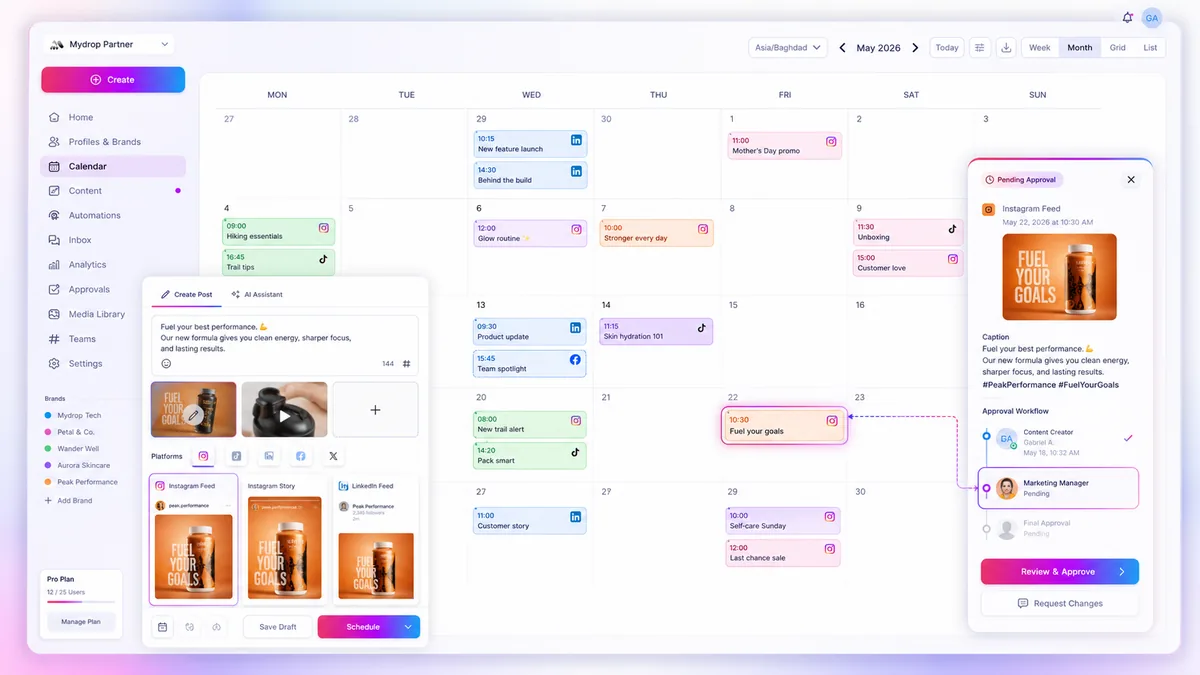
To fix your launch campaigns, stop treating them as collections of individual posts and start managing them as time-bound data environments. Most teams fail here because they rely on manual tracking strings that drift as soon as a campaign calendar changes, leaving you with broken links and a messy spreadsheet that nobody actually audits.
We have all been there. It is 6 p.m. on a launch Tuesday, and you are frantically checking whether the link on the Instagram post for the "Summer Refresh" actually contains the right utm_campaign tag, or if it is still pointing to last quarter's test run. It is high-stress, it is prone to human error, and frankly, it is work that software should be doing for you. The real cost isn't the creative effort; it's the operational drift that happens when your tools treat every post as an island.
What the best tools need to handle

When you manage campaigns across dozens of profiles, you stop being a creator and start being an air traffic controller. If your software does not know when a campaign starts and ends, you are essentially flying blind.
The best tools force a shift from manual asset management to automated campaign orchestration. Here is what that looks like in practice.
| Workflow Step | The "Spreadsheet" Way | The Campaign-First Way |
|---|---|---|
| Tracking Setup | Copy/Paste UTM strings into each post | Define UTM config once at the campaign level |
| Active Windows | Manual alert to stop/start links | Auto-append active during defined dates |
| Assignment | Tag posts manually or rely on memory | Link post directly to the campaign entity |
| Cleanup | Manually update or remove broken links | Campaign "ends" and tracking automatically toggles off |
Operator rule: A campaign is not just a tag; it is a governance window. If your tool cannot enforce tracking parameters at the moment of publishing, it is not a campaign manager-it is just a folder.
At Mydrop, we see teams struggle with this because their tools disconnect the post-composer from the central tracking configuration. When these systems are siloed, the UTMs become detached from the reality of the campaign's active period. You want a tool where, once you assign a post to a campaign, the system handles the UTM append logic automatically-only when the campaign is actually live. This removes the "did we remember to update the link?" anxiety entirely.
Ultimately, your stack needs to bridge the gap between your marketing strategy and the actual publishing pipe. If you have to remember to check a setting every time you publish, your workflow has already failed. True enterprise-ready tools allow you to assign a campaign at the source-whether it’s a bulk upload, an AI-drafted post, or a quick creative update-and then get out of your way.
Where basic tools start to break

When your team grows to manage multiple brands across dozens of channels, your software needs to do more than just hold a calendar. Most entry-level tools treat every social post as a standalone event. They might let you attach a tag or a label, but if the underlying platform doesn't know that a post belongs to a time-bound campaign, you end up in "spreadsheet jail."
Here is where the cracks start to show in basic tools:
- Link rot: You launch a promotion and set a campaign end date in your tracker. But your publishing tool doesn't know that date. Your team keeps publishing posts with the old, expired tracking links long after the campaign has officially closed.
- Manual drift: Every time a new social media manager joins the team, they need a refresher on which UTM parameters to use for which campaign. Without centralized, automated attribution, you get inconsistent data that makes your analytics dashboard look like a Rorschach test.
- The "Copy-Paste" tax: If you are still manually copying tracking strings from a sheet into the post composer, you are effectively paying your team to perform data entry instead of strategy.
Decision check: If your team has to verify a UTM string for every single post, you have a tooling failure, not a process problem.
The buying criteria that matter
When evaluating your social stack, look past the shiny dashboard previews. You need a platform that understands that a campaign is a data environment, not just a folder for assets. Use the following scorecard to pressure-test whether a candidate platform can actually handle enterprise-scale launches.
Enterprise Campaign Scorecard
| Criterion | What it actually means | Red Flag | Enterprise Standard |
|---|---|---|---|
| Period Awareness | Does the tool know when a campaign starts/ends? | Needs manual toggling to stop UTMs. | Auto-disables tracking after the period. |
| Cross-Feature Logic | Can I assign a campaign to an automation output? | Only works for manual scheduling. | Available in bulk jobs, AI drafts, and automations. |
| Attribution Control | Can I set default UTMs at the brand level? | Every post needs custom strings. | Global defaults with campaign-specific overrides. |
| Visible Context | Is the campaign status clear in the composer? | You can't see if a campaign is active/expired. | Real-time "Ongoing" or "Finished" status signals. |
If you are currently running a launch and find yourself asking, "Did we update the tracking links for these posts?" you have already lost the battle. At Mydrop, we built our campaign feature specifically to solve this by anchoring the entire workflow to an active-period window. When you assign a post to a campaign, the system automatically appends the correct UTM parameters to your links at the moment of publishing. If the campaign period has ended, the system knows to stop. It is a small piece of technical plumbing that saves hundreds of hours of manual auditing across large, multi-brand teams.
The goal isn't to work harder at managing links. The goal is to set the rules once at the brand level, link your launch assets to that window, and let the software handle the distribution mechanics so you can get back to reviewing the actual performance data.
How Mydrop supports this workflow
At Mydrop, we built our Campaigns feature specifically to end the manual UTM dance. Instead of attaching a string of tracking parameters to every single post, you define a campaign once as a time-bound entity. You set your start and end dates, define your standard utm_source, utm_medium, and utm_campaign, and then link your posts to that campaign.
When your team publishes a post, the system automatically checks the calendar. If the campaign is active-or has no specific end date-it appends your tracking parameters to the links instantly. If the campaign has ended, the system gracefully stops adding those parameters, preventing your analytics from getting cluttered with stale data. Because this logic lives at the platform level, you no longer need to worry about someone forgetting to copy-paste a parameter or mislabeling a link at 9 p.m. on a Friday.
Workflow check: Never manually construct a URL for a social post. If your tool does not automate the injection of tracking parameters based on a defined time window, you are essentially paying for a glorified spreadsheet that happens to have a "publish" button.
A simple shortlist checklist
If you are auditing your current stack, use this brief checklist to see if your infrastructure is holding you back.
| Capability | Requirement | Why it matters |
|---|---|---|
| Windowed logic | Auto-stop on end dates | Prevents data pollution after a campaign expires. |
| Cross-feature binding | Link posts to campaigns | Ensures consistent reporting across all content types. |
| Global configuration | One-time UTM setup | Removes the risk of human error in manual strings. |
| Permission-based | Centralized campaign access | Keeps team edits secure while allowing broad visibility. |
Conclusion
The bottleneck in most high-performing social teams is rarely the creative output itself; it is the coordination debt accumulated while trying to manage that output manually. When you treat campaigns as distinct, time-bound environments rather than just a tag on a post, you stop "managing" content and start orchestrating results.
If your current software forces your team to be the manual bridge between the calendar and the analytics dashboard, it is time to move to a platform that handles the plumbing for you. When the infrastructure becomes invisible, your team can finally stop acting like data auditors and get back to the work that actually grows your brand.

 Google review
 Trustpilot review
 Product Hunt comment




