


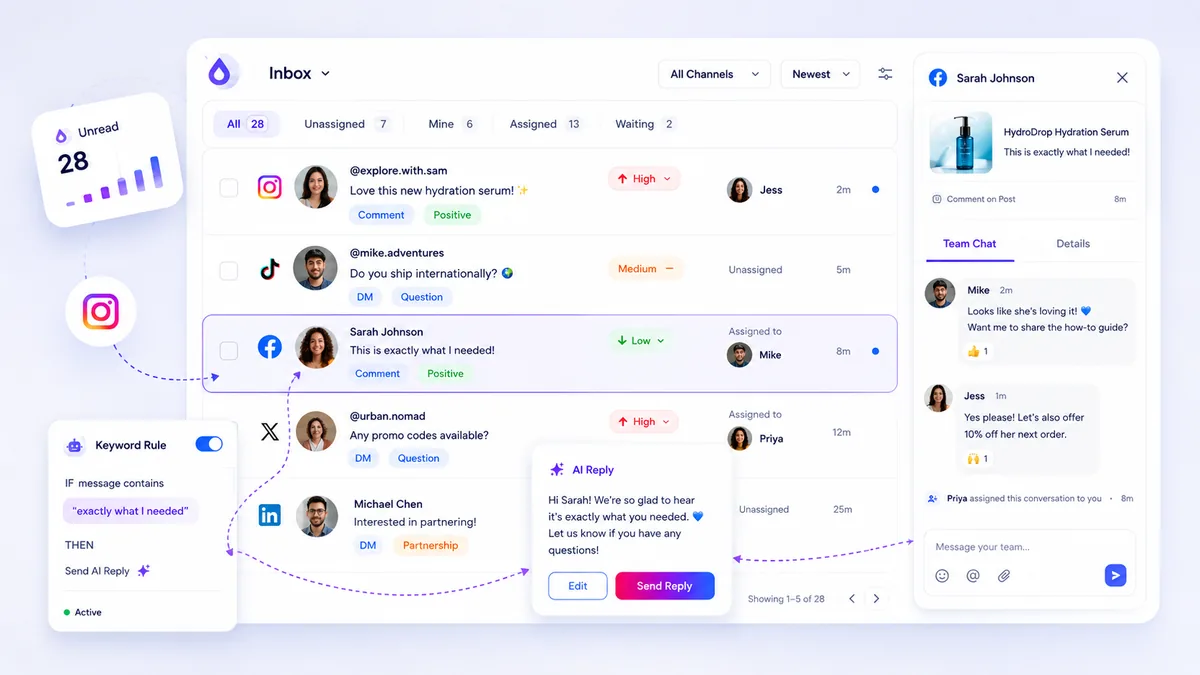
The best social inbox tools are not just speed-tracking utilities; they are operational hubs that provide the context, collaboration, and AI-assisted drafting necessary to deliver high-quality, on-brand resolutions to every comment and DM. If you are managing social support across multiple platforms, you know the pressure. Hitting average response time KPIs often forces talented community managers to prioritize the click over the connection. It is a high-stakes environment where a generic, fast reply often creates more work, forcing customers to return for clarification. The reality is that the resolution of the inquiry matters far more than the speed. Stop gamifying response time and start auditing engagement quality.
What the best tools need to handle

To move from volume-based speed to quality-based resolution, your inbox tool must do more than just aggregate alerts. It needs to normalize chaotic platform data into a unified, auditable queue.
Most teams struggle because their inbox tool is just a window, not a workspace. A truly capable tool should allow you to assign ownership, track status, and append internal context without leaving the conversation. If your team has to jump into the native app to see a user's previous interactions or to check if a thread has already been addressed by someone else, you have a coordination problem, not a capacity problem.
Operator rule: If your tool does not let you tag, assign, and add internal notes within the thread view, you are not managing a social inbox; you are just firefighting.
To audit your current setup, evaluate your tools against this standard.
The Inbox Quality Scorecard
| Feature | Why it matters for quality |
|---|---|
| Thread Normalization | Combines DMs, comments, and mentions into a single, predictable workflow. |
| Internal Notes | Enables team collaboration so context is never lost between shifts. |
| Assignee Auditing | Ensures accountability for every resolution, not just speed-based metrics. |
| AI Draft Assistance | Provides context-aware starting points to maintain brand voice at scale. |
| Status Tracking | Moves interactions from "unread" to "resolved" to track actual completion. |
When you look at your inbox, do you see a list of tickets, or do you see a list of people? The best tools enable the latter by keeping the conversation's history visible and the brand's voice consistent. At Mydrop, we see teams struggle with this when their inbox tool treats social support as a series of disconnected events rather than an ongoing relationship. Without a unified operational queue, you are guaranteed to miss context, leading to inconsistent responses and frustrated customers. A robust inbox tool needs to act as the single source of truth for your engagement strategy, ensuring that every touchpoint, whether it is a public comment on a post or a private DM, is managed with the same level of care, auditability, and team-based context.
Where basic tools start to break

The speed trap is real. When your inbox is treated as a notification queue to be cleared rather than a conversation to be resolved, the team loses focus on the why of the interaction. You end up with a team of speed-responders who prioritize the click over the connection.
Most native platform apps suffer from chronic fragmentation. If a customer comments on an Instagram post, then DMs on Facebook, and later replies to a LinkedIn update, they exist in three separate silos. Basic tools force you to chase that customer across platforms like you are playing a game of digital whack-a-mole. You lose the context of their previous issues, their sentiment, and their history with your brand.
When you lack thread normalization, you cannot provide a high-quality resolution. You end up sending generic, disjointed replies because the agent has no idea the user was already complaining about the same product issue on a different channel yesterday. It turns community managers into reactive fire-fighters instead of proactive brand representatives.
The second breaking point is collaboration debt. If your inbox doesn't support internal notes, thread assignment, or audit trails, the team cannot collaborate on complex queries. You end up with informal, high-risk workarounds-like taking screenshots, dumping them into Slack, and hoping someone remembers to actually reply in the app. This is how quality slips through the cracks, and how sensitive customer issues get lost in the shuffle of a busy campaign.
The buying criteria that matter
When you stop looking for speed and start looking for resolution quality, the evaluation criteria for your social inbox change entirely. You need a system that functions as an operational hub, not just a message aggregator.
Use this scorecard to audit how well your current tool stacks up against the needs of a scaling enterprise team.
Social Inbox Quality Scorecard
| Criterion | Why It Matters | Enterprise Threshold |
|---|---|---|
| Thread Normalization | Combines comments and DMs from different platforms into one view. | Must link profile to multiple channels. |
| Internal Collaboration | Allows teams to add notes and assign threads without leaving the conversation. | Real-time notes & granular assignment. |
| AI-Assisted Drafting | Leverages brand context for consistent tone, not just generic auto-replies. | Must include brand/thread context inputs. |
| Audit & Export | Essential for compliance and analyzing resolution quality. | CSV export with full thread metadata. |
Beyond the scorecard, make sure your next tool handles these non-negotiable workflows:
- Unified Operational Queue: Does the tool allow you to filter by status, priority, and assignee across all integrated platforms? If not, you are still siloed.
- Context-Aware Replies: Can the team see the full history of the thread and the user’s previous interactions before hitting send?
- AI Support for Brand Voice: Does the AI drafting feature let you include specific brand guidelines, tone, and "must-avoid" topics?
- Proactive Health Checks: Does the tool monitor if it has actually connected to the platform’s API for webhooks, or are you just assuming you are receiving every message?
At Mydrop, we see teams struggle not because they lack resources, but because they lack a unified way to turn fragmented social activity into an auditable support pipeline. If your tool doesn't help you prioritize quality over speed, it is actively working against your brand's reputation.
Decision check: If you cannot easily export a client-safe audit log of your inbox activity, you do not actually own your social support process-you are just renting access to it from the platform.
How Mydrop supports this workflow
When we built the Mydrop inbox, we started with a simple, slightly cynical premise: your team is likely drowning in platform notifications, not conversations. We see this across hundreds of brand profiles. You are jumping between Instagram, Facebook, LinkedIn, and Threads, trying to keep track of who said what. It is a recipe for coordination debt.
At Mydrop, we normalize all those fragmented notifications into one operational queue. Threads become normalized objects. Whether it is a DM on Instagram or a comment on LinkedIn, your team interacts with them using the same interface: assignment, priority, tags, and status tracking.
The real quality lift comes from context persistence. Because we treat the thread as a long-lived conversation, you can add internal notes that travel with that thread, regardless of the platform. No more "who talked to this person last week?" moments. When a support agent opens a thread, they see the whole history, the previous resolutions, and the internal context needed to deliver a thoughtful, on-brand response.
And for those high-volume periods, AI assistance is there to draft replies, but it is not built to just "speed things up." We feed the AI your brand guidelines, past interactions, and specific thread context. It provides a starting point that keeps your voice consistent and accurate, letting your human team focus on the final quality review-which is the only part of the process that truly matters to your brand reputation.
A simple shortlist checklist
When evaluating your next social inbox, use this checklist to separate "notification clearers" from "operational hubs." If a tool fails more than two of these, your team will continue to struggle with quality and consistency.
- Thread Normalization: Does it pull DMs and comments from all platforms into one view?
- Unified Thread Context: Does it keep the conversation history in one place, even if the user switches platforms?
- Internal Collaboration: Can you add internal, non-public notes directly to the conversation?
- Granular Assignment: Can you assign threads to specific team members or roles?
- AI-Assisted Drafting: Does the AI tool pull from brand context and previous conversation history?
- Auditable Status: Can you mark a conversation as resolved, pending, or escalated?
- Export Capability: Can you export interaction data for internal audits or stakeholder reporting?
Conclusion
The obsession with "average response time" is a trap that leads directly to burnout and generic, unhelpful engagement. Your customers do not want a fast, wrong answer; they want an accurate, helpful resolution. If you have to choose between shaving 30 seconds off a reply and ensuring the answer is technically accurate and tonally perfect, always choose the latter.
Shift your focus from measuring speed to measuring resolution quality. Audit your team’s workflows. Look for the points where context gets lost, where the same questions are answered differently by two people, and where the lack of internal collaboration prevents your team from doing their best work. Once you fix the operational gaps, the speed will take care of itself.


 Google review
 Trustpilot review
 Product Hunt comment




