

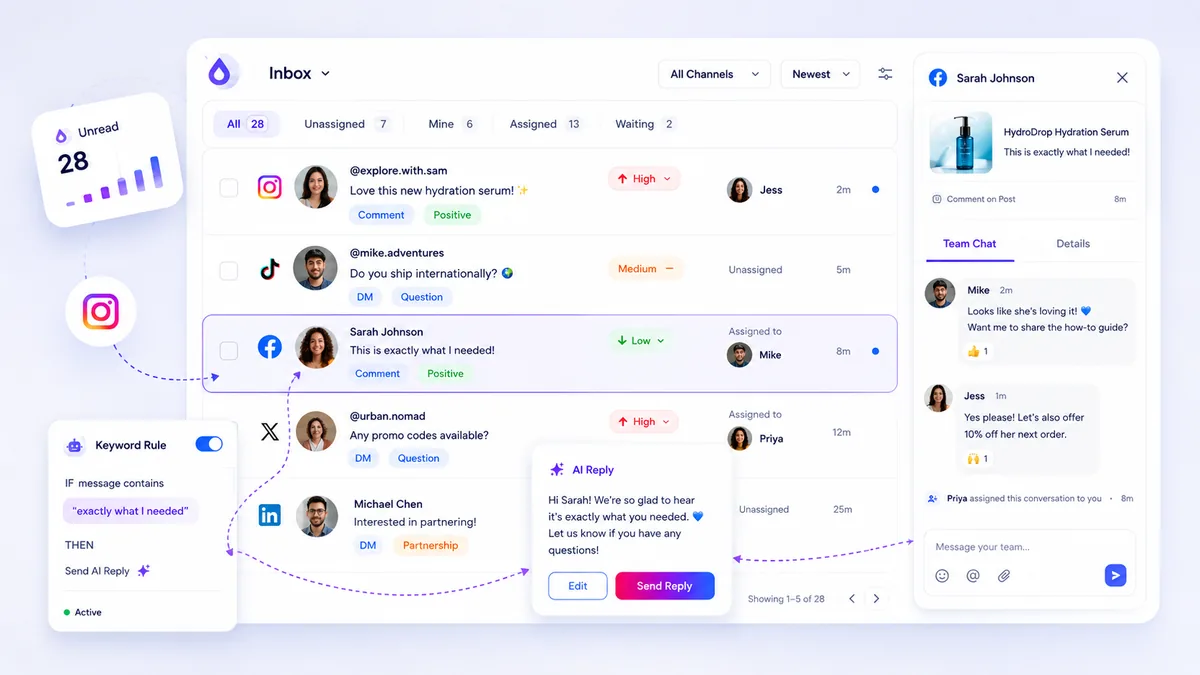
The real metric for scaling your agency support is not just volume; it is SLA-Breach Velocity, the rate at which your response times degrade relative to client expectations. Most teams fall into a reactive hiring trap, waiting until support quality visibly plummets before adding staff. Instead, look for a sustained, three-week upward trend in "time to first reply." If that number creeps up, your workflow or toolset has hit a structural ceiling that simply throwing more warm bodies at the inbox will not fix.
We get it. The inbox is a high-pressure, fragmented firehose. You are juggling platform interfaces, escalating client demands, and the constant, nagging fear that a high-value DM is sliding out of sight while your team tries to stay afloat. It is not just about keeping the lights on. It is about keeping your sanity when the campaign spikes.
What the best tools need to handle

If your support team is jumping between native apps, your response time data is fundamentally tainted. You cannot scale what you cannot centralize. When you treat social channels as isolated silos, every team member wastes precious minutes just figuring out who is already handling what. This context-switching tax is often the true culprit behind sluggish responses, not a lack of effort from your team.
To actually scale, your inbox must move beyond a simple list of messages. It needs to function as a shared operational queue.
Operator rule: If your team cannot answer an inbound message without opening a second platform tab, you have already lost the efficiency race.
For enterprise and agency workflows, here is the baseline functionality required to keep response times stable as volume scales:
| Feature | Why it matters for scaling |
|---|---|
| Unified Thread View | Eliminates manual checking across platforms; creates one source of truth for DMs and comments. |
| Triage Assignment | Moves work from "whoever is fastest" to "whoever is equipped," ensuring priority threads do not languish. |
| AI-Assisted Drafting | Reduces "time to first response" by providing agents with high-quality, brand-aligned starting points. |
| Operational Metadata | Allows tracking of tags and status so you can identify why response times are slipping, such as waiting for approvals. |
At Mydrop, we see teams struggle most when their inbox is just a feed. When you treat every interaction as an equally urgent event, you burn out your team and miss the high-value conversations that actually move the needle for your clients.
The best tools treat the inbox as a production line. You need to assign, prioritize, and automate the mundane parts of the reply process so your team can focus on the nuance. If you are not measuring how long a thread stays in "unassigned" or "needs reply" status, you are blind to your own capacity limits. Do not look at total volume. Look at the velocity of the hand-offs within your team. That is where the real bottlenecks live.
Where basic tools start to break

Your team’s inbox isn’t just a pile of messages; it’s a high-stakes, multi-platform firehose. When you rely on native platform apps-checking Instagram on your phone, logging into Facebook in another tab, and hoping you haven't missed a DM on LinkedIn-you are essentially operating with blinders on.
This is the context-switching tax. Every time an agent pivots between app interfaces, they lose seconds of focus. When that happens hundreds of times a day across a distributed team, those seconds snowball into minutes of delay, then hours. Pretty soon, your "time to first reply" isn't a metric of service quality anymore-it's a measure of how fast your team can toggle between browser tabs and login sessions.
Native tools fail because they are designed for individual users, not for operational throughput. They lack a unified queue, meaning your team has no visibility into who is working on what. You lose the ability to set priority, assign threads, or track SLA compliance. In our experience, when a team has to manage more than three profiles across even two platforms manually, their response times don't just fluctuate; they collapse.
The buying criteria that matter
If you have hit a wall, do not just hire more bodies. You need a platform that turns fragmented social noise into an auditable, team-owned queue. When evaluating your options, stop looking for "nice-to-have" features and focus on these critical operational requirements.
The Scaling Decision Matrix
Use this matrix to determine if your current bottleneck is a people problem, a process problem, or a platform problem.
| Scenario | Primary Symptom | Root Cause | Recommended Action |
|---|---|---|---|
| The "Firehose" | High volume, low complexity (e.g., FAQs) | Inefficient triage/manual drafting | Implement AI-assisted drafting & automation rules |
| The "Silo" | High context-switching, missed threads | Fragmented native apps | Centralize in a unified inbox platform |
| The "Gridlock" | Long hold times, high escalation rate | No assignment/visibility | Implement role-based assignment & status tracking |
| The "Wall" | Consistent SLA breaches despite high staffing | Capacity saturation | Audit workflow bottlenecks then scale headcount |
Critical Workflow Checks
- Normalized Threading: Does the tool pull comments and DMs from different platforms into a single, identical view? If you are still jumping between LinkedIn and Instagram native UIs, your response time data is fundamentally tainted.
- Operational Ownership: Can you assign a thread, add internal notes, and update statuses without leaving the conversation? If you are using spreadsheets or Slack to coordinate replies, you are paying a massive coordination tax.
- AI-Drafting vs. Templated Replies: Can the tool build context-aware drafts using the specific thread history? Static templates often sound robotic; you need AI that understands the current conversation context to actually speed up the drafting phase without sacrificing brand tone.
- Health & Auditability: Can you export clean, client-safe CSVs of all activity? You need to prove to stakeholders exactly where the time is being spent, especially during those hectic campaign spikes.
Decision check: If your team spends more than 20% of their time just finding and assigning conversations rather than answering them, you do not have a volume problem. You have a coordination problem.
At Mydrop, we see teams move from reactive chaos to proactive engagement by treating the inbox as a shared operational queue. By normalizing threads from every connected profile-whether it’s a high-volume DM thread on Instagram or a complex technical query on a LinkedIn post-we remove the guesswork. Your team sees one truth, follows one workflow, and manages responses with clear priority levels that actually map to your client's SLAs. When the data is clean and centralized, you aren't just guessing when to scale; you are making decisions based on your actual SLA-Breach Velocity.
How Mydrop supports this workflow
Centralization is not just about having a clean desk policy; it is the only way to get an accurate read on your team's actual response velocity. At Mydrop, we see agencies and enterprise teams struggle because they are essentially fighting a war on six different fronts. When your team is hopping between native apps for Instagram, LinkedIn, and Threads, your response time data is fundamentally tainted by the time it takes just to switch contexts.
Mydrop solves this by creating "One Queue, One Truth." We normalize threads from disparate platforms into a single operational stream. This means your support staff isn't struggling with platform-specific layouts; they are working in a unified interface where assignment, priority, and status updates are standardized.
Here is how the platform directly impacts your SLA-Breach Velocity:
- Thread Normalization: By pulling comments, DMs, and mentions into one view, we eliminate the "context-switching tax" that makes simple replies feel like heavy-lift tasks.
- AI-Assisted Drafting: Most inbox volume is repetitive. Our AI drafts use the thread context, brand voice, and specific goal to suggest responses, allowing your team to move through low-complexity queries in seconds, not minutes.
- Health Monitoring: There is nothing worse than an "inbox ghost"-a gap where you think you are receiving messages but the webhook connection has silently failed. Our Inbox Health dashboard gives your lead an auditable trail of sync status, so you know exactly when a profile is live or needs a manual backfill.
When you treat your inbox as a shared operational queue rather than a scattered list of notifications, you stop managing chaos and start managing capacity.
A simple shortlist checklist
Before you decide to add headcount, run your current setup against this scorecard. If you check "No" for more than two items, your bottleneck is your tooling, not your team size.
| Requirement | Why it matters for scaling | Mydrop Approach |
|---|---|---|
| Unified Queue | Prevents context-switching and "missed" threads. | All platforms in one stream. |
| Audit Trail | Essential for compliance and performance review. | Full history of notes and actions. |
| AI Drafts | Drastically reduces time on repetitive queries. | Context-aware generative drafting. |
| Health Checks | Ensures 100% visibility of inbound volume. | Proactive status and sync monitoring. |
| Exportability | Needed for real-time reporting to stakeholders. | Client-safe CSV exports. |
Workflow check: If you cannot export your inbox data to show a client exactly why your team is at capacity, you aren't managing an inbox-you are just enduring one.
Conclusion
The most resilient teams we work with have stopped treating "response time" as a vanity metric to be optimized for a dashboard. Instead, they use it as a diagnostic tool for operational health. They know that when their SLA-Breach Velocity spikes, it is rarely a signal to hire more staff; it is almost always a signal that their coordination is breaking down under the weight of manual, fragmented processes.
Don't wait for your team to burn out before you address the root cause. If your tools are forcing your best people to work like robots-constantly jumping between tabs, copy-pasting, and hunting for approval-then no amount of headcount will fix the underlying issue.
Invest in the infrastructure that makes "One Queue, One Truth" possible. Once your workflow is centralized, auditable, and intelligently assisted, you will find that you can handle significantly more volume without sacrificing the quality or speed that your clients demand. Most teams do not have a volume problem; they have a coordination problem. Fix the coordination, and the scale will follow.

 Google review
 Trustpilot review




