

Reliability isn’t about how many likes your last campaign earned; it’s about having a transparent view into your dispatch system. If you aren't tracking exactly what happens between the "schedule" button and the platform feed, you aren't managing social media-you're gambling. The most effective metric for auditing your performance isn't engagement; it’s your post-state accuracy rate.
We know the "post-and-pray" anxiety. You’ve spent hours crafting content, refined the creative, hit schedule, and then spent the next six hours hoping the API connections held up. There is nothing worse than realizing a high-priority announcement vanished because of a silent failure. You deserve better than guesswork, and your stakeholders certainly expect it.
What the best tools need to handle

If you are managing posts across a dozen brand profiles, you need your software to do more than just hold your content; it needs to be your early warning system. When a platform changes its API access or your authentication token expires, the best tools don’t wait for you to notice the empty feed. They surface the problem instantly.
To build a robust operation, look for these three capabilities in any scheduling platform:
- Granular State Tracking: Every asset needs to live in a defined status-waiting, scheduled, pending, posted, warning, or failed. You shouldn't have to guess if a job is in progress or stalled.
- Proactive Error Surfacing: A "silent failure"-where a post is marked as "scheduled" but never reaches the audience-is a critical defect. Your tool must flag platform-specific issues, like media format mismatches or unexpected rate limits, in the same dashboard where you do your work.
- Automated Alerts: You shouldn't need to manually refresh your calendar to check on a critical announcement. If a job encounters a snag, you should receive a direct notification via email or your preferred internal comms channel so you can intervene before the campaign momentum dies.
At Mydrop, we see teams that rely on these signals to turn post-management into a predictable, high-visibility process. Rather than constantly checking for errors, they rely on the platform to report them, which shifts their energy from fire-fighting to strategy.
Operator rule: Never accept a tool that reports success simply because it sent the data toward the platform. True success is only confirmed when the platform returns a valid post URL.
When you have this level of visibility, you move from being a reactive manager to a proactive strategist. You stop worrying about whether the technical plumbing is working and start focusing on the quality of your content.
Where basic tools start to break

Most basic scheduling platforms treat social media dispatch as a binary event: it either happened, or it did not. This is a massive simplification that leaves teams vulnerable. The real problem isn't that tools occasionally struggle with API connectivity; it is that they keep you in the dark when they do.
We have all been there. A high-priority launch post is marked as "published" on your dashboard, but your community manager notices the feed is empty. The tool didn't tell you the authorization token expired overnight, or that the API rejected the image format for a specific platform. The post simply vanished into the void, leaving you to explain the gap in your campaign coverage.
This is where teams usually get stuck: they rely on tools that lack granular status visibility. If your current setup cannot tell you the difference between a network timeout, an expired token, or a format violation, you are flying blind. When these "silent failures" accumulate across dozens of profiles and markets, they create a persistent, hidden drag on your team's efficiency. You end up spending hours of your week cross-checking feeds against your calendar instead of focusing on strategy.
Most teams do not have a content problem. They have a decision bottleneck.
The buying criteria that matter
When you audit potential platforms, move beyond feature checklists and focus on operational transparency. You need a system that treats publishing as a managed process, not a "fire and forget" mechanism.
A platform that prioritizes reliability gives you actionable data before, during, and after the dispatch moment. When evaluating your next tool, use this scorecard to measure its real-world impact.
| Failure State | Visible Symptom | Business Impact | Remediation Path |
|---|---|---|---|
| Warning | Thumbnail delay or rate limit | Minor campaign timing shift | Automated retry or manual sync |
| Failed | Auth token expired or hard quota | Total campaign disruption | Re-authenticate or contact support |
When evaluating your next tool, look for these specific capabilities:
- Granular Status Visibility: Verify that the system surfaces status indicators like
warningandfaileddirectly on the calendar interface. You should not need to hunt through logs or check individual platform feeds to know if something went wrong. - Automated Error Surfacing: Ensure you have automated email alerts that trigger specifically on these state changes, not just a generic "post success" notification.
- Unified Error Logging: Look for a system that provides actionable error messages.
At Mydrop, we see that the most effective teams treat post failures as actionable tasks. They do not just want a notification that a post missed its mark; they want the system to tell them why it failed-like a quota limit or a missing permission-so they can fix it and republish in one click. If a platform forces you to re-create the entire post just to address a minor token error, it is actively working against your team's velocity.
The goal is to move your team from "post-and-pray" anxiety to a model of proactive management, where you are alerted to issues before they affect your audience. Reliability isn’t a nice-to-have feature; it is the foundation of any serious enterprise social strategy.
How Mydrop supports this workflow
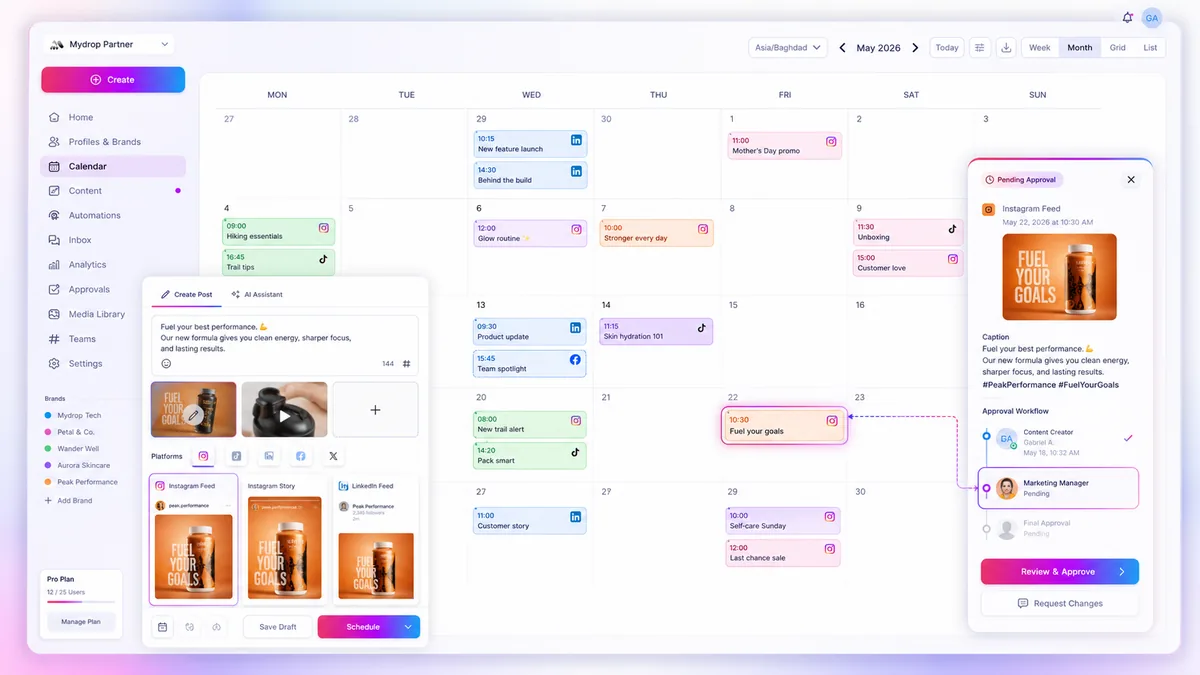
At Mydrop, we built our scheduling engine on the principle that if you cannot see the state of a post, you cannot effectively manage it. Instead of burying platform errors in a notification log that no one ever checks, our Calendar serves as a real-time health dashboard for your entire dispatch system. Every asset in your queue carries a clear, persistent state: waiting, scheduled, pending, posted, warning, or failed.
If a post hits a technical snag-perhaps a platform API update or a momentary rate limit-it shifts into a warning or failed state immediately. You do not need to hunt for this. Our system pushes automated alerts directly to your team, letting you jump in to fix the token, update a thumbnail, or adjust the content before the rest of the campaign feels the ripple effect. Managing hundreds of brand profiles across five global markets is not just about scheduling; it is about having a no-guesswork view of what is live and what needs your attention right now.
When you see a post marked with a warning state, it means the system is still attempting the delivery, but something is blocking the path. A failed state means the platform has officially rejected the request, usually requiring a manual fix, like a re-authentication. By centralizing these indicators in the same view where you build your posts, we reduce the time spent chasing ghosts in disconnected spreadsheets.
A simple shortlist checklist
When you are evaluating a tool, look past the shiny interface and dig into the technical operational features. Use this checklist to run a mini-audit on any platform you are considering. If a tool fails more than two of these, your team will eventually spend more time troubleshooting than creating.
Reliability Audit Checklist
| Capability | What to look for | Why it matters |
|---|---|---|
| Granular State Tracking | Does the UI clearly differentiate between waiting, warning, and failed? |
Prevents "silent failures" where you assume a post is live. |
| Direct Error Surfacing | Are platform-specific errors (e.g., token expired, quota met) shown inside the post composer? | Cuts down time spent digging through third-party platform logs. |
| Proactive Alerts | Can the tool send alerts to specific stakeholders when a critical post fails? | Ensures the right person knows immediately when a campaign is stalled. |
| Inline Remediation | Can you edit, re-authenticate, or retry a failed post without rebuilding it from scratch? | Minimizes the time an asset sits in a failed state. |
| Sync Verification | Does the system verify the post was actually received by the platform? | Confirms success beyond just the scheduling trigger. |
Conclusion
Reliability in social media management is not about hoping your posts make it through the gate; it is about building a system that alerts you the moment they hit a bump. Most teams struggle not because they lack creativity, but because their tools force them to act as blind operators, manually verifying every single asset.
The best social team is not the one that never faces a glitch. It is the one that sees the glitch, understands it, fixes it, and keeps moving before their audience even notices. If you are still relying on a "post-and-pray" workflow, you are carrying unnecessary operational risk. Shift your focus from vanity metrics to system transparency today, and stop treating your social strategy as a gamble.



 Google review
 Trustpilot review




