

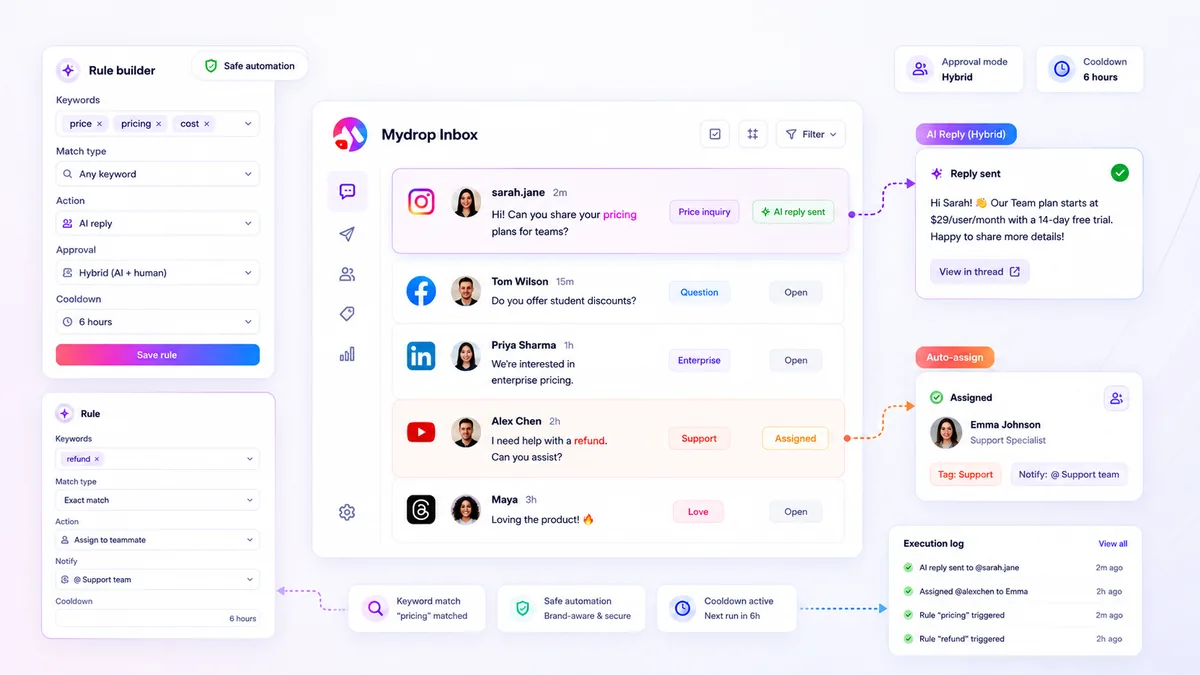
If you are managing volume across multiple platforms, the bottleneck is not message volume; it is the lack of operational logic. The best social media automation tools act as a triage engine that assigns, tags, and responds within strict safety parameters.
We get it. Your community is thriving, but your inbox is a landslide. The personal touch that built your brand feels impossible to maintain when drowning in queries, and the pressure to respond instantly is a liability. This work is messy, and keeping up is exhausting.
This article will help you benchmark your system against enterprise-grade triage requirements. We are building a robust, guardrailed system that handles the noise while preserving the human touch for critical interactions.
What the best tools need to handle

When you are managing hundreds of profiles across five different markets, the actual reply is the easy part. The real work happens in the seconds before a human ever sees the message. If your tool cannot route, categorize, and validate intent before attempting a response, you are just accelerating your coordination debt.
The most successful teams operate using a 3-Layer Triage system. It is how you turn a chaotic inbox into a predictable operation.
| Layer | Action | Operational Goal |
|---|---|---|
| 1. Routing | Automatic Assignment | Get the right ticket to the right specialist instantly. |
| 2. Context | Tagging & Notification | Surface urgent issues to the team without manual reading. |
| 3. Response | Guardrailed Automation | Safely handle repetitive tasks without losing brand voice. |
Many teams focus entirely on Layer 3, attempting to automate everything from the start. That is usually a mistake. If your system does not handle the first two layers properly, you are essentially automating blind. You might reply quickly, but you will often reply to the wrong person, on the wrong topic, or with the wrong brand voice.
A high-performing triage engine needs to be granular. It should know, for example, that a message containing "refund" on an enterprise profile requires a different routing priority than a "thanks" comment on a campaign post. If your tool cannot distinguish between these two with custom keyword matching and exclusion lists, your human support team will spend their entire day sorting through noise instead of resolving complex cases.
Here is where teams usually get stuck: they assume the tool "just knows" what to do. But enterprise-grade automation requires explicit operational definitions. You must define the rule, the matching conditions, and crucially, the exit conditions-the logic that stops the tool from acting if a human has already intervened or if the thread is already resolved. Without those guardrails, your automation is just a blunt instrument.
Where basic tools start to break

Most entry-level social tools treat automation like a simple "if-this-then-that" command. This works fine until your community actually grows and the volume becomes unmanageable. The moment you start managing hundreds of messages across diverse platforms, that simplicity becomes your greatest liability.
The biggest culprit is the "Set-and-Forget" Trap. Many tools lack the logic to recognize when not to reply. Imagine a customer reporting a genuine safety concern or a brand controversy brewing in the comments. A basic tool sees a triggered keyword, matches it, and instantly fires off a canned response-completely oblivious to the context. That is exactly how you turn a minor support issue into a major public relations headache.
Another common failure mode is thread-blindness. A basic system does not know if a conversation is already resolved or if a human support agent is already actively typing a response. We have all seen it: a customer complains, a human agent replies, and then five seconds later, an automated bot jumps into the same thread with a generic, unrelated message. It looks unprofessional, breaks the trust you are trying to build, and makes the automation feel like a wall instead of a bridge.
At this level of scale, automation must be intelligent enough to check if a thread is still "live" or if it has been marked as resolved before it ever attempts an action.
The buying criteria that matter
When you transition to enterprise-grade community management, the conversation shifts from "Can it automate?" to "How safely can it automate?" You are not just looking for a tool that replies; you are looking for a triage engine that acts as a gatekeeper.
The difference comes down to the guardrails you have in place. Before you commit to a platform, test your current setup against this reliability matrix.
Social Support Automation Reliability Scorecard
| Feature | Basic Automation | Enterprise-Grade Triage |
|---|---|---|
| Contextual Matching | Basic contains/exact | Exclusion logic, platform filters |
| Approval Flow | None (Immediate) | Manual, Auto, Hybrid-human-loop |
| Thread Awareness | None (Blind) | Cancel on resolve/already replied |
| Risk Mitigation | None (Spam risk) | Intelligent Cooldowns |
| Auditability | None | Full Execution Logs |
Why these criteria are non-negotiable:
- Approval Control: You need Hybrid Approval. For common, low-risk queries, auto-replies are fine. But for anything involving account issues or escalations, the tool must pause and hold that draft for a human to review. If your tool does not let you toggle between automatic and manual modes, it is a liability.
- Execution Logs: Automation should never happen in a black box. If an auto-reply goes out, you need a clear audit trail. You need to know what triggered the rule, which rule was applied, and when it happened. This is not just for debugging; it is for understanding how your triage logic is actually performing across your channels.
- Intelligent Cooldowns: This is the most underrated safety feature in the stack. A robust tool prevents the same automated response from spamming a single user or a single thread repeatedly. Cooldowns ensure that your automation stays helpful, not annoying.
At Mydrop, we see teams fail when they prioritize raw speed over these operational guardrails. The best tool is not the one that replies fastest; it is the one that allows you to configure your triage logic so your human team can focus on the complex, nuanced interactions that truly define your brand. Your automation should make your human support better, not just faster.
How Mydrop supports this workflow
When you are managing dozens of brand profiles across five markets, manual triage is a fast track to burnout. At Mydrop, we built the Inbox Rules engine precisely to solve this. Instead of treating every message as a simple, linear task, you can build a three-layer filter that acts as an extension of your team.
First, your system should automatically categorize incoming traffic by assigning tags based on keyword patterns. Our rules engine handles this instantly, routing "pricing" questions to the sales team while sending technical issues straight to support. Second, it manages notification flow, ensuring the right person, not just the general inbox manager, gets alerted when something urgent pops up.
The final layer is where the risk lives: the response itself. We designed Mydrop's rule builder to give you total control, not just basic "on" or "off" toggles. You set the guardrails: manual approval required for public replies, AI-drafted responses for repetitive FAQs, and smart cooldowns to prevent spamming your own community. If a thread is marked resolved in another system, Mydrop automatically cancels pending replies, preventing the classic "oops, why is that bot still posting" moment. It is about automating the noise while keeping your most important, brand-sensitive interactions safely human-led.
A simple shortlist checklist
Before you commit to a new platform or try to overhaul your current mess, run your system against this criteria. If you answer "no" to more than two of these, you are not scaling; you are just speeding up your next crisis.
- Contextual Matching: Can your tool handle
contains_any,contains_all, andexcludekeyword logic to filter out noise? - Approval Control: Does it allow you to set manual, auto, and hybrid (human-in-the-loop) approval modes for different brands or message types?
- Risk Mitigation: Does it offer intelligent cooldowns and automatic cancellation for resolved threads to avoid public missteps?
- Auditable Logic: Are rule execution logs easily accessible to the team for reviewing why a certain reply was, or was not, sent?
- Operational Flexibility: Can you segment rules by platform, profile, brand, and thread type without creating a fragmented dashboard?
Conclusion
Scaling community support is rarely about finding a faster way to type. It is about building a system that allows you to be as responsive at midnight as you are at noon, without losing the nuance that defines your brand.
If your current tools leave you frantically checking every single notification, you are not using an automation system; you are simply maintaining a slightly more organized bottleneck. The shift from "responding" to "managing" happens the moment you move away from reactive, manual habits and start defining your operational logic in advance.
The best social media operations leaders treat their triage workflow like an infrastructure project. They build for the noise, design for the risks, and prioritize the human touch where it matters most. Your community deserves that kind of intentionality, and your team definitely deserves a break from the 6 p.m. firefighting sessions.



 Google review
 Trustpilot review




