


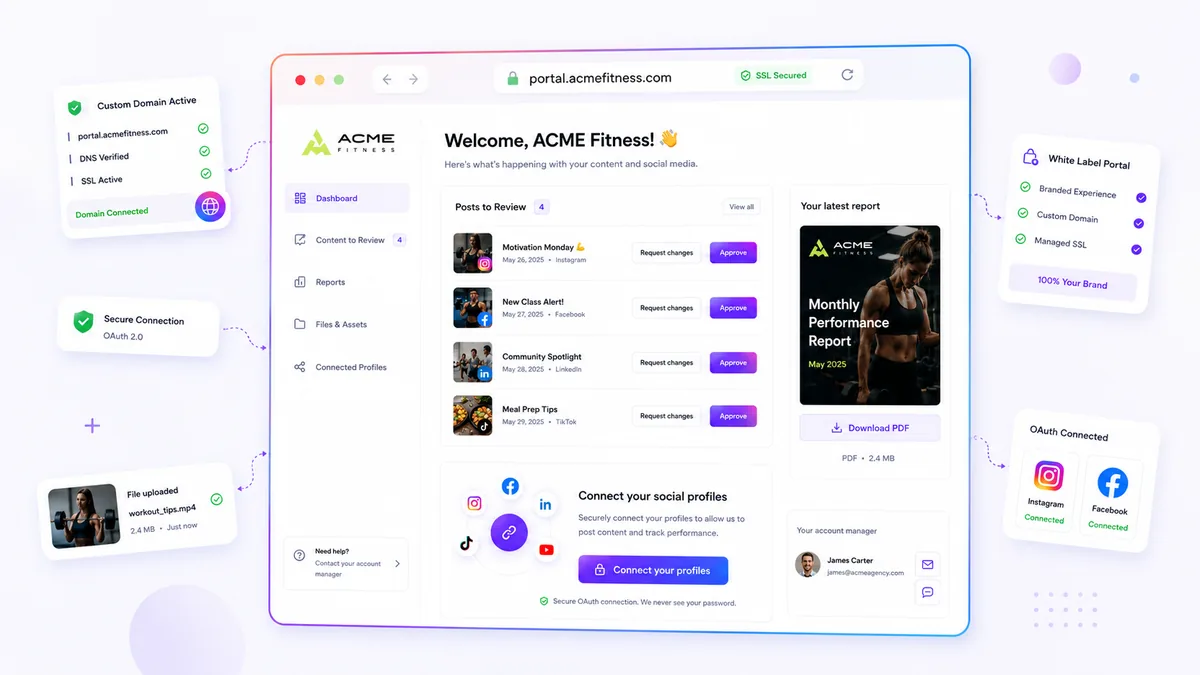
When your client-facing surfaces live on scattered subdomains or generic platform URLs, you are not just losing brand equity; you are introducing friction into every single client touchpoint. For agencies juggling dozens of brands, this is where consistency dies. We get it. You are trying to scale your output, but you are constantly fighting a losing battle against a messy, fragmented digital footprint. It is exhausting to explain why a brand does not feel like itself on a landing page, and it is even more exhausting to patch these leaks manually. The hidden cost is the massive, unbilled operational tax of patching DNS and SSL mappings. The solution? Stop treating your infrastructure as an afterthought and start auditing your domains systematically.
What the best tools need to handle

If your infrastructure requires manual certificate signing requests or ticket-based DNS validation, you have hit a scalability wall. A modern tool should handle the entire certificate lifecycle natively. When you add a custom domain, the system should verify the DNS, provision the SSL automatically, and route traffic without manual intervention.
This setup needs to be flexible enough to dispatch traffic to different surfaces dynamically. Whether it is a link-in-bio or a branded portal, the same domain should serve either surface based on your configuration. If you have to re-configure DNS every time you want to pivot from a bio link to a portal, you are wasting cycles.
Use this scorecard to evaluate your current setup. Rate your system from 1 (broken) to 5 (fully automated).
| Criterion | What it means | Why it matters |
|---|---|---|
| Customizability | Map any client-owned domain. | Maintains brand equity. |
| Provisioning | Fully automated SSL/DNS. | Removes manual bottlenecks. |
| Workflow Integration | Dynamic routing (bio/portal). | Scalable surfacing. |
| Visibility | Mydrop URLs entirely hidden. | Total white-labeling. |
| Self-Service | No dev tickets required. | Increases speed to market. |
The goal is to reach a point where launching a new branded surface takes minutes, not hours of troubleshooting. The One-Surface Rule is the guiding star: every client-facing touchpoint should live on the client’s own domain, seamlessly provisioned and managed. If your tool cannot do this, it is not helping you scale; it is simply holding the ladder while you climb.
Where basic tools start to break

Basic tools often mask a fundamental limitation: they are built for a single brand, not an agency portfolio. When you are managing five clients, manual domain management is merely annoying. When you are managing fifty, it becomes a structural risk.
The break point usually happens when you move from manual DNS updates to maintaining SSL certificates across dozens of client domains. If your platform requires manual certificate signing requests or has no automated SSL renewal, you are not just managing domains. You are acting as an outsourced, unpaid IT department for every single client. This is where the operational tax of "good enough" tooling hits your bottom line.
The most common failure point is host dispatch. Basic tools often force a one-to-one mapping between a domain and a page. If you need to switch a client from a link-in-bio page to a brand portal, you have to tear down the existing DNS and start over. That is downtime, potential broken links, and another approval cycle you should not have to manage.
The Operational Friction Matrix
This table summarizes how manual domain management creates invisible drag on your team.
| Operational Area | Manual Tooling (The Friction) | Automated Tooling (The Goal) |
|---|---|---|
| DNS Verification | Manual checks; high delay (24-48hrs) | Immediate verification; near-instant status |
| SSL Management | Manual CSR/Certificate handling; high error risk | Automated provisioning; self-healing renewal |
| Surface Routing | One domain per page; requires DNS rework | Dynamic host dispatch; target assignment |
| Brand Fidelity | Subdomains/generic URLs often visible | Full white-labeling; platform invisible |
| Scaling | Requires dev/IT ticket per domain | Self-service; zero-ticket launch |
If your system requires you to manually manage DNS status or perform SSL lifecycle tasks, you are operating at a scale that will inevitably hit a ceiling.
The buying criteria that matter
When evaluating tools for your multi-brand audit, do not just look at the design UI. Look at the domain infrastructure underneath. If you are serious about white-labeling, your platform must treat domains as first-class, automated infrastructure.
Here is the checklist you should use to evaluate any platform:
- Asynchronous SSL Provisioning: The tool must handle the entire SSL lifecycle automatically after DNS is verified. You should never be manually uploading a certificate or monitoring renewal dates. If it does not handle this natively, it is not an enterprise tool.
- Decoupled Host Dispatch: The platform should decouple the domain from the specific surface it hosts. You want to be able to route a domain to a link-in-bio page, a client portal, or a custom landing page by changing a setting, not by re-configuring DNS records. This is the only way to avoid the "re-launch" tax when a client campaign changes direction.
- Full White-Labeling Fidelity: Can you strip all platform branding? If your clients still see the platform URL in the browser, you are doing work for the platform provider, not for your client. The domain experience should feel like an extension of the client's own property, not a third-party app.
- Self-Service Onboarding: The infrastructure must allow an account manager to connect a domain without a single dev ticket.
At Mydrop, we see teams prioritize this decoupling because it turns a two-day IT project into a two-minute configuration change. When the platform manages the complexity of DNS checks and certificate maps, your team focuses on the campaign strategy, not the server configuration.
Operator rule: If you need a developer to launch a client surface on a branded domain, the platform is not doing its job.
The goal is not to become a DNS expert. The goal is to provide a seamless client experience where the brand is the only thing that matters. If your current tool forces you to compromise on that branding for the sake of simplified technical management, you are not just missing a feature-you are missing an opportunity to scale.
How Mydrop supports this workflow
We built Mydrop for teams that moved past the spreadsheet and manual update phase of social media management. We saw the same pattern everywhere: the creative work was excellent, but the distribution infrastructure was brittle.
At Mydrop, we approach custom domains as a core utility, not an add-on. When you connect a client-owned domain, our system automates the heavy lifting. You simply configure your DNS, and our infrastructure validates the connection, provisions the SSL certificate, and prepares the dispatch layer.
The beauty of this is that the domain becomes a flexible routing layer. You can point a branded domain to a link-in-bio page today and swap it to a full brand portal tomorrow without touching a single DNS record or waiting for another certificate cycle. Your team stays focused on the campaign, not the plumbing.
It creates a seamless, white-labeled experience for the end user. The public never sees a platform URL, and your client feels the surface is entirely their own.
Decision check: Treat your domain infrastructure as a routing service. If you have to reconfigure DNS for every new project, you are paying a hidden tax on every campaign launch.
A simple shortlist checklist
Before you commit to a platform for your agency or enterprise brand, run these five checks to ensure you are not buying into more technical debt.
- Automated SSL: Can the platform manage SSL provisioning asynchronously, or do you have to upload CSRs and manage certificate renewal dates manually?
- Host Flexibility: Does the system allow you to swap between a link-in-bio target and a brand portal target on the same domain without DNS changes?
- Verification Speed: Is the DNS verification process real-time and self-service, or does it require a support ticket?
- Total White-Labeling: Are there any residual platform URLs visible in the final public URL structure, even when using a custom domain?
- Assignment Logic: Can you re-assign a single domain across different workspaces or targets within your portfolio seamlessly?
Conclusion
The reality is that your digital footprint is only as strong as the infrastructure supporting it. Fragmented domain branding is a choice, not an inevitability. It persists because teams settle for the easiest setup today, ignoring the long term cost of managing that fragmentation at scale.
If you are tired of patching brand leaks and explaining why your client portal looks like it belongs to someone else, it is time to upgrade your tech stack. You do not need more manual effort; you need a system that treats your brand presence as a first class citizen.
Stop letting your infrastructure dictate your branding. Take control of your client-facing domains and turn them into the professional, consistent foundation your campaigns deserve. The work of cleaning up your digital presence is easier than you think, provided you have the right tool for the job.

 Google review
 Trustpilot review
 Product Hunt comment




