


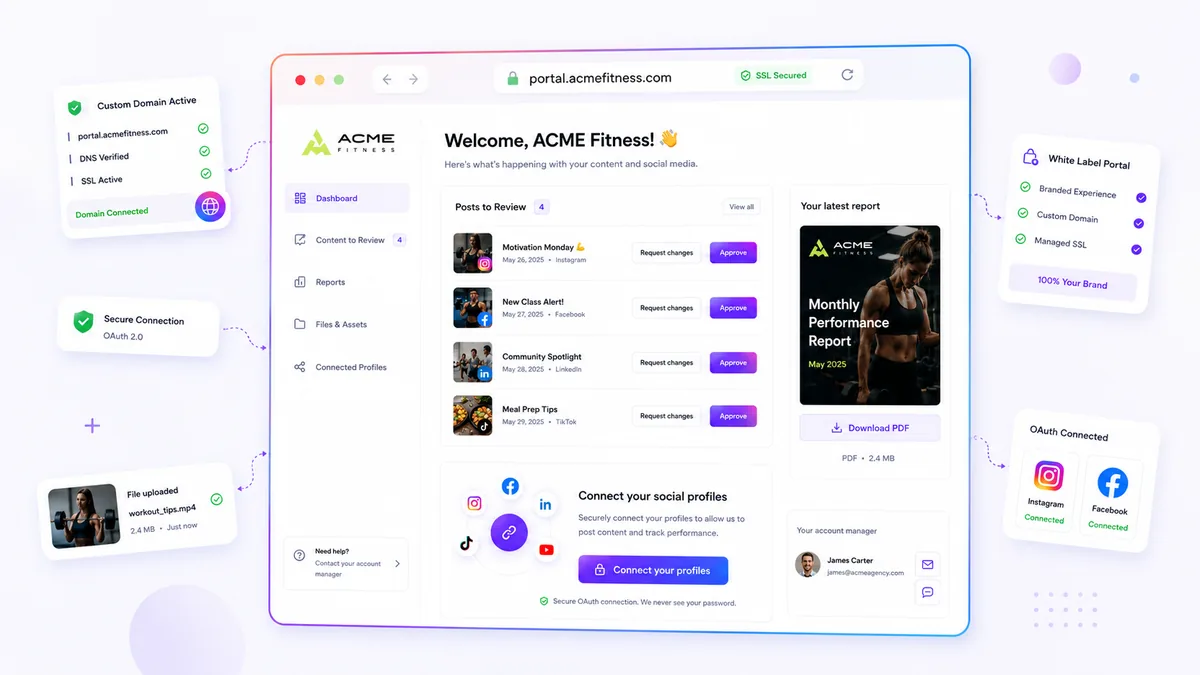
Stop tracking email open rates and start measuring Portal Engagement Time. Email opens are a vanity metric; they tell you nothing about whether your report was read or ignored. If your workflow relies on burying strategic insights in attachments that live in cluttered inboxes, you are creating a massive coordination bottleneck. The best way to accelerate review cycles is to move reports into a dedicated space.
When clients can access their data instantly in a secure portal, the shift from passive receipt to active decision-making happens immediately. Across dozens of agencies, we have seen the same pattern: the moment you stop emailing static files and start providing a frictionless, no-login space for review, response latency drops dramatically. This is the difference between a report that sits in the dark and one that drives strategy.
What the best tools need to handle

For a portal to actually move the needle on review speed, it must be designed for immediate, frictionless access. If your client has to fumble with passwords, reset credentials, or register for a new account just to view their monthly performance metrics, they will inevitably defer that task. Every extra click acts as a tax on their willingness to engage with your work.
The best tools manage this friction by prioritizing direct, secure access to the data itself.
| Capability | Why It Impacts Velocity |
|---|---|
| Instant Access | No-login barriers mean zero friction for quick reviews. |
| Sanitized Views | Showing only what matters prevents data overload. |
| Integrated Feedback | Comments alongside metrics keep discussions in context. |
| Direct Downloads | PDF access within the dashboard saves searching through threads. |
Operator rule: If a client can't view and comment on their report within two clicks of opening their portal, your delivery system is failing them.
When you manage multiple brands and stakeholders, you cannot afford to have feedback scattered across fragmented email chains or private messaging apps. A robust portal acts as a central source of truth. It allows your clients to review, inspect, and approve reports exactly where the data lives. It turns the report review from a cumbersome "catch-up" task into a seamless, asynchronous interaction.
At Mydrop, we designed the Brand Portal with exactly this philosophy in mind. It lets teams securely expose sanitized analytics and downloadable reports to stakeholders without the administrative nightmare of managing user accounts. The goal isn't just to "host" the file; it is to create a controlled environment where the client has everything they need to take action without needing to reach out to you for access.
This shifts your team's role from "data delivery service" to "strategic partner." Instead of chasing clients for a sign-off via email, you provide a clear, visible space where the review can happen on their timeline, with all the necessary context right at their fingertips.
Where basic tools start to break

Let us be honest: for most agencies and multi-brand teams, email is where analytics insights go to die. We have all lived through this. You spend three days distilling complex campaign data into a polished, actionable report. You attach it to an email, hit send, and wait.
And wait.
The client's inbox is already a war zone. Your report gets buried under urgent requests, calendar invites, and marketing spam. When they finally find it, they are looking at a static PDF that was already obsolete the second it was exported. Worse, if you need them to approve the findings or provide feedback, they have to draft a reply, refer back to the PDF, and hope they didn't miss a critical data point on page four.
The real breakdown happens in the context gap. Every time a client has to jump from their email to a storage folder, or download a file to view it, you lose their momentum. Version control also becomes a disaster. You end up with a thread titled "RE: Q3 Report_final_v2_edit.pdf"-it is basically a crime scene.
When your workflow forces clients to log into a complex workspace just to view a simple dashboard, you are adding friction that actively discourages them from engaging. If you make them jump through hoops to see the data they pay you for, they will stop looking at it entirely.
The buying criteria that matter
If you are evaluating tools to fix this, stop looking for "more features" and start looking for velocity. A high-velocity analytics review process removes every barrier between the client and the data.
When you are assessing your setup, use the following comparison to see where your process actually stands.
| Metric | Email-Based Delivery | Portal-Based Access |
|---|---|---|
| Access Time | Variable (Hours to Days) | Seconds (Direct Link) |
| Version Control | Nightmare (Static Files) | Single Source of Truth |
| Feedback Loop | Disconnected (Email replies) | Integrated (In-context) |
| Security | Weak (Password sharing) | Strong (OAuth/No-Auth) |
| Engagement | Low (Passive reading) | High (Active inspection) |
To reach that high-velocity state, your chosen tool needs to hit four specific requirements:
- The "Two-Click" Rule: Your client should be able to land on their report, inspect the numbers, and leave a comment without ever entering a username or password. If it takes longer than two clicks, you have built a bottleneck, not a dashboard.
- Authentication-Free Security: Passwords are a major source of friction and a security liability. Modern tools should handle access via secure, time-limited, or tokenized links that allow the client to review reports or download files without creating a new account they will immediately forget.
- In-Context Collaboration: Feedback needs to happen next to the chart, not in a separate email thread. If a client has a question about a specific spike in traffic, they should be able to tag you directly on the dashboard where that spike is visualized.
- Sanitized Visibility: You need granular control over what they see. Clients do not need to see your internal production calendar or the messy metadata behind the scenes. They need the outcome.
At Mydrop, we designed our Brand Portal specifically to bypass these blockers. It acts as a secure, sanitized conduit where you can expose exactly the reports, files, and post previews a client needs, without ever forcing them to manage a login or hand over their own social media passwords.
Most teams do not have an analytics problem; they have a decision bottleneck. When you strip away the friction of email attachments and force-login workspaces, you stop chasing approvals and start driving strategy.
How Mydrop supports this workflow
At Mydrop, we built the Brand Portal specifically to kill that email-based friction. We know that when you are managing dozens of brand profiles across different stakeholders, the last thing you want is a support ticket just to resend a PDF someone lost in their inbox.
The Mydrop Brand Portal acts as a persistent, sanitized home for your client's analytics. By configuring a portal, you aren't just giving them a link; you are giving them a dedicated workspace where they can view scheduled reports, download approved PDFs, and chat with your team without ever needing to juggle a separate Mydrop login.
The real power here is the removal of auth-friction. When you share a portal link, your client can access exactly what you have enabled-be it campaign overviews or specific analytics-in a non-login or simple password-protected environment. This means the client isn't digging for a password at 5 p.m. on a Friday; they are clicking the link and seeing the data.
Because this interface is tied directly to your brand settings, you control the context. You can expose just the sanitized reports and metrics you want them to see, while keeping the messy internal workspace hidden. When a client needs to discuss a specific chart, they don't have to take a screenshot and email it; they can use the integrated conversation space right alongside the metrics. It turns a static delivery into an active conversation.
A simple shortlist checklist
When you are auditing your current setup, or evaluating whether a new tool will actually move the needle on your review velocity, use this checklist. If your current system doesn't hit these five marks, you are likely carrying more coordination debt than you realize.
- Zero-friction access: Can your client access their report with one click? If they need to manage a login, reset a password, or navigate a complex platform just to see a chart, you have already lost their attention.
- Sanitized exposure: Does the tool allow you to share only the data relevant to the client? You should never have to worry about a client accidentally stumbling into internal campaign drafts or non-public strategy notes.
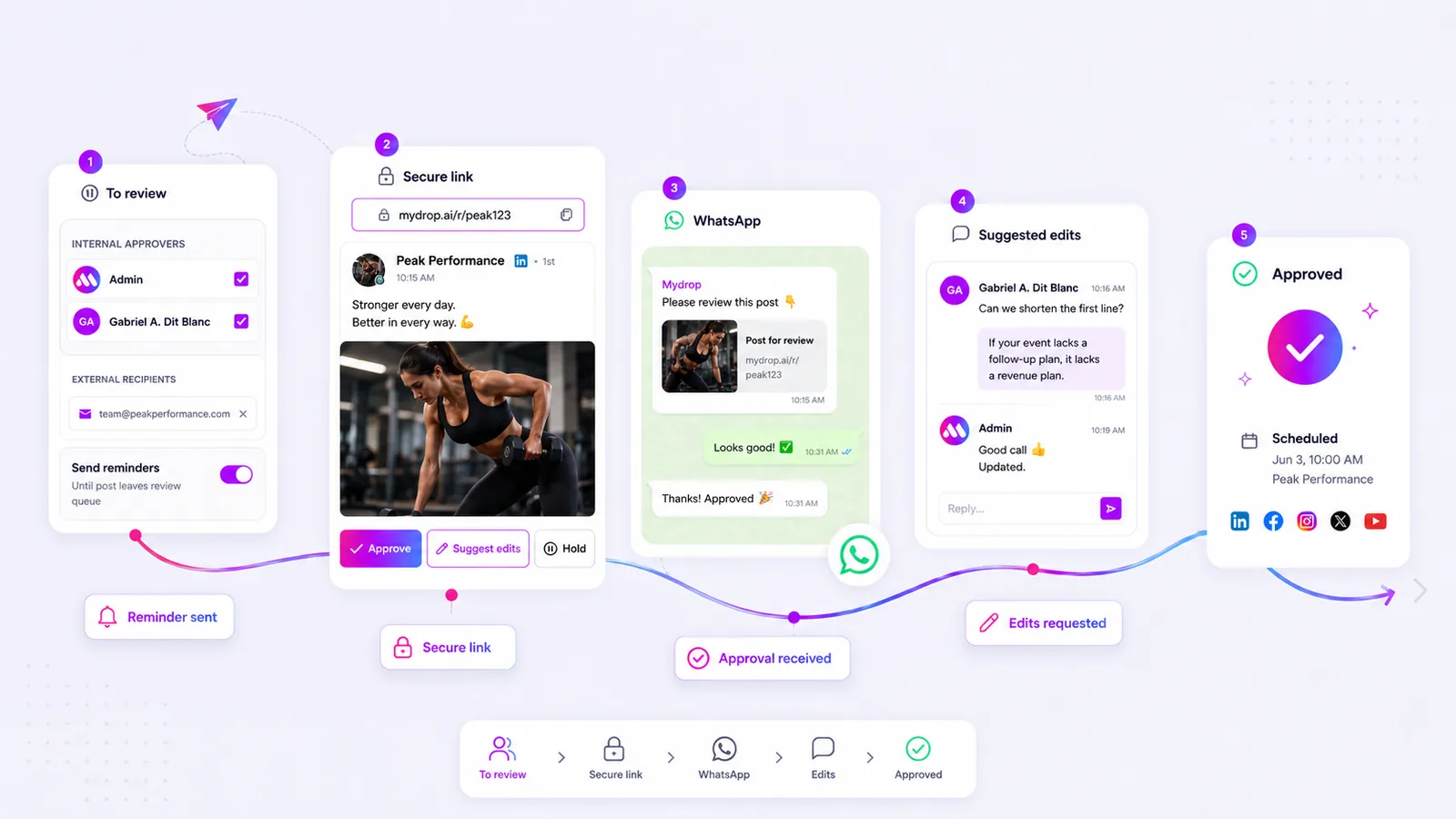
- Integrated feedback loop: Can the client leave questions or approval marks directly on the report? If the feedback exists in an email thread, it is already disconnected from the data.
- Self-serve assets: Is the latest version of the report, the PDF, and the raw performance data always available for download without you having to manually attach it to an email?
- White-label consistency: Does the portal look and feel like part of your brand? Using a custom domain and your own brand identity builds confidence, whereas a generic third-party tool often feels like an external obstacle.
Decision check: If a client can't view and comment on their report within two clicks of opening their portal, your delivery system is failing them.
Conclusion
The shift from simply "delivering reports" to "collaborating on insights" is the biggest jump in maturity an agency or enterprise team can make. It forces you to stop focusing on the vanity metric of "did they open the email" and start focusing on the operational reality of "are they seeing, understanding, and actioning the data."
When you move to a portal-based workflow, you stop being a digital courier and start being a strategic partner. You reclaim the hours lost to administrative follow-ups, and more importantly, you ensure your best work actually gets seen by the people who need to approve it. Stop chasing email opens. Build a system that makes feedback inevitable.
 Google review
 Trustpilot review
 Product Hunt comment




