


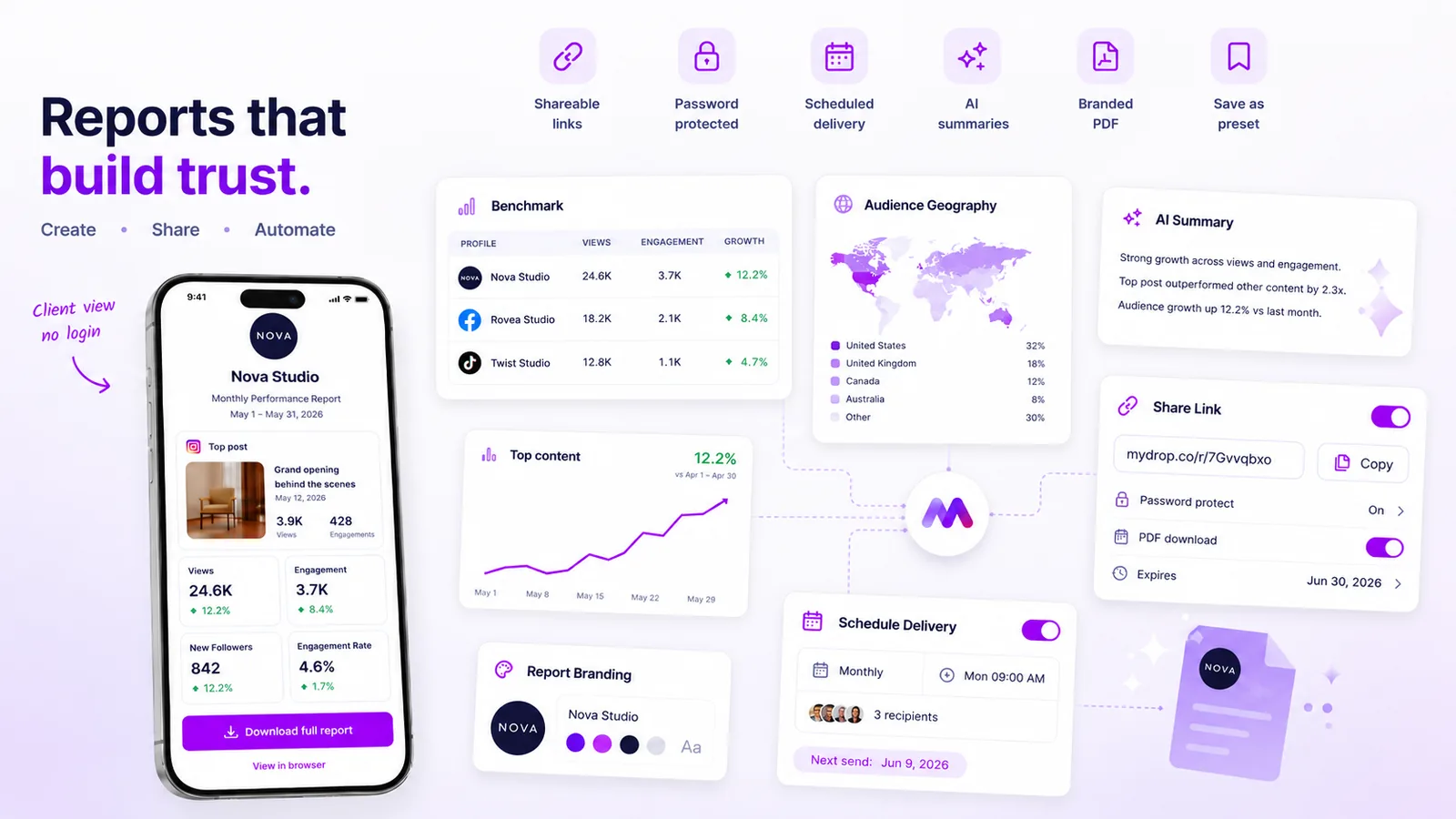
The most effective way to build long-term client trust is by shifting your workflow from manual data compilation to a reliable, automated reporting cadence. If you are still relying on your team to manually assemble screenshots, export spreadsheets, and format email updates, you are likely hitting the same wall we have seen across hundreds of agencies: a massive, recurring drain on operational capacity that leaves your best people doing administrative busywork instead of providing strategic insight.
We have all been there. It is Friday afternoon, you are racing to pull metrics before the weekend, and you are hoping you did not miss a key KPI or miscalculate a reach metric. It feels chaotic, it is prone to human error, and frankly, nobody enjoys chasing approvals at 6 p.m. When your reporting relies on human intervention for every iteration, consistency becomes your biggest liability. True transparency is not just about the data you send; it is about the reliability of the delivery loop.
What the best tools need to handle

If you are managing social media operations for enterprise brands, a tool that simply generates a static report is no longer good enough. You need an infrastructure that treats reporting as a predictable service, not an ad-hoc task.
To scale, your reporting tool must handle the heavy lifting of the entire delivery cycle. Here are the core capabilities you should prioritize:
- Flexible Recurrence Engines: Your tool should support more than just a manual send. It must handle complex cadences like daily, weekly, and monthly jobs that trigger automatically without manual oversight.
- Multi-Channel Delivery: Clients consume data differently. Some want a branded PDF attachment, others prefer a secure public link or a direct app link for deeper exploration. Your tool should provide all three.
- Proactive Failure Alerts: A silent failure, where a scheduled report simply never arrives, is often worse than a late report. You need a system that logs every run and proactively emails you if a job fails so you can resolve the issue before the client notices.
- Configurable Snapshots: This is often the most overlooked feature. If you update a brand profile or a metric configuration, you do not want your past reporting setups to break. A solid tool uses snapshot-based configurations to ensure that every recurring run uses the report settings exactly as you intended when the schedule was first saved.
At Mydrop, we have built our analytics scheduling around this principle of hands-off reliability. Because our platform manages both the report builder and the schedule runner, we allow you to take any configured analytics view and turn it into a recurring delivery stream in minutes. You do not have to manually manage email lists or attachments; you simply configure the cadence, set the recipients, and the runner handles the execution, PDF generation, and error logging automatically.
Operator rule: If your reporting tool requires a run now button for every client update, you are not using an automated system; you are using an expensive manual trigger.
When you look at potential tools, do not focus on how pretty the charts look. Focus on how much of the operational debt they actually offload from your account management team. If the tool cannot handle the job lifecycle from trigger to failure recovery without someone checking in, it will eventually become its own bottleneck.
Where basic tools start to break

The real trouble with basic reporting tools isn't the final PDF appearance; it is the hidden coordination debt they pile onto your team. When you manage one or two brand profiles, manually assembling data, taking screenshots, and stitching them into a weekly email is a manageable, if annoying, chore. Once you hit five, ten, or fifty profiles, that workflow becomes a liability.
The breaking point is usually invisible until it is too late. It happens when the account manager spends four hours on Friday afternoon just formatting data instead of analyzing it. Or when a client notices a report was sent three hours late because the operator was stuck in an internal meeting.
Basic tools fall apart here because they are static and siloed. They treat reporting as an event to trigger, not a process to manage. When you rely on these tools, you are not just fighting the clock; you are fighting the platform's inability to handle complexity.
Decision check: Most teams do not have a content problem; they have a decision bottleneck. If your team spends more time gathering data than acting on it, your reporting tool is the bottleneck.
If you are checking your email sent folder to see if a report actually went out, your tool has already failed. If your reports are just flat files detached from the living, breathing campaign, you are failing the "transparency" test. A truly automated report is a diagnostic tool, not a glorified invoice.
The buying criteria that matter
When you move past the "it looks pretty" phase of vetting tools, you need to look at the operational engine under the hood. You are not buying a report generator; you are buying a communication system.
Here are the four pillars to audit before you commit to a new platform:
- Job Reliability and Lifecycle: Can you pause, resume, or duplicate a schedule? Does the system tell you why a report failed to send? A robust tool handles the failure states for you-it logs them and alerts you proactively, rather than leaving you to discover the gap weeks later.
- Snapshot Stability: Does the report capture the state of the brand as it was when the report was scheduled? If you delete a profile or change a metric, the report should not break or become inaccurate. It needs to preserve the intended configuration.
- Contextual Flexibility: Does the tool deliver more than just a raw PDF? Can you include a branded summary, an internal app link for deep-diving, or a public link for easy stakeholder sharing?
- Operational Transparency: Can you run a report right now to test the delivery flow? You need "run-now" controls to verify that the email looks correct, the PDF attached properly, and the recipients are correct before the automated machine takes over.
At Mydrop, we designed our analytics scheduling to address these exact pain points. By using snapshot-based configurations, we ensure that the report you set up today is exactly what the client receives next month, even if your account structure evolves in the background.
Reporting Scalability Scorecard
Use this table to audit your current tool against enterprise-grade automation requirements. Score each capability from 0 to 5.
| Capability | What to look for (Criteria) | Score (0-5) |
|---|---|---|
| Scheduler Robustness | Supports daily/weekly/monthly; allows pause/resume/duplicate. | |
| Failure Transparency | Proactive alerts on job failure; accessible history logs. | |
| Configuration Integrity | Uses snapshots to prevent breakage if profiles change. | |
| Delivery Versatility | Supports PDF, public links, and branded summaries. | |
| Verification Tools | "Run-now" capability for immediate testing and QA. |
Decision threshold: If you score below 15, your current tool is a major source of operational friction and you are likely paying for it in team burnout.
If you find yourself manually checking lists of recipients or re-running failed jobs, you are essentially paying your team to act as the internal cron job. That is an expensive, unreliable way to run a business. A solid, automated reporting system does the heavy lifting, giving your account managers back the time they need to actually build the client relationship.
How Mydrop supports this workflow
At Mydrop, we designed our Analytics Report Scheduling feature specifically to tackle the coordination debt that kills agency-client trust. We have seen how teams managing hundreds of profiles break down under the weight of manual data compilation. It is not a lack of effort; it is a flaw in the system.
Our approach centers on three operational pillars: stability, flexibility, and proactive visibility.
When you configure a schedule in Mydrop, it creates a "config snapshot." This is critical. It preserves the exact report setup-the metrics, the brands, the cadence-at the moment you saved it. If you later rename a client profile, add a new social channel, or reorganize your project structure, your scheduled reports do not break. They continue running exactly as promised, because they are decoupled from the shifting state of your live dashboard.
We also know that client needs are rarely as tidy as a weekly calendar. That is why Mydrop’s scheduler includes a "run-now" capability. When a client calls on a Tuesday morning needing data for a mid-week sync, you can trigger their recurring report instantly without waiting for the next scheduled job.
Finally, we prioritize reliability over silence. Our internal runner tracks every job. If a data gap occurs or a delivery fails, you are notified immediately. You never want your client to be the first person to notice that their dashboard is empty. By moving your client communication from manual attachments to a stable, automated system, you move from being a data delivery service to a strategic partner.
A simple shortlist checklist
When you are vetting potential tools, look past the shiny dashboard marketing and run this quick test to see if a tool can actually support your agency at scale.
- Does it offer a configuration snapshot? If you change a project name or metric group, does the scheduled report break or stay stable?
- Can you trigger ad-hoc runs? If a client requests a report outside the normal cycle, is there a simple "run now" control?
- How are failures handled? Does the tool notify you when a report fails, or do you find out only when an angry client emails you?
- Is delivery flexible? Does it support both direct PDF attachments and secure, branded public links for stakeholders who prefer web-based views?
- Is job management granular? Can you easily pause a report during a client offboarding process without having to delete the entire schedule and recreate it later?
Conclusion
The awkward truth is that transparency is a design choice, not a project management task. If you are still relying on your team to manually assemble screenshots, export spreadsheets, and email reports every week, you are not just losing time. You are building a bottleneck into your business that prevents you from scaling.
Most teams do not have a content problem. They have a decision bottleneck. When you automate the delivery of your insights, you stop paying your talented people to perform administrative chores. You allow them to do what you hired them for: identifying trends, crafting strategy, and managing client relationships.
Whether you are supporting a dozen local businesses or managing operations for a global enterprise, the goal is the same. Build a system that keeps your clients informed without creating a massive, recurring tax on your team’s focus. If your tool is helping you do that, you are ahead of the curve. If it isn't, it is time to upgrade your infrastructure.
 Google review
 Trustpilot review
 Product Hunt comment




