


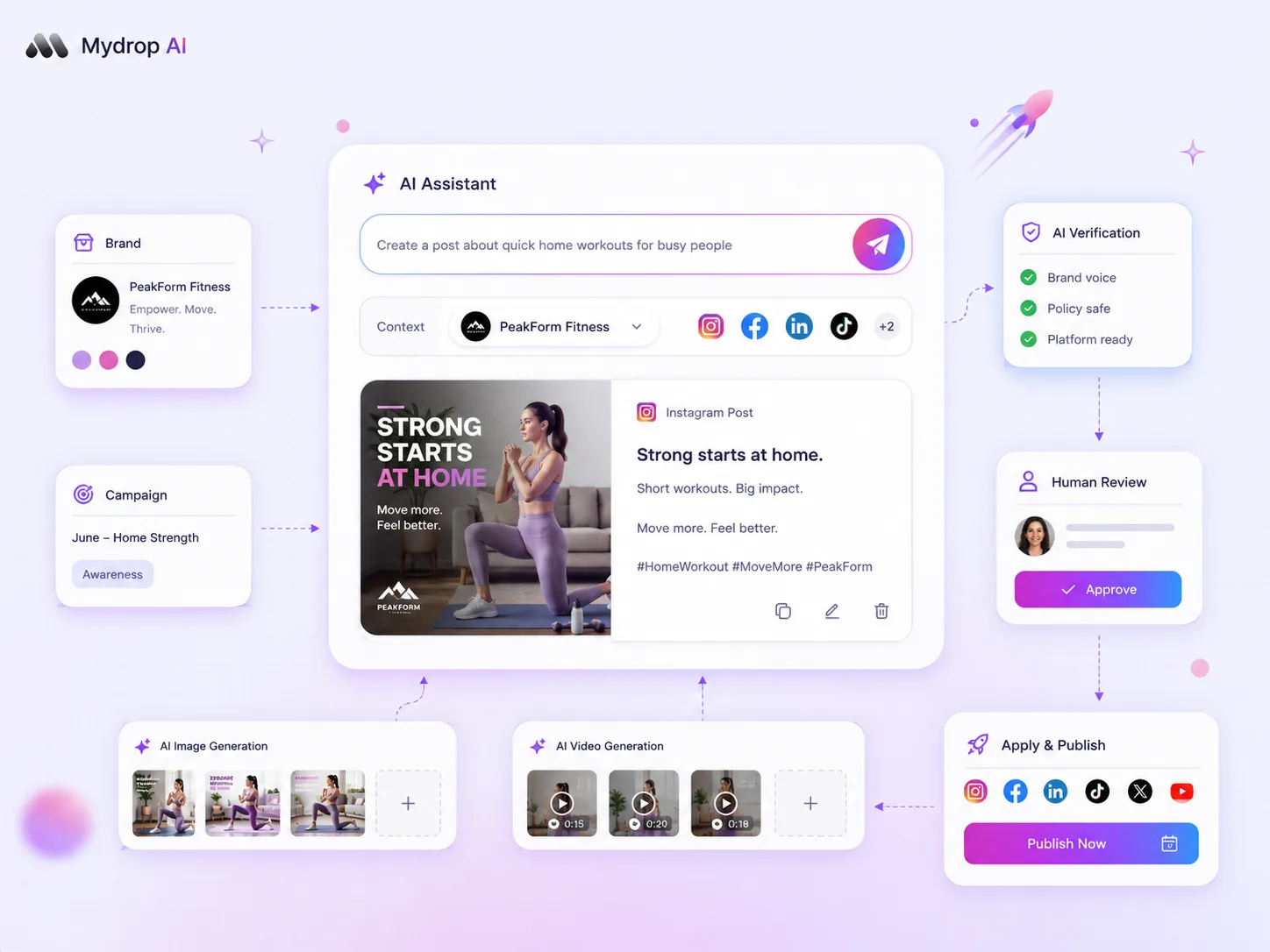
The right choice for your agency is not between AI generation and traditional stock photography, it is about building a workflow that intelligently routes assets based on brand compliance, campaign equity, and production speed. For social media teams, the friction is rarely in generating ideas, it is in maintaining consistency across hundreds of posts without drowning in approval loops. We get it. Your calendar is a relentless beast, and balancing the demand for high-velocity output with the non-negotiable need for brand safety often feels like an exhausting tightrope walk. You do not need another tool that just outputs images, you need an operating system that vets them before they hit your channels. Most teams do not have a content problem. They have a coordination bottleneck. By treating AI as a component of a larger media plan rather than a standalone generator, you can reclaim your time and keep your brand identity intact.
What the best tools need to handle

Look past the flash of the text-to-image prompt box. The real test is how well the tool integrates into the messier realities of enterprise operations. An AI tool that lives in a silo, detached from your scheduling chain, is just a new source of technical debt.
At a minimum, any platform you adopt must master these three operational requirements:
- Asynchronous Status Management: AI generation is not instantaneous. Your tool must handle background polling and recover when a task hangs. You should not have to manually refresh to see if your media job finished.
- Granular Quota Accounting: If you have a team of thirty creators, you need to track AI usage against workspace limits. Without built-in counters, budget management becomes a nightmare.
- Automated Media Plan Verification: This is the non-negotiable. The best workflows do not just dump raw files, they automatically cross-reference generated assets against your campaign plan.
Operator rule: Never allow generated media to bypass your compliance checks. If the platform does not offer a structured verify and apply flow for its assets, you are asking for brand drift.
At Mydrop, we built our AI media feature to treat generation as part of a structured lifecycle, from initial request to mandatory compliance verification. Because we track media generation status and link outputs directly to the posts they serve, your team can see whether a piece of AI-generated content has been approved for a brand profile or if it is still stuck in the queue. This avoids the common scenario where an unvetted image accidentally makes it into a final campaign, forcing a scramble to swap assets. When the tool itself manages the state of the asset, like our media plan verification flows that check items before they are finalized, your team spends less time auditing assets and more time on the creative strategy.
Where basic tools start to break

The real headache begins when your AI-generated assets-beautiful as they may be-don't actually make it into your post, or worse, make it into the wrong one. We have all been there: the creative team generates dozens of images, but because the tool lives in a vacuum, those files sit orphaned in a folder, completely disconnected from the actual content calendar.
This is where the "speed" of AI becomes a coordination debt trap.
When your generation software doesn't talk to your scheduling platform, you are essentially manually shipping assets. Your team ends up downloading, renaming, re-uploading, and verifying each image against a separate spreadsheet. By the time you actually hit publish, any efficiency gain you might have captured is long gone, buried under the manual labor of just moving files around.
Common mistake: Treating AI generation and social media scheduling as two separate, non-communicating pipelines. If your team has to copy-paste between browser tabs, you are doing it wrong.
Furthermore, basic tools often lack any concept of governance. They just generate. They don't know your brand colors, your approval requirements, or that this specific campaign needs a final check by legal. When you lack an integrated bridge between "generate" and "schedule," those safety checks get skipped in the heat of the moment, leading to costly brand compliance risks.
The buying criteria that matter
Stop obsessing over which model generates the prettiest picture. Instead, look for how the tool manages the lifecycle of the asset from the moment you hit "generate" until the moment it goes live.
We recommend building your evaluation around an integrated workflow scorecard. The best software is not the one with the flashiest UI, but the one that ensures your generated output is actually ready for prime time.
Agency Tool Readiness Scorecard
Use this to compare platforms during your next demo. If a tool cannot check these boxes, you are buying a toy, not an enterprise solution.
| Capability | What it actually means | Why it matters to your agency |
|---|---|---|
| Integrated Polling | The tool automatically tracks job status (pending/done). | You stop chasing team members for "the final file." |
| Automated Compliance | AI assets are held in a mandatory verification state. | Stops raw, unapproved AI output from leaking to production. |
| Quota Accountability | Tracks AI usage per workspace or brand. | Essential for keeping billing transparent for different clients. |
| In-App Attachment | Assets map directly to posts in the composer. | Eliminates manual "download-upload" cycles. |
At Mydrop, we see teams fail most often when they focus on the input (the prompt) rather than the output (the post). A workflow that doesn't include Media Plan Verification-where an automated check confirms the media meets your campaign specs before it can be attached to a live post-is just creating more work for your managers later.
Decision check: Never prioritize the speed of image creation over the safety of the approval workflow.
Your goal is to build a "fire and forget" pipeline where the AI does the heavy lifting, but the system keeps the guardrails locked tight. If your current tool forces your team to act as the manual conduit between those two worlds, you are already behind the curve.
How Mydrop supports this workflow
At Mydrop, we see the "AI-or-human" debate as a false dichotomy. The real problem isn't the AI itself; it's the lack of guardrails between a prompt and a published post. When you manage dozens of brand profiles and hundreds of assets, you cannot afford to have a content creator accidentally use an unverified AI-generated image that misses the brand color palette or, worse, includes an subtle hallucination that damages your reputation.
We built our Media Plan Verification flow specifically to solve this. Instead of letting AI assets bypass your team’s eyes, our workflow treats AI output as a draft that must be validated. When your team uses the AI Media Panel to generate an image, that output doesn't just sit in a folder. It’s held in a pending state until a human, or an automated compliance rule, explicitly signs off on it.
This isn't just about slowing things down; it’s about injecting speed where it’s safe. Once a media plan is applied and verified, the generated media is automatically attached to the post, and the platform handles the final storage and metadata mapping for you.
We also recognize that "unlimited" AI generation is a myth-especially when managing costs across multiple agency clients. Mydrop’s quota accounting runs in the background, tracking every image and video job. This prevents the "surprise invoice" scenario that plagues so many agencies, giving you a clear view of your operational overhead for every campaign.
By tying the generation process directly to the scheduling calendar and your team’s approval hierarchy, you move from a "wild west" of disconnected AI tools to a structured, repeatable engine. This is the difference between experimenting with AI and scaling it.
A simple shortlist checklist
When you're evaluating tools to manage this complexity, don't just look at how pretty the images are. Look at how the tool handles the messy, unglamorous parts of agency life. Use this checklist to filter out the toys and find the enterprise-ready platforms.
| Feature Area | Why It Matters | Essential Capability |
|---|---|---|
| Approval Workflow | Prevents brand-damaging mistakes. | Mandatory human-in-the-loop review for all AI assets. |
| Governance | Ensures consistent brand identity. | Centralized asset storage with metadata and compliance tracking. |
| Cost Control | Protects agency margins. | Real-time workspace quota accounting for AI jobs. |
| Reliability | Keeps your content calendar moving. | Automated polling and callback handling for slow provider jobs. |
| Integration | Saves manual copy-paste time. | Direct attachment of generated media to posts and galleries. |
Decision check: If a tool generates great images but forces you to download, re-upload, and manually link them to your scheduler, you have just traded one set of bottlenecks for another.
Conclusion
Most teams do not have an "idea problem." They have a decision bottleneck. The relentless pressure to increase output often obscures the fact that the actual cost isn't in creating the asset-it’s in coordinating, verifying, and deploying it at scale across multiple, demanding stakeholders.
If your agency is still struggling to maintain quality while accelerating volume, stop obsessing over which AI model provides the most photorealistic lighting. Start obsessing over your workflow. The goal isn't just to produce more; it’s to build an engine that ensures every asset-AI or otherwise-is validated, compliant, and ready to perform.
The real competitive edge in this landscape won't go to the teams that output the most raw content. It will go to the teams that have mastered the art of control. When you remove the friction from the review process, you finally have the bandwidth to do what you were actually hired for: crafting strategies that actually move the needle for your clients.

 Google review
 Trustpilot review
 Product Hunt comment




